


Blog
Front App Alternatives: Which Customer Support Tool Is Right for Your Team?
- By Vinod Kumar VR
- No Comments


- Published on
- 10 min read
In today’s fast-moving digital world, teams need simple and fast ways to talk to customers. Many companies use Front, but they also look for front app alternatives as their needs grow.
Studies show that customer experience is very important. According to Salesforce, 88% of customers say experience matters as much as products. Also, Zendesk reports that over 70% of customers expect fast responses. Another report by HubSpot shows that 90% of customers rate quick support as important.
Because of this, many teams search for front alternatives, apps like Front, and better tools that fit their workflow. This guide will help you find the best front app competitors and choose the right one for your team.
What Is Front App
Front is a shared inbox tool. It helps teams manage emails, chats, and messages in one place. Teams can assign messages, reply together, and track conversations.
It is mainly used by support teams, sales teams, and customer success teams.
Why Are Teams Looking for Front App Alternatives?
Many teams use Front to manage customer messages and team work. It works well in the beginning. But as teams grow, their needs also grow. They may want simpler tools, better features, or lower costs.
Some teams also feel that managing many conversations in one place can become hard over time. This is why they start looking for better and easier alternatives.
Key Features Front App Offers
- Front gives teams a shared inbox. This means everyone can see and reply to messages from one place. It helps teams stay organized and not miss any emails.
- It also supports both email and chat. Teams can talk to customers and also chat with each other without leaving the tool. This makes communication faster and easier.
- Front includes collaboration tools. Team members can assign messages, leave notes, and work together on replies. This helps improve teamwork.
- It also has workflow automation. Some tasks, like assigning messages, can be done automatically. This saves time and reduces manual work.
Common Complaints About Front App
- One big issue is pricing. Many small teams feel that Front is expensive. As the team grows, the cost also increases.
- Some users also find the interface complex. It may take time to learn and understand all the features. This can slow down new users.
- Another problem is limited automation. Teams may need more advanced features as they grow.
- Also, when there are many messages, the tool can feel cluttered and hard to manage.
Who Should Switch from Front?
- Small teams with tight budgets may need a cheaper option. Paying high costs may not be ideal for them.
- Teams that need better automation should also look for other tools. More automation can help save time and improve work.
- Growing companies may want tools that can scale easily. They need more features as they expand.
- Also, teams that are tired of using many tools may prefer one simple solution that does everything in one place.
What to Look for in Front App Alternatives
When you choose a Front app alternative, you need a tool that makes work simple and fast. The right tool should help your team talk to customers, stay organized, and grow without problems. Below are the key things you should look for.
Omnichannel Support
A good tool should let you manage all customer messages in one place. This includes email, live chat, social media, and SMS. When everything is in one inbox, your team does not miss any messages. It also helps you reply faster and give better support. Your team can see the full conversation history, no matter where the message came from.
Automation and AI
Automation and AI can save a lot of time. The tool should be able to send quick replies, assign tickets to the right person, and sort messages. AI can also suggest replies and help answer common questions. This reduces manual work and helps your team focus on more important tasks.
Pricing and Scalability
Pricing should be clear and easy to understand. Avoid tools with hidden costs. The tool should also grow with your team. As your team gets bigger, you should be able to add more users and features without trouble. A good tool fits both small teams and large teams.
CRM and Integrations
Your tool should connect with your CRM and other apps you use. This includes tools like email, calendars, and project management apps. When everything is connected, your team can see customer data in one place. This helps in giving better and more personal support.
Ease of Use and Onboarding
The tool should be simple and easy to use. Your team should be able to start using it without long training. A clean and simple design helps users work faster. When a tool is easy, your team will use it more and make fewer mistakes.
The 12 Best Front App Alternatives in 2026
1. Clariti App
What it is
Clariti is a modern collaboration and communication tool that brings emails, chats, files, and tasks into one place. It organizes everything into contextual conversations, so teams can see the full story without switching between apps.
Best for
Remote teams, startups, and small businesses that want better clarity and less app switching.
Standout features vs Front
- Contextual conversations (email + chat together).
- No app switching.
- Better visibility of discussions.
Pros
- All-in-one communication.
- Clear context.
- Improve productivity.
Cons
- Learning curves for users who are new to hybrid conversations.
Pricing Info
- Premium pricing is available on request.
2. HubSpot Smart CRM
What it is
HubSpot Smart CRM is an AI-powered CRM solution designed to facilitate cross-departmental customer interactions. It centralizes customer data from sales, marketing, and customer service teams to offer full overviews of the buyer’s journey, while its shared inbox lets representatives stay in touch with prospects via email, phone, and live chat.
Best for
Remote teams, small businesses, and customer-facing departments that need to centralize data.
Standout features vs Front
- Automatic data enrichment.
- Shared inboxes with direct prospect context.
- Automated communication workflows.
Pros
- Includes built-in data agents.
- Track prospect buying intent signals.
- Custom reports.
Cons
- Steep gaps between paid plans may make scalability a challenge.
Pricing info
- Free: No.
- Smart CRM Professional: from $45/month.
- Smart CRM Enterprise: from $75/month.
3. Zendesk
What it is
Zendesk is a powerful customer support platform that offers advanced ticketing, automation, and analytics. It helps teams manage customer queries across email, chat, phone, and social channels in one system.
Best for
Large enterprises and high-volume customer support teams.
Standout features vs Front
- Advanced ticketing.
- Strong automation.
- Deep analytics.
Pros
- Scalable.
- Omnichannel support.
- Strong reporting.
Cons
- Expensive.
- Complex setup.
Pricing Info
- Free: No.
- Premium: Starts ~$55/user/month.
4. Canary for Support
What it is
Canary for Support is a modern customer support tool that combines a shared inbox, AI chatbot, and lightweight helpdesk in one simple platform. It is designed for fast-moving teams that want to improve response time and reduce manual work using AI.
Best for
Small to mid-sized teams looking for a simple and AI-powered support solution.
Standout features vs Front
- AI chatbot and reply to suggestions.
- Built-in shared inbox and helpdesk.
- Simple and clean interface.
Pros
- AI-powered automation and insights.
- Easy to use interface.
- All-in-one support features.
Cons
- No native phone or SMS support.
- Limited integration.
Pricing Info
- Free: 7-day trial available.
- Premium: Starts at $10/user/month.
5. Intercom
What it is
Intercom is a customer messaging platform that combines live chat, AI bots, and product tours. It helps businesses engage users, provide support, and automate conversations across the customer journey.
Best for
SaaS companies and tech startups that need AI-driven customer engagement
Standout features vs Front
- AI chatbot.
- Live chat automation.
- Product tours.
Pros
- Strong AI.
- Great for engagement.
- Rich features.
Cons
- Expensive.
- Complex pricing.
Pricing Info
- Free: No
- Premium: Starts ~$39/month + usage.
6. Hiver
What it is
Hiver is a customer support platform that helps teams manage shared inboxes, tickets, live chat, knowledge base, automation, and AI-assisted support from one organized workspace. It is built for teams that want structured customer service workflows without adding unnecessary complexity.
Best for
Growing support teams that need shared inboxes, ticketing, automation, and AI support in one place
Standout features vs Front
- AI-powered support workflows
- Shared inbox and ticketing
- Live chat and knowledge base
- SLA management and CSAT surveys
- Automation and assignment rules
Pros
- Easy to use for support teams
- Strong collaboration features
- Helps avoid duplicate replies
- Useful AI features like AI Compose and AI Summarizer
- Good fit for scaling customer support operations
Cons
- Advanced AI features are available on higher plans
- WhatsApp, voice, portal, and SLA features require Pro or above
- Best suited for teams that want structured shared inbox support
Pricing Info
- Free: Yes
- Premium: Starts at $25/user/month.
7. Missive
What it is
Missive is a team collaboration tool that combines email, chat, and task management. It allows teams to collaborate on emails, create shared drafts, and communicate internally on one platform.
Best for
Small teams that want flexible email collaboration
Standout features vs Front
- Team chat inside email.
- Shared drafts.
- Task management.
Pros
- Flexible.
- Good collaboration.
- Affordable.
Cons
- UI can feel busy.
- Limited automation.
Pricing Info
- Free: Yes
- Premium: Starts ~$18/user/month.
8. Zoho Desk
What it is
Zoho Desk is a customer support platform that integrates with the Zoho ecosystem. It offers ticketing, automation, AI assistance, and CRM features at an affordable price.
Best for
Budget-conscious teams that need CRM and support together
Standout features vs Front
- Built-in CRM.
- AI assistant.
- Affordable plans.
Pros
- Low cost.
- CRM integration.
- Scalable.
Cons
- UI not modern.
- Setup takes time.
Pricing Info
- Free: Yes
- Premium: Starts ~$14/user/month.
9. Gorgias
What it is
Gorgias is a customer support tool built for ecommerce businesses. It connects with platforms like Shopify and helps teams manage customer queries, orders, and support tasks in one place.
Best for
Ecommerce brands and online stores.
Standout features vs Front
- Ecommerce automation.
- Order management.
- Shopify integration.
Pros
- Great for ecommerce.
- Strong automation.
- Easy integration.
Cons
- Cost grows with usage.
- Niche focus.
Pricing Info
- Free: No.
- Premium: Starts ~$10/month + usage.
10. Kustomer
What it is
Kustomer is an advanced customer experience platform that provides a full view of customer interactions. It combines omnichannel support with detailed customer timelines and analytics.
Best for
Large companies with high customer interaction volumes
Standout features vs Front
- Omnichannel support.
- Customer timeline view.
- Strong analytics.
Pros
- Powerful features.
- Deep insights.
- Scalable.
Cons
- Expensive.
- Complex.
Pricing Info
- Free: No
- Premium: Starts ~$89/user/month.
11. Crisp
What it is
Crisp is a simple and affordable messaging platform that focuses on live chat and basic customer communication. It offers a shared inbox and simple tools for startups.
Best for
Startups and small teams looking for a low-cost chat solution.
Standout features vs Front
- Flat pricing.
- Live chat focus.
- Easy setup.
Pros
- Affordable.
- Easy to use.
- Good for chat.
Cons
- Limited features.
- Not a full help desk.
Pricing Info
- Free: Yes
- Premium: Starts ~$25/month.
12. Trengo
What it is
Trengo is a communication platform that helps teams manage messages from email, WhatsApp, and social media in one place. It also includes automation features to handle repetitive tasks.
Best for
Teams managing social media and messaging apps
Standout features vs Front
- Social messaging.
- WhatsApp supports.
- Automation.
Pros
- Omnichannel.
- Good automation.
- Social focus.
Cons
- Learning curve.
- Pricing can rise.
Pricing Info
- Free: No
- Premium: Starts ~$19/user/month.
13. Freshdesk
What it is
Freshdesk is a widely used customer support tool that offers ticketing, automation, and multi-channel support. It is easy to use and works well for growing teams.
Best for
Small to mid-sized teams looking for a scalable helpdesk solution
Standout features vs Front
- Ticketing system.
- Automation.
- Multi-channel support.
Pros
- Easy to use.
- Scalable.
- Good value.
Cons
- Limited advanced AI.
- Some features are locked in higher plans.
Pricing Info
- Free: Yes
- Premium: Starts ~$15/user/month.
Front App vs Front App Competitors — Comparison
|
Feature
|
Email
|
Chat
|
Context
|
AI
|
Pricing
|
|---|---|---|---|---|---|
|
Front
|
Yes
|
Yes
|
Limited
|
Basic
|
High
|
|
Clariti
|
Yes
|
Yes
|
Strong
|
Strong
|
Custom
|
|
HubSpot Smart CRM
|
Yes
|
Yes
|
Strong
|
Strong
|
Moderate
|
|
Zendesk
|
Yes
|
Yes
|
Medium
|
Strong
|
High
|
|
Freshdesk
|
Yes
|
Yes
|
Medium
|
Medium
|
Moderate
|
Best Front Alternatives by Use Case
Best for SaaS Teams
SaaS teams deal with many messages every day. These come from emails, chats, and calls.
Clariti App
- Clariti puts all of them in one place. It groups them into hybrid conversations based on topic.
- This makes it easy to see the full context. You know who said what and why.
- Teams do not lose track of updates. This reduces confusion and saves time.
- It is useful for product teams, support teams, and remote teams.
Best for Ecommerce Teams
Ecommerce teams handle many customer queries. These are about orders, returns, and refunds.
Gorgias
- Gorgias connects with platforms like Shopify. This helps agents see order details fast.
- It can automate replies for common questions. This saves time and effort.
- Agents can manage emails, chats, and social messages in one place.
- This helps teams respond faster and improve customer experience.
Best for Budget Teams
Small teams need simple and low-cost tools.
Zoho Desk
- Zoho Desk offers basic ticketing and automation at a low price.
- Crisp provides chat, email, and chatbot features in one tool.
- Both tools are easy to set up and use.
- They help teams manage customer queries without high costs.
Best for Enterprise
Large companies handle high volumes of customer requests.
Zendesk and Kustomer
- Zendesk and Kustomer offer advanced tools for this scale.
- They provide automation, analytics, and deep integrations.
- Teams can track performance and improve service quality.
- These tools support large teams with complex workflows.
Best for Microsoft Users
Many teams use Microsoft tools like Outlook and Teams.
Zoho Desk
- Zoho Desk works well with these tools.
- It helps bring emails and support tickets together.
- Teams can manage work without switching apps often.
- This improves speed and keeps work simple.
How to Migrate from Front App
Export Data
- Download emails, contacts, and history.
Onboard Team
- Train your team on the new tool.
Avoid Mistakes
- Do not rush to migration.
- Test before the full switch.
- Keep backups.
Which Front App Alternative Should You Choose?
Decision Table
|
Team Size
|
Best Tool
|
|---|---|
|
Small
|
Crisp, Zoho Desk
|
|
Medium
|
Freshdesk, Intercom
|
|
Large
|
Zendesk, Kustomer
|
|
Remote
|
Clariti
|
Why Clariti Stands Out
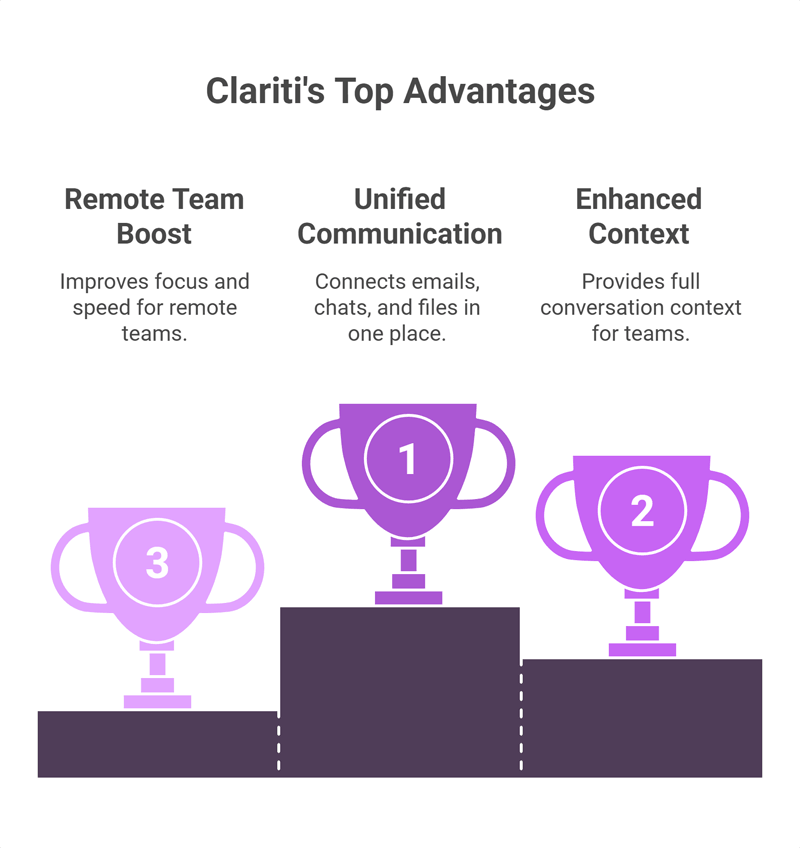
Clariti is different from other alternatives to Front app. It does not just manage tickets. It connects emails, chats, and files in one place.
This means teams see the full context of every conversation. They do not need to switch between apps. This saves time and reduces confusion.
For remote teams, this is a big advantage. It improves focus and helps teams work faster.
Conclusion
Choosing the right customer support tool is very important. Many teams start with Front but later look for better options. This is why front app alternatives are growing fast.
Each tool has its strengths. Some are better for large teams, while others are good for startups. The right choice depends on your needs, budget, and workflow.
If you want a simple ticketing system, tools like Freshdesk or Zoho Desk work well. If you need strong automation, Zendesk or Intercom are good choices.
But if your team wants to reduce app switching and improve clarity, Clariti stands out. It brings all communication into one place and keeps everything connected.
In the end, the best tool is the one that makes your team faster, simpler, and more productive every day.
Frequently Asked Questions
What is the best alternative to Front app in 2026?
Clariti is one of the best alternatives in 2026 for teams that want email, chat, and files in one place. Zendesk and Freshdesk are also strong options for support-heavy teams.
Is there a free Front app alternative?
Yes, some tools offer free plans:
- Freshdesk (free tier)
- Zoho Desk (free plan)
- Crisp (free version)
These are good for small teams starting out.
What is the Front app used for?
Front is used to manage team communication. It works as a shared inbox where teams can handle emails, chats, assign messages, and collaborate on replies.
Why are teams switching away from Front app?
Many teams switch due to:
- High pricing
- Limited automation
- Tool complexity
- Need for better integrations or AI
How does Front app compare to Freshdesk?
Front focuses on shared inbox and team collaboration. Freshdesk is a full helpdesk with ticketing, automation, and better support features for growing teams.
What is the cheapest Front alternative for small teams?
Zoho Desk and Crisp are among the cheapest options. They offer low-cost plans with basic support features, making them ideal for small businesses.
Which Front alternative is best for ecommerce businesses?
Gorgias is the best choice for ecommerce. It integrates with Shopify and helps manage orders, returns, and customer queries in one place.
Does Zendesk do everything Front does?
Yes, and more. Zendesk offers everything Front does plus advanced ticketing, automation, analytics, and full omnichannel support.
What are the main limitations of Front app?
- Expensive for small teams
- Limited advanced automation
- Can feel cluttered
- Not ideal for complex support workflows
Which Front Alternative has the best AI features?
Intercom and Zendesk offer strong AI features like chatbots and automation. Clariti also stands out with AI-driven contextual communication.
Is Hiver a good alternative to Front for Gmail users?
Yes, Hiver is a great option if your team uses Gmail. It works inside Gmail and adds shared inbox and collaboration features.
Can I migrate my data easily from Front to another platform?
Yes, most tools support migration. You can export emails, contacts, and data from Front and import them into tools like Zendesk or Freshdesk.
What is the difference between a shared inbox and a help desk?
A shared inbox helps teams manage emails together. A help desk goes further with ticketing, automation, reporting, and multi-channel support.
Which Front alternative is best for Microsoft Teams users?
Zoho Desk and Zendesk work well with Microsoft tools. They offer integrations that help teams using Microsoft ecosystems.
Does Intercom replace Front app for SaaS companies?
Yes, Intercom can replace Front for SaaS teams. It offers live chat, AI bots, and customer engagement tools that go beyond basic email collaboration.




Start for FREE with Personal CRM
We too hate spam! Your email is secure with us.

Spot secured. You're in.
You’re officially on the list for early access to Clariti.


No more switching tools.

No more lost context.

Just Clarity.
You’ll be among the first to experience it when we launch. We’ll let you know the moment it’s ready.

Keep an eye out for emails from @clariti.app.
(and check your spam folder just in case—whitelisting us helps ensure you don’t miss a thing).

