Manage Notifications

Stay Alert, Not Overwhelmed — Smart Notifications Done Right!

Notification BI

One Place for All Alerts — Stay Informed, Not Interrupted!

Centralized Alerts

All notifications from chats, emails, calls, and calendar events appear in one panel.

Open button Close button

Contextual Links

Each alert links directly to its related conversation.

Open button Close button

Cross-Device Sync

Notifications stay consistent across desktop and web.

Open button Close button

Real-Time Updates

Receive instant alerts for new messages, emails, or calls.

Open button Close button

Mute Controls

Temporarily silence conversations or block specific contacts.

Open button Close button

Quick Reply

Preview, open, and respond directly from the notification panel.

Open button Close button

Instant Message Alerts

Get immediate notifications for new chats or group mentions.
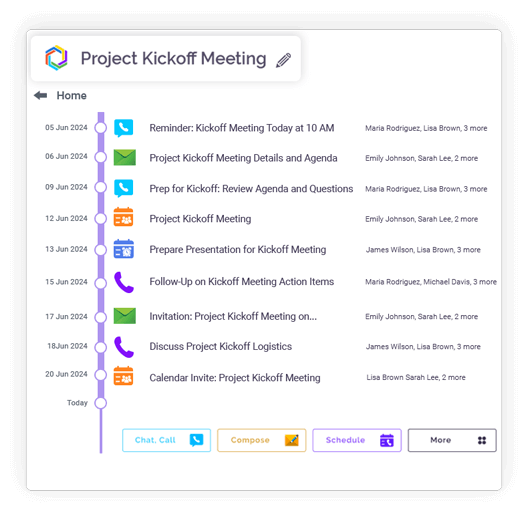
Open button Close button
Feature slide img

Never Miss a Beat — Clariti Reminds You Before You Forget!

Call Reminders

Receive alerts before one-on-one or group calls.

Open button Close button

Event Notifications

Get notified about upcoming calendar events or meetings.

Open button Close button

To-Do Alerts

Receive reminders for pending or overdue To-Dos.

Open button Close button

Recurring Alerts

Automatic reminders for recurring events like weekly or monthly meetings.

Open button Close button
Feature slide img

Integration

Connect your apps. Get more done.

Microsoft 365

Microsoft 365

Office productivity suite

Google Workplace

Google Workspace

Cloud-based productivity suite

Onedrive

OneDrive

Cloud file storage

Google Drive

Google Drive

Cloud file storage and sharing

Dropbox

Cloud file storage and sharing

PCloude

pCloud

Secure cloud file storage

Github

GitHub

Source code hosting

Hot Spot

HubSpot

Marketing automation platform

Team

Microsoft Teams

Team collaboration platform

More Useful Features

Centralized Alerts 

See everything in one view.

Smart Snooze 

Pause notifications easily.

Block Contact 

Mute notifications from contact.

Cross-Module Reminders 

Calls, events, tasks.

Contextual Notifications 

Each alert is directly linked to conversation

Real-Time Updates 

Receive instant alerts in Clariti.

Stay Alert with Centralized Notifications

Clariti delivers all your notifications through a single, centralized alert system. You receive updates from emails, chats, calls, and tasks in one streamlined feed. This eliminates the need to monitor multiple apps for important alerts. The centralized approach ensures you never miss critical updates while maintaining organized awareness.

Notification blog_img

Smart Snooze and Mute for Distraction-Free Focus

Clariti’s smart snooze and mute features let you temporarily pause all notifications or block a particular contact. You can customize quiet hours for uninterrupted deep work sessions.

Real-Time Updates for All Chats, Emails, and Calls

The platform provides instant, real-time notifications for all incoming communications. Whether it’s new emails, chat messages, or incoming calls, you receive immediate alerts. This ensures you’re always current with the latest team interactions and updates.

Contextual Notifications Linked to Conversations

Every notification in Clariti is directly linked to its source conversation. You can see the full context of each alert without opening the main application. Notifications display relevant conversation history and 

participant information. This contextual approach helps you quickly assess importance and respond appropriately.

Reply and Take Action Directly from Alerts

You can respond to messages and complete actions directly from notification pop-ups. The system allows you to type quick replies, react to messages, or mark tasks complete. This eliminates the need to switch contexts or open full applications for simple responses. The feature significantly reduces response time and maintains workflow efficiency.

Call, Task & Event Reminders

Clariti sends reminders for upcoming calendar events, task deadlines, and scheduled calls. The system notifies you about important dates and commitments. You can set custom reminder times for different types of events. This ensures you stay on top of your schedule and never miss crucial appointments.

Blog Links

Frequently Asked Questions?

Can I manage all my alerts in one place?

Yes, Clariti provides a centralized notification center where all your alerts are managed in one place. You can view and manage calls, events and task from a single calendar. The notification center helps you stay organized and informed about all important activities.

Absolutely. Clariti offers flexible mute and snooze options for notifications. This helps maintain productivity while ensuring you don’t miss important updates.

Yes, Clariti maintains perfect notification synchronization across desktop and web. Your notification preferences and read status remain consistent whether you’re using the desktop app or web version. This ensures a seamless experience across all platforms.

Definitely. Clariti sends reminders for tasks, calendar events, and important deadlines. The system notifies you about upcoming commitments and scheduled items. You can customize reminder times for different types of activities. This ensures you stay on top of all your important schedules and tasks.