File Sharing

Share Files Without the Fuss — Just Click, Send, and Collaborate!

file sharing BI

Share in Seconds — No Links, No Chaos, Just Clarity!

Instant Sharing

Share documents, images, and media within chats or conversations.

Open button Close button

Drag-and-Drop Uploads

Add files by dragging them into the chat window.

Open button Close button

Multi-File Sharing

Send several files together in one action.

Open button Close button

Cross-Channel Sharing

Share files across emails, chats, and group discussions.

Open button Close button

Real-Time Alerts

Receive notifications when files are shared.
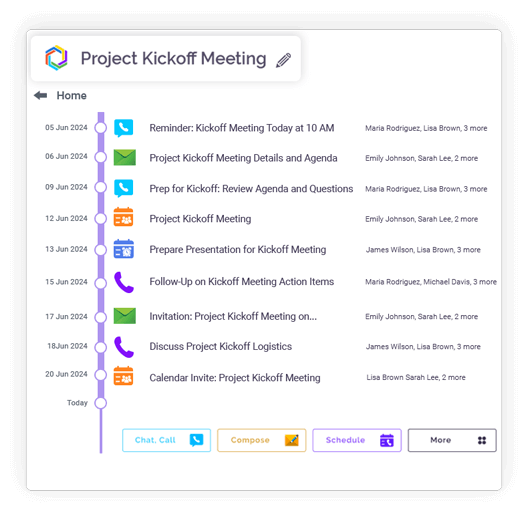
Open button Close button
Feature slide img

Have Your Way — Connect Google Drive, OneDrive, & More!

Cloud Drive Support

Integrates with Google Drive, Dropbox, OneDrive, Box, and pCloud.

Open button Close button

No-Download Access

Open and view cloud files directly.

Open button Close button

Unified Cloud Access

Manage multiple cloud accounts from a single interface.

Open button Close button

Direct Cloud Attachments

Attach files from cloud drives to chats or emails.

Open button Close button
Feature slide img

Open. View. Discuss. — No Downloads Needed!

Built-In Viewer

Preview documents, PDFs, images, and spreadsheets inside Clariti.

Open button Close button

Instant Viewing

View shared files during chats or meetings.

Open button Close button

App-Free Access

No need to switch to external applications.

Open button Close button

Easy Navigation

Zoom and scroll controls for large files.

Open button Close button

Format Support

Supports DOCX, XLSX, PDF, and JPG formats.

Open button Close button
Feature slide img

Find Files Fast — Smartly Sorted, Always in Context!

Context-Based Organization

Automatically link files to relevant conversations.

Open button Close button

Version Tracking

Track updates and prevent duplicate uploads.

Open button Close button

Contextual Search

Search files by name or conversation context.

Open button Close button

File Categorization

Label and filter files for quick access.

Open button Close button

Centralized Repository

Access all shared files from one workspace.

Open button Close button
Feature slide img

Integration

Connect your apps. Get more done.

Microsoft 365

Microsoft 365

Office productivity suite

Google Workplace

Google Workspace

Cloud-based productivity suite

Onedrive

OneDrive

Cloud file storage

Google Drive

Google Drive

Cloud file storage and sharing

Dropbox

Cloud file storage and sharing

PCloude

pCloud

Secure cloud file storage

Github

GitHub

Source code hosting

Hot Spot

HubSpot

Marketing automation platform

Team

Microsoft Teams

Team collaboration platform

More Useful Features

One-Click Sharing

Instantly send files to colleagues.

Cloud + Local Support

Attach from anywhere.

Drag-and-Drop Upload

Quickly add files by dragging into the chat window.

Inline File Previews

View without downloading.

Built-In File Viewer

Preview files without leaving Clariti.

Conversation Linking

Files tied to related topics.

What Is File Sharing and Why It Matters

At its most basic, file sharing is the digital transmission of a document from one person or system to another. But to view it merely as data transfer is to miss its profound significance. In today’s interconnected workplace, file sharing is the circulatory system of collaboration. It’s how strategy is disseminated, feedback is incorporated, and projects advance from concept to completion. A shared file is more than a collection of bytes; it’s a vessel for ideas, a snapshot of progress, and an invitation to collaborate. When this system is inefficient, the entire organizational body suffers from poor circulation, leading to duplicated efforts, version confusion, and stalled decision-making.

File sharing blog_img

Benefits of Seamless File Sharing for Teams

When file sharing is truly seamless, its benefits cascade across an organization. The most immediate gain is accelerated velocity. Projects move faster when team members instantly access the right files without waiting for email replies or permissions. Enhanced alignment ensures everyone works from the single, latest version, eliminating the classic nightmare of “Final_Final_v2_Revised.doc.” Furthermore, it democratizes knowledge, breaking down information silos and empowering every team member with the context they need to contribute meaningfully. This creates a culture of transparency and collective ownership, where the focus shifts from managing files to driving outcomes.

How to Share Files Instantly Without Email Hassles

The traditional method of email attachments has become a notorious bottleneck. It clogs inboxes, hits size limits, and severs the document from its broader context. The modern alternative is platform-native sharing. In tools like Clariti, sharing is as simple as dragging and dropping a file directly into a relevant conversation thread. There’s no need to open a separate email client, write an explanatory note, or compress files. The conversation itself provides the context. This instant, in-context sharing eliminates the back-and-forth and ensures the file is immediately accessible to everyone who needs it, right where the work is happening.

Collaborate Smarter: Real-Time File Sharing Made Easy

The next evolution beyond simple sharing is collaborative interaction. Modern platforms like Clariti are transforming shared files from static artifacts into dynamic collaboration hubs. Features like inline previews allow team members to view images, PDFs, and presentations directly in the chat without downloading them. Comments and feedback are tied directly to the file within the conversation thread, creating a clear, auditable trail of the evolution of ideas. This transforms a linear process—share, download, edit, re-share—into a fluid, real-time dialogue around the work itself, dramatically compressing feedback loops.

Secure and Effortless File Sharing in the Cloud

Security is the non-negotiable foundation of modern file sharing. The cloud has become the default repository, offering not just accessibility 

but also robust protection. In a well-architected platform like Clariti, security is inherent, not an afterthought. Enterprise-grade encryptionprotects data both in transit and at rest. Access controls are seamlessly integrated into conversation permissions, ensuring that sensitive documents are only visible to authorized participants. This creates a secure sharing environment where effort is minimized and protection is maximized, giving teams confidence to share freely.

How Clariti Simplifies File Sharing and Collaboration

Clariti redefines file sharing by integrating it directly into the flow of communication through its “Hybrid Conversations” model. Instead of files living in a separate, siloed cloud drive, they are embedded directly into the topic-based conversations where they are being discussed. This eradicates the most time-consuming question in the modern workplace: “Where did we put that file?” In Clariti, the file is with the conversation about the file. This native integration means every document comes with a ready-made history of discussion and decision, simplifying the entire collaborative process and making knowledge instantly retrievable.

Tips to Improve Team Productivity with File Sharing

To maximize productivity, teams should adopt a few key practices. First, adopt a context-first mindset: always share a file within the conversation topic it relates to, not a generic channel. Second, leverage unified search to find files based on their content or the discussions about them. Third, establish clear naming conventions for versions to maintain clarity. Finally, use a platform like Clariti that integrates sharing with communication to avoid the productivity tax of constant app-switching.

The Future of File Sharing: Simplicity Meets Security

The future of file sharing is not about faster upload speeds or larger storage quotas. It’s about intelligence and integration. The next frontier is the complete contextualization of digital assets, where AI might automatically suggest relevant files for a conversation or summarize document history. Security will become even more frictionless, with smarter, behavior-based access controls. The winning platforms will be those that make file sharing not a distinct task, but an invisible, secure, and intelligent part of the collaborative conversation.

Blog Links

Frequently Asked Questions?

What is file sharing?

File sharing is the ability to distribute files—such as presentations, spreadsheets, or images—directly within a communication platform. In Clariti, it allows teams to upload and access files within relevant conversation threads, ensuring documents are always tied to their context rather than stored in isolated folders.

It centralizes resources so everyone works from the latest version of a file, reducing duplicates or outdated copies. Team members can discuss, edit, and refine documents in real time within the same thread where the files are shared, streamlining feedback and accelerating project progress.

Users can share the OneDrive or GoogleDrive links that can be clicked and viewed, and downloaded, if needed.

By integrating files directly into topic-based conversations, Clariti eliminates the need to switch between storage apps and communication tools. Files are automatically organized alongside related chats and emails, making it effortless to locate and reference them later.

Unlike email attachments or standalone cloud storage, Clariti preserves the context around each file. Files are linked to the discussions and decisions that shaped them, creating a searchable knowledge base that prevents misalignment and reduces time spent tracking down information.