

Your To-Dos, Meetings, and Events — All in One Smart View!
Turn chats, emails, or feeds into To-Dos directly from conversations.
Each To-Do stays connected to its original message or conversation.
Preserves the who, what, and why behind every To-Do.
Update progress, set alerts, and mark completion easily.
Postpone To-Dos and receive reminders later.
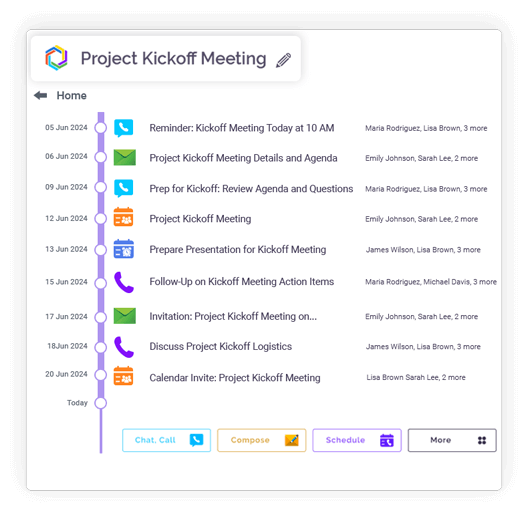
View To-Dos, meetings, and events in one place.
Add documents or notes to To-Dos for clarity.
Set recurring reminders for pending or repeating items.
Schedule internal or external meetings from chats or emails.
Seamlessly sync with existing calendars.
Send meeting invitations and notifications automatically.
Schedule changes reflect instantly across calendars.
Adjusts schedules across global teams.
Schedule one-time or recurring events from the workspace.
Set weekly, monthly, or quarterly schedules with reminders.
View events in daily, weekly, or monthly formats
Events remain linked to related chats or emails
Manage calls, To-Dos, meetings, and events together.
Receive reminders with related conversation details.
See deadlines, projects, and meetings at a glance.
Search all the completed events, calls and to-dos.

Integration
Microsoft 365
Office productivity suite

Google Workspace
Cloud-based productivity suite

OneDrive
Cloud file storage

Google Drive
Cloud file storage and sharing

Dropbox
Cloud file storage and sharing

pCloud
Secure cloud file storage

GitHub
Source code hosting

HubSpot
Marketing automation platform

Microsoft Teams
Team collaboration platform
To-Do Integration
Convert chats into tasks.
Calendar View
Visualize events easily.
Recurring Meetings
Automate regular sessions.
Smart Alerts
Get reminders instantly.
Automatic Context Retrieval
Clariti preserves context.
Context-Linked Scheduling
Schedule meetings from chats.
Timely • Organized • Ready
A unified smart view is the antidote to digital fragmentation. It consolidates your tasks, meetings, and events into a single, coherent timeline. Instead of toggling between a task manager, a calendar, and an email client, you see how your immediate to-dos fit around your scheduled commitments. This holistic perspective is crucial because it reveals the true shape of your day, exposing potential conflicts and highlighting available focus time that would otherwise remain invisible.
The simple act of scheduling your to-dos—a practice known as time-blocking—transforms abstract tasks into concrete appointments. Instead of a daunting, unstructured list, you create a realistic game plan for your day. By assigning a specific time slot to “Finalize Q3 Report” or “Prepare client presentation,” you make a commitment to yourself. This not only fights procrastination but also provides a clear, visual map of what you can realistically accomplish, reducing anxiety and enhancing daily focus.
Meetings are no longer isolated events when integrated into a unified calendar. By having them alongside your tasks, you can properly prepare. The 30 minutes before a strategic review can be automatically blocked for preparation, and the 15 minutes after can be reserved for action item logging. This creates a natural, efficient workflow around each meeting, ensuring you arrive prepared and leave with clear next steps, seamlessly integrated into your existing task list.
From project deadlines and client calls to birthdays and team celebrations, every commitment finds its place. A single integrated calendar, like the one in Clariti, pulls these elements from your emails and chats, automatically building a comprehensive schedule. This eliminates the mental energy spent on remembering where you recorded an event, creating a trusted system that ensures nothing falls through the cracks.
The synergy is powerful. You gain immediate clarity on your priorities, understanding at a glance whether your day is meeting-heavy or requires deep work. This integration prevents over-scheduling and helps you balance reactive work (meetings) with proactive work (tasks). The result is not just better time management, but better energy management, allowing you to align your workload with your natural rhythms.
Use color-coding to visually distinguish between work streams. Be ruthless in estimating how long tasks will truly take. Most importantly, schedule focus blocks for high-priority work first, treating them with the same respect as a meeting with your CEO. Learn to differentiate between what’s urgent and what’s important, and structure your day accordingly.
Adopting a unified scheduling tool like Clariti is more than an organizational upgrade—it’s a productivity revolution. It reduces cognitive load, eliminates app-switching, and provides the strategic overview needed to take control of your time. By bringing your tasks, meetings, and events into one smart view, you stop being a reactive juggler and start being a proactive architect of your most productive and balanced work life.
Why integrating calendar and chat software would be a good option
Read more > >From Emails to Tasks: How Email + Chat + To-Dos Fix Project Management Chaos
Read more > >Boost team productivity with Clariti’s scheduling and meetings
Read more > >Top 25 Startup Business Tools and How to Choose the Right Ones
Read more > >Use a unified productivity platform like Clariti that integrates your calendar with task management. You can manually add items or automatically sync them from emails and chats, creating a single source of truth for deadlines, meetings, and action items in one visually organized space.
It provides a holistic view of your time and responsibilities, reducing the risk of overbooking or missing deadlines. By seeing to-dos alongside meetings, you can allocate time for deep work and ensure preparation for scheduled discussions, leading to better time management and reduced stress.
This integration helps prioritize daily activities by visualizing available time slots alongside pending tasks. It creates natural reminders to complete action items before relevant meetings and makes it easier to balance immediate tasks with long-term commitments, improving overall workflow efficiency.
It eliminates the need to switch between multiple apps, saving time and mental energy. With all commitments visible in one place, you can strategically block time for focused work, identify scheduling conflicts early, and maintain better control over your daily agenda and energy levels.
Yes, modern platforms like Clariti offer cloud synchronization. This ensures your schedule and task list stay updated in real-time, allowing you to manage your time effectively whether you’re at your desk or on the go.
We too hate spam! Your email is secure with us.
(and check your spam folder just in case—whitelisting us helps ensure you don’t miss a thing).




