


Team Communication, Blog
Top 25 team communication apps for businesses in 2026 and experts guide to choose the perfect fit
- By Vinod Kumar VR
- No Comments


- Published on
- 10 min read

Blog Summary
Team communication apps are essential tools that streamline collaboration, allowing employees to communicate effectively across locations. These platforms offer features like messaging, file sharing, video conferencing, and task coordination — helping teams stay aligned and productive.
The blog highlights 25 top-rated communication apps for 2026, including versatile platforms like:
- Clariti, which integrates emails and chats into hybrid conversations
- Discord, and Troop Messenger for messaging
- Google Chat, Flock and Zoho Cliq for broader team collaboration.
To select the right tool, experts recommend evaluating based on team size, communication needs, integration capabilities, security features, and ease of use.
Effective team communication is vital to business success. It enhances decision-making, reduces delays, and boosts employee engagement. Communication apps not only improve workflow efficiency but also build a more connected and agile workplace.
View more
Effective communication is the foundation of every successful organization. As remote work and distributed teams become more common, the need for reliable team communication apps is stronger than ever. These team communication apps are digital tools built to help team members connect, talk, and work together easily, no matter where they are or which time zone they work in.
Team communication apps come in many forms to meet different needs. Some focus on instant messaging and real-time chat, which helps team members share updates and ideas quickly. Others offer built-in email features that make it easier to manage messages in one place. Many team communication apps also support video calls and virtual meetings, giving teams a face-to-face experience even when they are far apart.
Organizations choose team communication apps for several important reasons. One key reason is improved productivity. These tools bring all conversations into one space and reduce the need to switch between many apps. This helps teams stay focused and work more efficiently. Teamwork software also improves transparency by keeping everyone informed about tasks, deadlines, and progress in real time.
At its core, a team communication app works as a central hub for daily work. Team members can share ideas, exchange files, and coordinate tasks with ease. Features like file sharing, task tracking, and calendar links replace scattered tools with one simple platform. By creating channels for teams or projects, these apps improve organization and help build strong team connections.
In a fast-changing business world, employee communication platforms are essential for staying flexible and competitive. Whether supporting remote teams, improving collaboration, or increasing productivity, these tools play a vital role in long-term business success.
- Clariti: App for context-based communication.
- MirrorFly: The #1 In-App SDK Provider To Build Custom Team Messaging Apps
- ProofHub: Best team communication app for Streamlined Project Management and Team Collaboration
- Connecteam: Best for deskless teams and businesses looking to streamline communication and boost employee engagement.
- Viva Engage: App for employee communities and internal communication.
- RingCentral Team Messaging: App for business chat within unified communications.
- Google Chat: App for Seamless Collaboration and Google Speed.
- Flock: App for Connecting, Communicating, and Collaborating.
- Chanty: App for Effortless Team Communication and Enhanced Efficiency.
- Troop Messenger: App for Simplified Team Communication and Efficiency Boost.
- Discord: App for Chatting, Connecting, and Conquering Together.
- Pumble: App for Effortless Team Communication and Maximum Efficiency.
- Rocket.Chat: App for Open-Source Team Communication and Messaging.
- Element: Business App for Decentralized and Secure Team Communication.
- Brosix: App for Secure Communication and Seamless Collaboration.
- Cisco Webex Teams: App for Enterprise Team Messaging and Meetings.
- Workplace: App for Connecting and Thriving in Your Professional Hub.
- Pronto: App for Instant Communication and Lasting Results.
- Basecamp: App for Streamlined Collaboration and Simplified Success.
- Zoho Cliq: App for Clicking, Connecting, and Collaborating Effortlessly.
- Amazon Chime: App for Business Messaging, Meetings, and Calls.
- Zulip: App for Open-Source Communication and Amplified Collaboration.
- Mattermost: App for Controlling Communication and Driving Your Future.
- Crew: App for Simplified Team Messaging and Dynamic Results.
- Fleep: App for Conversations that Drive, Collaboration that Thrives.
What is a communication app?
A communication app is a software application designed to facilitate real-time communication and collaboration among individuals or teams. These apps typically include features such as instant messaging, voice and video calls, file sharing, and group discussions, allowing users to connect and exchange information quickly and efficiently.
Most Popular 25 best team communication Apps for businesses in 2026
1. Clariti
Best team communication app for context-based communication
Clariti reigns supreme as the ultimate team communication app, boasting unparalleled context-based communication capabilities. Powered by Artificial Intelligence, Clariti seamlessly integrates emails, chats, documents, calendar events, and feeds into cohesive, contextual hybrid Conversations. This innovative approach ensures that communication remains focused and organized, facilitating collaboration and productivity.
By harnessing the power of AI, Clariti revolutionizes team communication, providing users with a streamlined and efficient platform for achieving their goals. With Clariti, teams can effectively manage their workflows and stay connected regardless of their location or time zone, making it the top choice for modern businesses.
Pros
- What truly distinguishes Clariti is its commitment to delivering a complete understanding of work.
- The platform supplies users with a comprehensive context and a bird’s-eye view of their tasks and projects, ensuring that they always know “who said what, when & why.”
- One of the standout advantages of Clariti’s context-based communication is its ability to eliminate the need for email forwards.
- It is priced significantly lower than competitors.
- Clariti is securely hosted on Amazon Web Services, providing total reliability, 100% uptime and trusted security of all your workday data.
Cons
- Learning curve for users who are new to hybrid conversations.
Why did we choose this
- Organizes conversations contextually.
- Integrates email, chat, and documents.
- Improves productivity with seamless workflows.
Pricing plans
- Premium plans are available on request.

2. MirrorFly
The #1 In-App SDK Provider To Build Custom Team Messaging Apps

MirrorFly comes to developers and brands as one of the leading white-label messaging solutions that offers rich APIs and SDKs for building interactive messaging apps for teams instantly.
Above all, you can integrate 1000+ call and chat features in less than 20 minutes. They also offer the flexibility to host apps on your own servers, customize the features, and get full source code ownership.
Pros
- All features are completely customizable.
- Enables SIP & VoIP calling capabilities.
- API supports multi-platform development.
Cons
- Does not support video recording capability.
- Cannot create meeting agendas.
Why did we choose this
- Customizable communication features.
- Provides real-time messaging.
- Scalable for growing businesses.
Pricing plans
MirrorFly offers twin pricing models – SaaS and SaaP solutions.
- SaaS: Based on monthly subscriptions.
- SaaP: Its self-hosted solution is available for a one-time license fee. Where you can customize features you need by paying once.
3. ProofHub
Best team communication app for Streamlined Project Management and Team Collaboration

ProofHub is an all-in-one project management and team collaboration tool that simplifies communication within teams of all sizes. It allows you to manage projects from start to finish without any confusion.
With its robust features like built-in chat, task comments, file sharing, and real-time feedback, ProofHub makes sure that everyone is on the same page. It provides a centralized platform for all your project needs, eliminating miscommunication and scattered information.
ProofHub offers you a clear overview of projects, their progress, deadlines, and milestones, which helps teams stay organized, communicate seamlessly, and efficiently achieve project goals.
Pros
- Plan, delegate, and manage tasks efficiently from one location.
- Real-time communication with built-in chat, discussions, task comments, and announcements.
- Flat pricing structure with no per-user fee; add new users as many as you want without any additional costs.
- Review assets, provide feedback, and approve them right away.
- Store and share project assets instantly with a centralized file repository.
- Time tracking and custom reports.
- Custom roles with access controls.
Cons
- May not be suitable for individual users or solopreneurs.
- No free plan available, however you can get a 14-day free trial.
Why did we choose this
- Combines project management and communication.
- Easy-to-use interface for teams.
- Offers built-in messaging and file sharing.
Pricing plans
- Essential plan costs $45 for up to 40 projects and unlimited users.
- Ultimate Control plan costs $89 for unlimited users, projects and features.
4. Connecteam
Best for deskless teams and businesses looking to streamline communication and boost employee engagement.

Connecteam is an all-in-one solution for team communication and workforce management, making it an indispensable tool for businesses that need to keep their teams connected while managing day-to-day operations efficiently. Its powerful communication features include real-time chat, company announcements, and feedback tools like surveys and polls, ensuring that every employee stays informed and engaged, no matter where they are. Custom communication groups allow managers to tailor messages to specific teams, departments, or locations, ensuring clarity and focus.
But Connecteam offers much more than communication. It provides tools for scheduling, time tracking, task management, and employee engagement, giving businesses everything they need to manage their workforce from a single app. With seamless functionality across devices, Connecteam ensures teams in the office, on-site, or on the go can stay connected and productive without missing a beat.
With its user-friendly design and wide range of features, Connecteam is the perfect fit for businesses looking to simplify communication and effectively manage their teams.
Pros
- Combines communication, scheduling, and time tracking in one app.
- Custom communication groups for tailored messaging.
- Works seamlessly across all devices for maximum accessibility.
- Real-time chat, announcements, and surveys to boost team engagement.
- User-friendly interface, ideal for businesses with deskless workers.
Cons
Some businesses may take time to explore and fully utilize all the features.
Why did we choose this
- Simplifies team communication with intuitive tools.
- Combines communication, scheduling, and time tracking in one platform.
- Perfect for deskless teams with its accessible and easy-to-use design.
- Boosts engagement through real-time updates, announcements, and feedback tools.
Pricing plans
- 100% free plan for small businesses.
- Paid plans start at $29 per month for up to 30 users.
5. Viva Engage
App for employee communities and internal communication

Viva Engage is Microsoft’s enterprise social communication app that helps employees connect through communities, groups, and conversations. It is part of the Microsoft Viva suite and supports company-wide internal communication and culture building.
Pros
- Built for organization-wide engagement.
- Deep Microsoft 365 integration.
- Social-style communication features.
Cons
- Not a traditional chat app.
- Premium features require Viva licensing.
Why did we choose this tool
- Excellent for employee communities and engagement.
- Works with Teams and Microsoft 365.
- Helps build internal culture.
Pricing Plans
- Free basic community features with Microsoft 365.
- Premium starts from: ~$2 per user/month (Viva Employee Communications).
6. RingCentral Team Messaging
App for business chat within unified communications
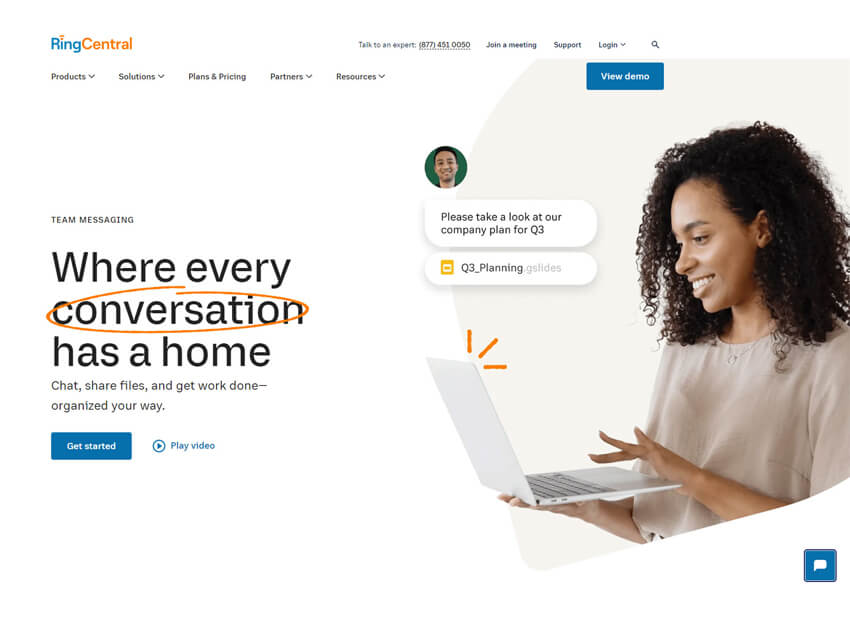
RingCentral Team Messaging is part of the RingCentral unified communications platform and offers team chat, file sharing, and collaboration alongside voice and video calls, making it a full business communication solution. (General knowledge)
Pros
- Integrated messaging and calling.
- Good global support.
- Works with phone system features.
Cons
- Messaging is part of broader suite.
- Higher overall subscription cost.
Why did we choose this tool
- Combines chat with calling and meetings.
- Strong support and uptime.
- Good for businesses needing full UC.
Pricing Plans
- No free basic version.
- Premium pricing starts from: ~$20 per user/month.
7. Google Chat
Best team communication app for Seamless Collaboration

Google Chat is an intelligent and secure communication app built for teams. From direct messages to team chat rooms, Google Chat provides an integrated platform that makes communication easy and efficient. Google Chat’s main selling point is how deeply it’s integrated with other Google Suite products, like Gmail and Google Calendar, which are commonly used across industries. It revolves around creating “rooms”, which users can then join to discuss various topics.
Pros
- Seamless integration with other Google Workspace apps.
- Simplicity and ease of use for team communication.
- Availability across multiple platforms, including web, mobile, and desktop.
Cons
- Lacks some advanced features found in other communication tools.
- Limited customization options for notifications and appearance.
- Occasional issues with message syncing and reliability.
Why did we choose this
- Seamlessly integrates with Google Workspace.
- Facilitates team collaboration and messaging.
- Offers robust search capabilities for easy information retrieval.
Pricing plans
- Basic version starts from $6.
- Premium pricing starts from $12.
8. Flock
Best team communication app for Connecting, Communicating, and Collaborating

Flock is one of the popular communication apps for modern teams and businesses. Flock is a newer entrant into the app communication game. Flock packs more features under chat and channels and it is relatively more affordable when compared with bigger counterparts.
Pros
- It supports some of the features like shared notes, reminders, to-dos, polls etc.
- Make audio and video calls and share your screen with your remote team.
- Available in all formats like web, desktop and mobile.
- Supports the app in 4 different languages.
Cons
- Limited customization options.
- Occasional performance issues during peak usage times.
- Absence of certain advanced features.
Why did we choose this
- User-friendly interface for team collaboration.
- Includes tools for polls and reminders.
- Offers powerful integrations with various apps.
Pricing plans
- Basic version is free.
- Premium pricing starts from $6.
9. Chanty
Best team communication app for Effortless Team Communication and Enhanced Efficiency

Chanty is a cloud-based team communication app that combines communication, project management, and automation to help teams work together more effectively. Chanty helps teams improve productivity and business communication. Unlimited message history, task management, file sharing and powerful notifications organize and save your day. Chanty helps you to collaborate and communicate effectively in one place.
Pros
- Intuitive interface.
- Affordable pricing.
- Robust task management features.
Cons
- Some users report occasional glitches.
- Limited integrations compared to other platforms.
- Fewer third-party app options.
Why did we choose this
- Combines team chat with task management.
- Simple and intuitive design for easy use.
- Allows voice messages for quicker communication.
Pricing plans
- Basic version is free.
- Premium pricing starts from $3.
10. Troop Messenger
Best team communication app for Simplified Team Communication and Efficiency Boost

Troop Messenger is a compact team communication app with amazing security and feature implementation facilitating safe and secured business data sharing. It offers a collaborative work forum for business needs. Troop Messenger for business is the sure shot tonic for business assisting you in reducing the time used up for manual data circulation and teamwork. Troop Messenger, the business communication app is one among all group communication apps which comes with unlimited group creation.
Pros
- User-friendly interface.
- Voice and video calling.
- Strong security measures.
Cons
- Occasional bugs.
- Limited integrations compared to other platforms.
- Relatively smaller user base.
Why did we choose this
- Provides secure and encrypted messaging.
- Features audio and video calling options.
- Supports file sharing and collaboration tools.
Pricing plans
- Basic version is free.
- Premium pricing starts from $10.99.
11. Discord
Best team communication app for Chatting, Connecting, and Conquering Together

Discord is one of the best team communication apps that lets you create a home for your communities and friends, where you can stay close and have fun over text, voice, and video. Whether your part of a school club, a gaming group, a worldwide art community, or just a handful of friends that want to spend time, Discord makes it easy to talk every day and hang out more often.
Pros
- Robust voice chat functionality.
- Customizable servers and channels.
- Wide availability across multiple platforms.
Cons
- Some users find its interface cluttered.
- Lacks advanced project management features.
- Occasional server outages can disrupt communication.
Why did we choose this
- Originally for gamers, now supports businesses.
- Offers voice and video chat features.
- Highly customizable server options for teams.
Pricing plans
- Basic version starts from $2.99.
- Premium pricing starts from $9.99.
12. Pumble
Best team communication app for Effortless Team Communication and Maximum Efficiency

Pumble is one of the best team communication apps that helps small business owners interact with members across multiple departments and locations via a unified portal. The app includes built-in search functionality, which allows users to search past messages, shared documents and other data. Pumble enables enterprises to create private or public digital workplaces with custom descriptions and names to share files and information and collaborate on projects.
Pros
- Web and mobile notifications.
- Tagging, custom channels.
- API access, drag-and-drop interface.
- Personalized profiles and more.
Cons
- Limited integrations with other tools.
- Absence of features like video conferencing.
- Occasional user interface complexities that may require time to navigate effectively.
Why did we choose this
- Unlimited messaging history for all users.
- Integrates with other productivity tools.
- Focuses on team collaboration and engagement.
Pricing plans
- Basic version is free.
- Premium pricing starts from $2.49.
13. Rocket.Chat
App for Open-Source Team Communication and Messaging

Rocket.Chat is an open-source team communication platform focused on secure, customizable messaging. It allows organizations to host their own chat system or choose hosted options, enabling fine-tuned privacy and control over data.
Pros
- Open-source and highly customizable.
- Strong security and data control.
- Supports messaging, channels, and integrations.
Cons
- Can require technical setup.
- Hosted features may add cost.
Why did we choose this tool
- High customizability for secure businesses.
- Useful for tech and compliance-focused teams.
- Flexible hosting and control options.
Pricing Plans
- Free version available (self-managed).
- Premium pricing starts from $8 per user/month.
14. Element
Business App for Decentralized and Secure Team Communication
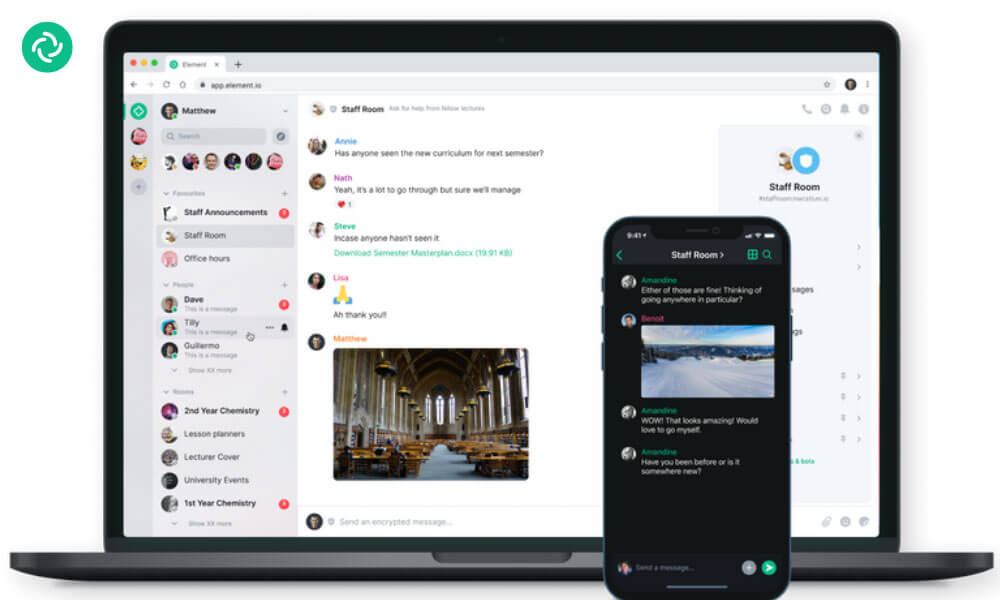
Element is a communication app built on the Matrix open standard, offering secure and decentralized messaging. It supports team chats, voice and video calls, file sharing, and bridges to other networks, ideal for teams seeking open standards.
Pros
- Open-standard and secure.
- Decentralized hosting options.
- Bridging with other networks.
Cons
- Steeper learning curve.
- Requires setup for custom hosting.
Why did we choose this tool
- Strong privacy and control for teams.
- Ideal for open-source adopters.
- Flexible deployment options.
Pricing Plans
- Free version available.
- Premium pricing starts from ~$5 per user/month.
15. Brosix
Best team communication app for Secure Communication and Seamless Collaboration

Brosix is a team communication app that helps small business owners to large enterprises streamline communication between internal departments via messaging. It enables users to text multiple team members using chat rooms and deliver announcements across contacts through broadcasting capabilities. It allows team members to share compressed files, voice recordings and screenshots of browsing history with colleagues. Additionally, it offers mobile applications for iOS and Android devices, receive notifications of new messages and access chat history.
Pros
- Strong focus on security and privacy.
- Easy-to-use interface.
- Robust administrative controls.
Cons
- Limited third-party integrations.
- Fewer features compared to larger platforms.
- Potential challenges in adoption for larger organizations with diverse needs.
Why did we choose this
- Focuses on secure team communication.
- Offers screen sharing and video conferencing.
- Provides customizable chat features for teams.
Pricing plans
- Basic version is free.
- Premium pricing starts from $4.
16. Cisco Webex Teams
App for Enterprise Team Messaging and Meetings

Cisco Webex Teams is a team communication and collaboration platform that offers messaging, file sharing, video meetings, and whiteboarding. It integrates with enterprise tools and supports secure collaboration across teams of all sizes.
Pros
- Enterprise-grade security.
- Messaging + meetings in one platform.
- Scalable for large teams.
Cons
- UI may feel complex to new users.
- Higher starting cost compared to simpler tools.
Why did we choose this tool
- Strong enterprise support and reliability.
- Rich collaboration feature set.
- Good for hybrid and remote teams.
Pricing Plans
- Free plan available.
- Premium pricing starts from ~$22.50 per user/month.
17. Workplace
Best team communication app for Connecting and Thriving in Your Professional Hub

The Workplace app is quickly becoming the best communication app for small business owners and modern teams looking to communicate seamlessly and securely. Not only does the app make collaboration efficient, but its security protocols keep critical data like files and conversations safe.
Moreover, through integration with popular office-suite platforms and other organizational tools, users can easily introduce new elements into their communication flows without breaking stride. With this kind of power and flexibility at their fingertips, teams have quickly come to appreciate the ability to use Workplace as a central hub for all of their conversations.
Pros
- Familiar interface for Facebook users.
- Seamless integration with other Facebook services.
- Focus on fostering collaboration and communication within organizations.
Cons
- Concerns about privacy and data security.
- Potential distractions from non-work-related content.
- Limitations in customization compared to other dedicated enterprise platforms.
Why did we choose this
- Facebook’s platform for businesses.
- Promotes informal communication among employees.
- Integrates with familiar Facebook features.
Pricing plans
- Basic version is free.
- Premium pricing starts from $4.
18. Pronto
Best team communication app for Instant Communication and Lasting Results

If you want to experience the power of having your entire organization on one communication app, then you should try Pronto. Using Pronto you can share any file type—documents, spreadsheets, slideshows, photos, videos, and more. Pronto integrates with all reputable cloud storage repositories, including Dropbox, OneDrive, iCloud, and Google Drive. Using Pronto you can create reminders for yourself or others in your groups—attach files, photos, or videos and assign due dates with auto-reminders for each task.
Pros
- User-friendly interface.
- Real-time communication.
- Integration capabilities.
Cons
- Limited customization options.
- Basic features.
- Pricing structure.
Why did we choose this
- Instant messaging with integrated file sharing.
- Offers a clean, user-friendly interface.
- Allows for group chats and direct messaging.
Pricing plans
- Basic version is free.
- Premium pricing starts from $750.
19. Basecamp
Best team communication app for Streamlined Collaboration and Simplified Success

Basecamp is a real-time team communication app that helps teams stay on the same page. With to-do-lists, calendaring, due dates and file-sharing, Basecamp provides a way for teams to keep track of priorities and actionable items. Basecamp has a simple interface in which users can create projects, document progress and manage tasks. It is a web-based software, allowing users to sign in anywhere, anytime, either through a web browser or through apps compatible with many mobile devices.
Pros
- Simple and intuitive user interface.
- Task lists and schedules for project management.
- Centralized communication and file sharing.
Cons
- Limited customization options.
- Lack of time tracking features.
- Steeper pricing for larger teams.
Why did we choose this
- Combines project management with communication tools.
- Easy-to-use interface for team collaboration.
- Supports to-do lists and file sharing.
Pricing plans
- Basic version starts from $15.
- Premium pricing starts from $299.
20. Zoho Cliq
Best team communication app for Clicking, Connecting, and Collaborating Effortlessly

Cliq is a communication app that helps teams by offering collaboration, chat bots, task management, video collaboration and more. This real time messaging app enables communication across teams and improve business productivity at your workplace.
Cliq is designed to get the work done on time and optimize your resources with this all-in-one business communication tool that’s more than just chat. Be it Small or Medium Businesses and an enterprise, Zoho Cliq enables business collaboration and automation through integration, bots and commands.
Pros
- Day-to-day task management, calendar.
- Searchable conversations.
- Centralized workflows.
- Virtual meetings.
- Whiteboard.
Cons
- Limited integrations compared to other platforms.
- Interface can feel cluttered with excessive features.
- Some users report occasional glitches and technical issues.
Why did we choose this
- Real-time messaging with file sharing capabilities.
- Integrates seamlessly with other Zoho products.
- Offers multi-channel communication options.
Pricing plans
- Basic version is free.
- Premium pricing starts from $1.
21. Amazon Chime
App for Business Messaging, Meetings, and Calls
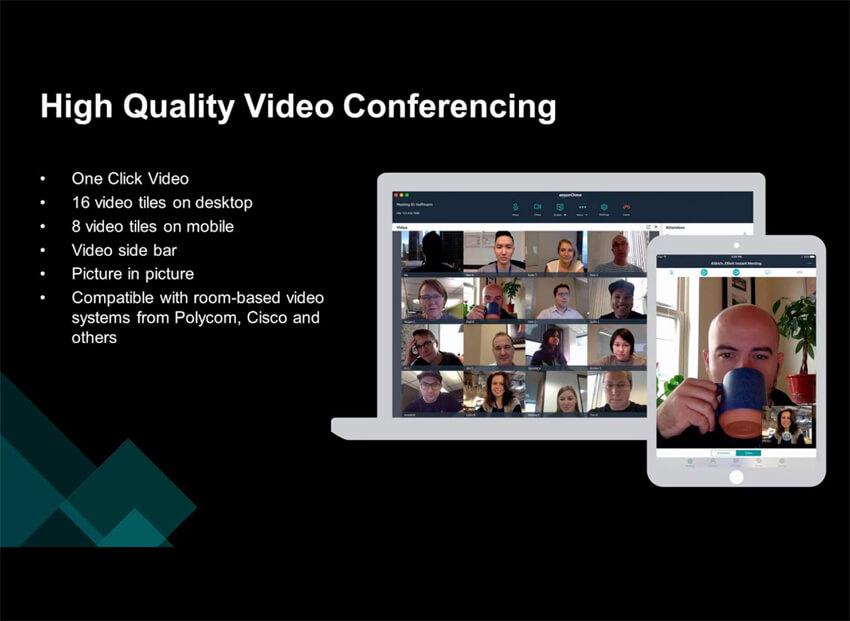
Amazon Chime is a communications service from AWS that combines team chat, meetings, calls, and content sharing. It allows businesses to hold online meetings, share screens, and communicate securely across devices.
Pros
- Integrated chat and meeting features.
- Screen sharing support.
- Scales with AWS infrastructure.
Cons
- End of service announced for 2026.
- Premium pricing can be pay-as-you-go and complex.
Why did we choose this tool
- Combined communication and meeting features.
- Strong for AWS-centric environments.
- Supports enterprise-grade security.
Pricing Plans
- Free basic features (chat, calls, meetings) available.
- Premium features start from ~$3 per user/day (up to $15 per month).
22. Zulip
Best team communication app for Open-Source Communication and Amplified Collaboration

Zulip is a full-featured, open-source, team communication app offering a better alternative to Slack or Microsoft Teams. Zulip provides the benefits of real-time chat, while also being great at asynchronous communication. Like email threads, Zulip topics create a separate space for each discussion, so different conversations will never get in each other’s way. Team members can save time by reading the topics they care about and maintain focus by replying in context on their own time.
Pros
- Threaded conversation organization enhances clarity.
- Supports integrations with various third-party tools.
- Offers self-hosting options for enhanced privacy and control.
Cons
- Learning curve for new users due to unique interface.
- Limited customization options.
- Community support may be less extensive than larger competitors.
Why did we choose this tool
- Unique threading system for organized discussions.
- Supports both chat and email-like conversation styles.
- Integrates with various third-party applications.
Pricing plans
- Basic version is free.
- Premium pricing starts from $6.67.
23. Mattermost
Best team communication app for Controlling Communication and Driving Your Future

As an open-source team communication app, Mattermost provides enterprises with secure communication and collaboration by utilizing custom workflows, centralizing communication, and providing enterprise-grade security. With hundreds of integrations, team members can resolve issues, deploy items, and collaborate on any specific task by connecting files and third-party systems. Mattermost is available for iOS and Android app users.
Pros
- Self-hosted option provides control over data privacy.
- Open-source nature allows for customization and community contributions.
- Offers extensive integration with other tools and services.
Cons
- Self-hosting requires technical expertise and maintenance.
- User interface may not be as intuitive for some users.
- Limited built-in features compared to some proprietary platforms.
Why did we choose this
- Open-source platform for secure messaging.
- Highly customizable to fit team needs.
- Supports integration with DevOps tools.
Pricing plans
- Basic version is free.
- Premium pricing starts from $10.
24. Crew
Best team communication app for Simplified Team Messaging and Dynamic Results

Crew is a comprehensive communication app that connects team members on the frontline, creates meaningful employee interactions, and drives real-time business results. Crew helps organizations align and manage front-line team member goals and communication to improve success across the board. Features include team communication, scheduling and shift coverage, employee recognition, document and task management, employee surveys, and enterprise management tools. Crew is available for mobile devices via iOS and Android apps.
Pros
- Simplifies team communication with instant messaging.
- Offers task management features to track work progress.
- Provides shift scheduling capabilities for managing team shifts.
Cons
- Limited integration options with other software.
- User interface could be more modern and intuitive.
- Some users report occasional glitches and performance issues.
Why did we choose this
- Focuses on team communication for frontline workers.
- Offers features like shift scheduling and messaging.
- Easy-to-use mobile app for on-the-go communication.
Pricing plans
- Basic version is free.
- Premium pricing starts from $30.
25. Fleep
Best team communication app for Conversations that Drive, Collaboration that Thrives

Fleep is a communication app that allows users to send messages and files to one another. The app also includes features such as group chat and video conferencing. Fleep is available for both desktop and mobile devices, and it integrates with a variety of other apps and services. The app is free to download and use, and it offers a variety of features that make it a useful tool for businesses and individuals.
Pros
- Combines chat and task management for better workflow.
- Easy integration with email and other tools.
- Offers a unique thread-based messaging system for clarity.
Cons
- Limited features in the free version.
- May lack advanced project management tools.
- Interface can be less intuitive for new users.
Why did we choose this
- Combines messaging with task management features.
- Offers email integration for seamless communication.
- Supports both personal and team conversations.
Pricing plans
- Basic version is free.
- Premium pricing starts from $5.72.
Expert tips to choose the best team communication apps for your business
Strong team communication is key to better collaboration and higher productivity. Using the right team communication apps can make daily work easier and more effective. Below are simple and practical strategies to help improve team communication with the right communication tools.
Assess Communication Needs
Start by understanding your team’s communication needs. Look at team size, work style, and whether employees work remotely or from the same office. Also consider the type of projects your team handles. This clear assessment helps you select communication tools that truly fit your business needs.
Choose the Right Tools
Carefully review and choose communication apps that match your team’s goals. Focus on tools that offer real-time messaging, video meetings, file sharing, task tracking, and easy integrations. Popular options such as Slack, Microsoft Teams, and Google Workspace are often used for these reasons.
Centralize Communication
Use a single team communication app like Clariti to keep all messages, files, and updates in one place. Centralized communication helps teams stay aligned and reduces confusion caused by scattered tools and information silos.
Foster Open Communication
Encourage open and honest communication across the team. Build a safe and supportive work environment where employees feel confident sharing ideas, concerns, and feedback without hesitation.
Use Voice Calling
Add voice calling tools for meetings and discussions. Voice conversations help improve clarity, boost engagement, and strengthen team connections, especially for remote teams working across locations.
Implement Task Management Tools
Use task management tools to assign, track, and organize work. Clear task ownership and deadlines help teams stay focused and understand their responsibilities better.
Embrace Real-Time Messaging
Promote real-time messaging for quick questions and updates. Instant messaging tools allow fast communication and support smooth teamwork during busy workdays.
Provide Training and Support
Offer regular training and support so team members know how to use communication tools properly. Make sure everyone understands key features and best practices for daily use.
Establish Communication Guidelines
Set clear communication rules for the team. Define response time expectations, proper communication tone, and the best channels for different types of messages.
Regular Check-Ins
Schedule regular team check-ins or meetings to review progress, share updates, and resolve issues. These sessions help maintain clear communication and team alignment.
Encourage Feedback
Create a feedback-friendly culture where team members can share suggestions and constructive input. Feedback helps improve communication habits and highlights areas that need improvement.
Promote Collaboration Spaces
Use shared collaboration spaces inside communication apps for brainstorming, idea sharing, and joint project work. These spaces support teamwork and creative thinking.
Integrate with Existing Tools
Choose communication apps that connect easily with the tools your team already uses. Smooth integrations reduce extra work and keep workflows organized.
Emphasize Active Listening
Encourage active listening across the team. Team members should listen carefully, show empathy, and respond thoughtfully to different opinions and ideas.
Continuously Evaluate and Adapt
Regularly review how well your communication tools and strategies are working. Gather team feedback and make changes when needed to improve communication over time.
By applying these strategies and using the right team communication apps, businesses can greatly improve collaboration, strengthen teamwork, and increase overall productivity.
The importance of effective team communication for achieving business success
Effective team communication plays a pivotal role in achieving business success. Here are some key reasons why it is important:
- Collaboration and Coordination: Effective team communication fosters collaboration and coordination among team members. It ensures that everyone is on the same page, working towards common goals, and sharing information and resources.
- Problem Solving and Decision Making: Strong team communication enables effective problem-solving and decision-making processes. When team members can openly express their ideas, concerns, and perspectives, it leads to more informed and effective decision-making.
- Increased Productivity: Good communication within teams streamlines workflows, minimizes misunderstandings, and reduces the need for constant clarification. This results in improved productivity as tasks are completed more efficiently.
- Employee Engagement and Satisfaction: When team members feel heard, valued, and included in communication processes, their engagement and satisfaction levels increase. This leads to higher morale, better job performance, and reduced turnover.
- Innovation and Creativity: Open and effective communication encourages the sharing of diverse ideas, viewpoints, and experiences. This creates an environment conducive to innovation and creativity, where new solutions and approaches can be developed.
- Conflict Resolution: Miscommunication and lack of clarity can lead to conflicts within teams. Effective communication helps in resolving conflicts by encouraging open dialogue, active listening, and finding mutually beneficial solutions.
- Customer Satisfaction: Effective team communication has a positive impact on customer satisfaction. When teams communicate well internally, they can deliver better customer service, respond to customer needs promptly, and ensure a consistent and coherent customer experience.
- Efficient Project Management: Clear and frequent communication is crucial for successful project management. It helps in setting clear expectations, assigning tasks, tracking progress, and ensuring timely completion of projects.
- Building Trust and Relationships: Strong team communication builds trust among team members. When there is transparency, honesty, and effective information sharing, it fosters stronger relationships and collaboration.
- Adaptability and Resilience: Effective communication enables teams to quickly adapt to changes, handle crises, and overcome challenges. It facilitates the flow of information, updates, and feedback necessary for adjusting strategies and approaches.
Overall, effective team communication is a cornerstone of business success. It enhances collaboration, productivity, innovation, and employee engagement while reducing conflicts and improving customer satisfaction. Organizations that prioritize and invest in strong team communication practices are better equipped to achieve their goals and thrive in today’s competitive landscape.
Team communication apps significantly improve the efficiency of team collaboration
Team communication apps greatly enhance team collaboration efficiency by providing real-time messaging, file sharing, and task management features. These tools streamline communication, reducing the need for lengthy email threads and ensuring that team members stay updated on projects.
Additionally, they foster a collaborative environment by allowing for quick feedback and brainstorming sessions, which can lead to faster decision-making. With integrated features like video conferencing and shared calendars, team members can coordinate more effectively, regardless of their physical location. Overall, team communication apps play a crucial role in enabling teams to work together seamlessly, ultimately driving productivity and success.
Conclusion
This was our communication app list that can boost effective team communication in every workplace. Apart from this, there are many other communication apps available in the market that can help team managers embrace and empower effective communication.
Communication is a valuable aspect of working in a team. When most companies switched to remote work during the pandemic, there was a fear of being able to collaborate properly. The quality of communication suffered a lot as employees were no longer working from the same physical location.
With the rise of remote work, there is a plethora of communication software that is available for remote teams. Start by signing up for these platforms.
Author Bio
V.R. Vinod Kumar is Clariti’s Senior Manager – Digital Marketing, bringing over two decades of writing experience. He writes extensively on SaaS-driven collaboration tools, workplace efficiency, and team communication.
Frequently Asked Questions
What are communication apps?
Communication apps are tools that facilitate seamless interaction and collaboration among team members.
What app do people use to communicate?
People use various apps to communicate, but Clariti stands out as a comprehensive solution for seamless collaboration. With its integrated approach to email, chat, and contextual conversations, Clariti ensures efficient communication across teams.
What are the types of team communication apps?
Team communication apps come in various forms, including instant messaging platforms, video conferencing tools, and project management software. These applications enable teams to collaborate in real time, share files, schedule meetings, and track project progress efficiently. With features like chat channels, file sharing, and task assignment, these apps streamline communication and enhance productivity in modern workplaces.
Why use apps for communication?
Using apps for communication enhances connectivity, streamlines collaboration, and boosts productivity by providing instant access to messages, files, and shared resources. These tools facilitate seamless interactions, enabling teams to communicate efficiently, regardless of geographical barriers or time zones.
Which is the best team communication app?
Clariti, the leading team communication app, offers flexible group chats with dynamic member adjustments to prevent information overload. Supporting direct and group chat, Clariti ensures alerts are pertinent to each member, streamlining communication.
What is a team communication app?
A team communication app aids collaboration for goal achievement, particularly crucial in remote and hybrid work setups for effective asynchronous communication. Clariti, as a comprehensive team communication app, consolidates emails, chats, calls, documents, and to-dos, organized by context, ensuring swift retrieval of information.




Start for FREE with Personal CRM
We too hate spam! Your email is secure with us.

Spot secured. You're in.
You’re officially on the list for early access to Clariti.


No more switching tools.

No more lost context.

Just Clarity.
You’ll be among the first to experience it when we launch. We’ll let you know the moment it’s ready.

Keep an eye out for emails from @clariti.app.
(and check your spam folder just in case—whitelisting us helps ensure you don’t miss a thing).

