
Mail

Email That Lives Where Your Work Happens!

Mail BI

All Your Emails, One Smart Inbox — Finally, Some Clarity!

Centralized Accounts

Manage up to four email accounts alongside chats and files.

Open button Close button

Email + Chat View

Access emails and chats from one organized interface.

Open button Close button

Seamless Workflow

Move between email, chat, and calls without switching apps.

Open button Close button

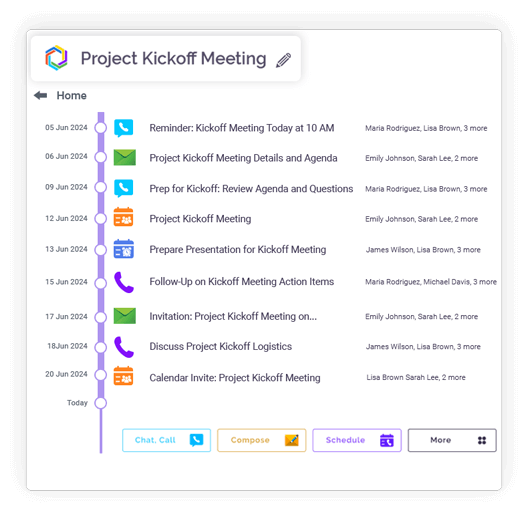
Context-Preserved Emails

Emails stay linked to related conversations or topics.

Open button Close button

Smart Grouping

Related messages are automatically grouped for clarity.
Open button Close button
Feature slide img

Manage Inboxes, Spam, Routes….And More

Full Email Functions

Compose, reply, forward, draft, and archive emails.

Open button Close button

Rich Text Editor

Use formatting, links, and bullet points.

Open button Close button

Attachments Support

Send and receive files in all common formats.

Open button Close button

Signature Management

Create and manage multiple signatures per account.

Open button Close button

Embedded Media

Add links and visuals directly within emails.

Open button Close button
Feature slide img

All your inboxes, one unified view.

Multiple Mailboxes

Handle several email accounts in one workspace.

Open button Close button

Quick Switching

Move between mailboxes without logging out.

Open button Close button

Unified Dashboard

View messages from all accounts in a consolidated layout.

Open button Close button
Feature slide img

Your inbox, working intelligently behind the scenes.

Auto Replies & OOO

Schedule automated responses for absences.

Open button Close button

Chat from Email

Start internal chats directly from emails.

Open button Close button

Email from Chat

Convert chats into emails for external sharing.

Open button Close button

Email Sharing

Share emails directly instead of forwarding.

Open button Close button

Schedule from Email

Create calls or calendar events directly from emails.

Open button Close button
Feature slide img

For better organization of emails based on context.

AI Context Linking

Automatically detects and suggests related communications.

Open button Close button

User-Controlled Linking

Link, preview, or dismiss suggested connections.

Open button Close button

Smart Spam Handling

Filters repetitive or unwanted emails.

Open button Close button

Routing Rules

Auto-route social media notifications and promotional emails to Feeds as and when they arrive.

Open button Close button
Feature slide img

Integration

Connect your apps. Get more done.

Microsoft 365

Microsoft 365

Office productivity suite

Google Workplace

Google Workspace

Cloud-based productivity suite

Onedrive

OneDrive

Cloud file storage

Google Drive

Google Drive

Cloud file storage and sharing

Dropbox

Cloud file storage and sharing

PCloude

pCloud

Secure cloud file storage

Github

GitHub

Source code hosting

Hot Spot

HubSpot

Marketing automation platform

Team

Microsoft Teams

Team collaboration platform

More Useful Features

Detailed Search 

Search all emails or search based on subject, conversation or participant name.

Rich Text Formatting 

Write professional emails.

Multiple Signatures 

Manage per account.

Out-of-Office Replies 

Automate responses.

Embed Emails in Chats 

Add context instantly.

Easy Account Switching

Move between different mailboxes without logging out.

Unified Email System for All Accounts

Clariti provides a unified email system that integrates all your email accounts—Gmail, Outlook, Yahoo, and others—into a single workspace. You can view, manage, and respond to messages from different providers without switching tabs or apps. This eliminates the hassle of checking multiple inboxes separately and streamlines your daily communication workflow.

Mail blog_img

Smart Unified Inbox for Email and Chat

Clariti features a smart unified inbox that blends emails and chats into topic-based conversations. Instead of siloed email threads and chat messages, related communications are grouped contextually. This allows seamless transitions between email and chat discussions while preserving the full conversation history in one accessible thread.

Full Email Client Features Built In

Clariti includes a full suite of email client features such as rich-text composition, threading, labeling, and archiving. You can manage emails by spam, set routes, set automatic replies, and add differente signatures for different email ids. These native tools ensure you don’t sacrifice functionality while benefiting from Clariti’s unified collaboration environment.

Multi-Mailbox Management in One Place

With Clariti, you can manage multiple email mailboxes from a single interface. Whether you have separate accounts for work, projects, or clients, all can be accessed and organized in one dashboard. This centralized management improves efficiency and ensures you never miss important messages spread across different accounts.

Rich Email Composition Tools

Clariti offers rich email composition tools including formatting 

options, bullet points, embedded images, and hyperlinks. You can craft professional, well-structured emails directly within the platform, with the ability to save drafts and schedule sends. These tools help maintain consistent and polished communication without needing a separate email application.

Multiple Signatures and Professional Formatting

Clariti supports multiple customizable email signatures, which you can assign per account or per context. Combined with professional formatting features like templates and branded styling, this allows you to maintain a polished and consistent brand presence across all email communications, enhancing professionalism and recognition.

Smart Automations and Out-of-Office Replies

Clariti enables smart email automations like spam management and out-of-office replies. Add to this, Clariti AI provides suggestions for the best context for every incoming mail. These automations help maintain communication hygiene and ensure timely responses even when you’re unavailable.

AI-Powered Smart Mail Assistance

Clariti AI assists in organizing your inbox through suggesting and grouping the emails based on context. This intelligent support saves time in organizing the emails and helps you focus on other important work.

Blog Links

Frequently Asked Questions?

Can I manage multiple email accounts from a single inbox?

Yes, Clariti allows you to manage multiple email accounts—like Gmail, Outlook, or Yahoo—in one unified inbox. You can view, send, and organize emails from different providers without switching tabs. This streamlines communication and ensures all your messages are accessible from a single, organized dashboard.

Yes, Clariti includes rich email formatting tools like bold, italics, bullets, and embedded images. It also supports multiple customizable email signatures, which you can assign to specific accounts or use contextually. This helps maintain professional and consistent branding across all your outgoing messages.

Yes, Clariti lets you drag and drop emails directly into chat conversations to create “Hybrid Conversations.” This embeds the full email—with its history and attachments—into the chat thread. Team members can then discuss the email in real time without losing any context.

Yes, Clariti offers automation features including out-of-office auto-replies and spam management. Clariti AI organizes incoming emails automatically by giving the best match (matching score) based on context. These tools help you maintain communication efficiency even when you’re not actively available.

Yes, Clariti includes AI-driven features designed specifically for smarter mail organization. Its AI automatically suggests linking incoming emails to relevant existing conversations, presenting options to “Add here,” “Preview & add,” or “Remove, not related.” The interface facilitates this by allowing you to easily link, preview, or dismiss these intelligent suggestions, ensuring your communications stay contextually grouped. Furthermore, AI enhances search within the Mail menu and helps manage spam at the domain level. It also enables you to reference emails or chats directly when creating new tasks or calls, streamlining workflow and maintaining organized, context-rich communication.