


Blog
From Emails to Tasks: How Email + Chat + To-Dos Fix Project Management Chaos
- By Clariti Team
- No Comments


Blog Summary
Project chaos happens when email, chat, and tasks don’t connect, so context gets lost, decisions don’t become accountable for work, and client updates become manual.
1. Successful delivery needs 3 linked layers:
- Project Management (to-dos, owners, deadlines)
- Project Communication tools (fast clarification + decisions)
- Customer Communication Management (consistent client confidence)
2. The fix is a loop: Email request → Chat clarification → Task created → Progress triggers client updates.
3. Key capabilities that reduce chaos:
- Email to-do integration (turn requests into tasks with context)
- Task management embedded in chat (convert decisions into work instantly)
- Clariti to-do + calendar (tasks don’t just exist they get realistically scheduled)
4. Tools: Several PM platforms get close, but Clariti stands out as communication-first, designed to keep context intact across email, chat, and tasks.
View more
The era of the “all-in-one” app that does everything poorly is over. In 2025, the most successful teams aren’t looking for one tool to rule them all they’re building connected ecosystems. They’ve realized that a task is only as good as the conversation that created it, and a project is only successful if the client actually knows it’s happening.
If you’re still copy-pasting chat messages into to-do lists or manually emailing project updates, you’re working against yourself. It’s time to move from emails to tasks.
Let’s explore how the bridge between your Email, Chat, your To-Dos, and your Client Updates is the secret to fixing project management chaos for good.
Project Management vs Project Communication Tools vs Customer Communication Management
Before we get into the mechanics, pause on what most teams skip:
Projects don’t succeed or fail inside tools. They succeed or fail inside communication.
To see the full picture, it helps to separate and then reconnect three ideas that often get blurred together.
1. Project Management
Project management gives work its shape turning goals into tasks, timelines, and ownership. It’s the structure: what needs to be done, by whom, and by when.
Without strong communication, even the best plan becomes a static checklist.
Example: A launch plan broken into milestones and deliverables.
2. Project Communication
Project communication keeps that structure alive. It’s the movement of information chats, updates, feedback, and decisions that pushes work forward.
When conversations live outside the task, context leaks and follow-through slows. That’s why project communication tools matter but only when the output of those conversations turns into trackable work.
Example: Clarifications in chat, feedback in email, approvals floating in someone’s inbox.
3. Customer Communication Management
You’ll often see “CCM” used to mean Customer Communication Management in regulated, document-heavy industries (statements, policy notices, compliance workflows). In this post, we’re using a lighter, project-focused version of the idea:
Customer Communication Management ensures client requests and updates don’t drift away from execution. It connects external messages to tasks, visibility, and accountability, so the client experience stays consistent even when the internal work gets messy.
Example: Turning a client’s email request into an assigned task with the email thread attached, then sending consistent progress updates without manual copy-paste.
When these three layers operate in isolation, teams stay busy but disconnected. When they work together, project management stops feeling like damage control and starts feeling intentional.
The Three Layers Every Successful Project Needs
Different purposes. One connected system.
1. Project Management: Turning Intent into Execution
Tasks are the backbone of delivery: ownership, deadlines, dependencies, and status.
The problem is not that teams “don’t have tasks.” The problem is they have tasks without context and context is what makes a task actionable.
What this layer must do well:
- Clear owners and due dates.
- Visible status (not “I think it’s done”).
- A place where deliverables live and don’t get lost.
2. Project Communication: Speed Without Memory
Chat tools became essential because they reduce friction. You can ask, clarify, decide, and move.
But chat has a hidden downside: it’s fast and therefore forgettable.
If decisions stay in chat and never become accountable work, you get:
- “We agreed on this last week… where is it?”
- “I thought you were doing it.”
- “It’s somewhere in the thread.”
Where chat-connected task creation matters most:
- Turning decisions into tasks in one click.
- Keeping the conversation attached to the work.
- Making handoffs explicit.
3. Customer Communication Management: Trust Beyond the Team
Clients don’t experience your internal tools. They experience:
- Response time
- Clarity
- Consistency
- Confidence
If updates are ad-hoc, trust becomes fragile. If updates are systematic, trust becomes durable.
The difference is huge:
- Sending updates: manual, inconsistent, easy to forget
- Managing confidence: a reliable loop where progress automatically becomes client-visible communication
Comparison Table: PM vs Communication vs Customer Communication
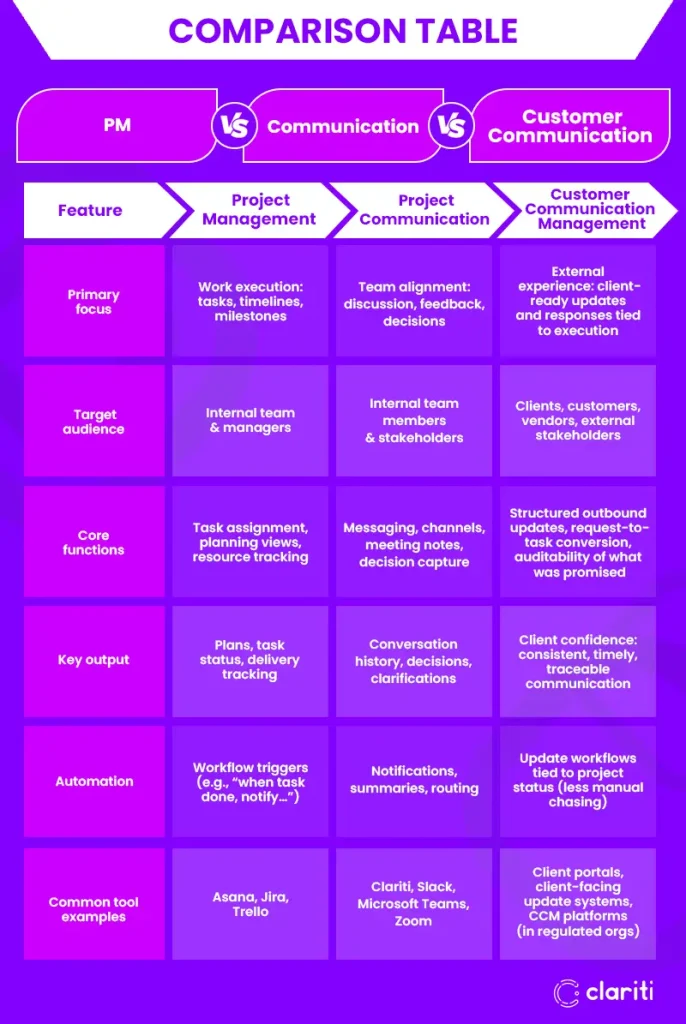
Critical differences to remember
- Internal vs external: PM + chat are mostly inward-facing. Customer Communication is outward-facing.
- Coordination vs accountability: Chat coordinates; PM accounts for delivery.
- Context continuity: The winning setup keeps the original request, the discussion, and the resulting task connected.
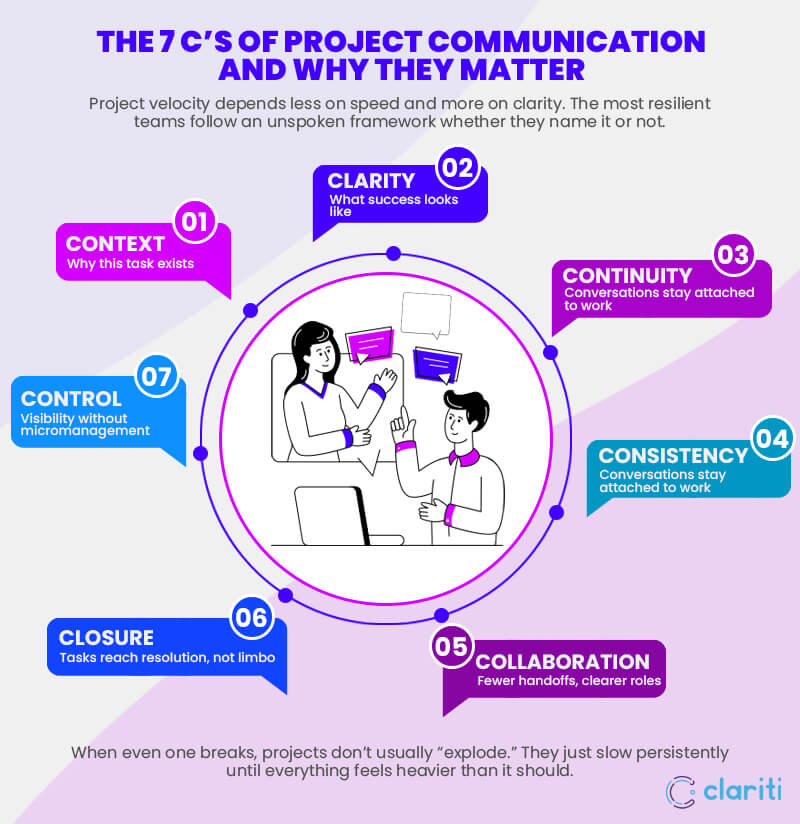
The 7 C’s of Project Communication and Why They Matter
Project velocity depends less on speed and more on clarity. The most resilient teams follow an unspoken framework whether they name it or not.
- Context – Why this task exists
- Clarity – What success looks like
- Continuity – Conversations stay attached to work
- Consistency – Same logic across email and chat
- Collaboration – Fewer handoffs, clearer roles
- Control – Visibility without micromanagement
- Closure – Tasks reach resolution, not limbo
When even one breaks, projects don’t usually “explode.” They just slow persistently until everything feels heavier than it should.
Why Most Business Management Tools Still Create Project Chaos
Even with “all the tools,” projects still mess up because most tools solve one layer, not the gaps between them.
- PM-first tools optimize tasks, not the conversations that produce and modify those tasks
- Chat-first tools optimize speed, not accountability
- Email remains critical (especially externally), but it’s often disconnected from execution
- The real failure mode is context breakage between layers:
- request → discussion → decision → task → update
- …becomes fragmented across apps and people
That’s why email to-do integration isn’t a “nice to have.” It’s the difference between “we saw the request” and “it shipped, and the client knows it shipped.”
From Emails to Tasks: The Ideal Connected Workflow
This is what the “connected ecosystem” actually looks like in day-to-day work where communication naturally turns into action, and action naturally turns into updates.
Step 1: A request arrives (Email)
A client emails: “Can we change the homepage headline and update the hero image by Thursday?”
In a disconnected world, someone:
- forwards it,
- pings the team in chat,
- manually copies details into a task tool,
- then forgets to update the client.
In a connected workflow, that email becomes the source-of-truth context and feeds email to-do integration directly.
Step 2: Clarify quickly (Chat)
The team asks two quick questions in chat:
- Which headline variation?
- Who provides the new hero image?
Those answers should not evaporate into scrollback. They should become part of the task context. This is where project communication tools are at their best fast, low-friction, high signal.
Step 3: Convert to accountable work (To-Dos)
Create tasks directly from the request + clarification:
- “Update homepage headline” (owner, due date, approval step)
- “Replace hero image” (owner, asset link, due date)
Critically: the task should retain the originating email thread and relevant chat decisions.
Step 4: Progress becomes client-visible updates (Customer Communication)
Instead of someone “remembering to email,” updates are triggered by the work:
- Task moved to “In Review” → client gets a review request
- Approved → client gets confirmation and next steps
- Blocked → client gets a heads-up with an ETA and what’s needed from them
That’s how you stop chaos: not by “more communication,” but by communication that stays connected to execution.
Top 7 Project Management Tools That Get Closest in 2026
These platforms aim (in different ways) to connect tasks, communication, and client visibility. Most are PM-first; the last category is communication-first.
1. ClickUp: The “Everything” App
- PM: Strong task management with multiple project views (Kanban, timelines, etc.)
- Team communication: Built-in chat/comments inside workspaces
- External updates: Guest access and client-facing sharing/portals depending on setup
Best for teams that want to consolidate a lot into one workspace.
2. monday.com: The Visual Work OS
- PM: Highly customizable boards + automations
- Team communication: Updates/comments live on items (task-level discussion)
- External updates: Shareable boards and client access options for visibility without full internal exposure
Best for teams that like visual workflows and configurable processes.
3. Zoho Projects: The Integrated Ecosystem
- PM: Solid planning and tracking
- Team communication: Works well when paired with the broader Zoho collaboration stack
- External updates: Stronger when integrated with Zoho’s CRM/helpdesk-style components for client workflows
Best for teams already invested in Zoho and wanting end-to-end business integration.
4. Wrike: The Enterprise Collaborator
- PM: Strong cross-functional tracking and reporting
- Team communication: Proofing and task-level collaboration features reduce back-and-forth
- External updates: Shareable dashboards and stakeholder visibility controls
Best for larger teams needing structure, reporting, and governance.
5. Teamwork.com: The Client-Centric Hub
- PM: Agency-friendly delivery with time tracking and dependencies
- Team communication: Built-in messaging and project-level discussions
- External updates: Client portal approach aligns well with services and billing transparency
Best for client services teams balancing delivery and client visibility.
6. Basecamp: The Simple Centralizer
- PM: Straightforward to-dos and schedules
- Team communication: Message boards + chat-style threads
- External updates: Strong “client visibility” controls so clients see what they should and not what they shouldn’t
Best for teams that want simple, predictable project spaces.
7. Clariti: The Communication-First Category
Clariti is listed 7th because it’s not trying to be “another PM suite with chat added.” It’s a different category: communication-first, designed for teams whose core problem is context fragmentation between inbox, chat, and tasks.
Where Clariti fits in the “Email + Chat + To-Dos” framework:
- The Bridge (Email + Chat): Keeps email + internal discussion connected, so the original request doesn’t get lost when the team moves into chat.
- The Action (To-Dos): Enables task management embedded in chat and email reducing copy-paste, missed handoffs, and “where did we agree on that?”
- The Planning Loop ( Clariti To-do + Calendar): Helps turn commitments into scheduled work, so tasks aren’t just captured they’re placed into time.
- The Continuity: Context-based organization keeps related messages, files, and tasks grouped, so decisions remain recoverable weeks later.
And yes. Clariti’s To-do + Calendar matters more than it sounds. Most teams don’t fail because they lack task features. They fail because tasks lose context detached from the email, chat, or meeting and never get scheduled realistically.
Clariti doesn’t add more tasks. It keeps the thread intact between inbox, conversation, and calendar.
Choosing the Right Project Management Setup
When you’re evaluating tools (or a combination), these four questions cut through the marketing:
- Centralization: Does it actually bring tasks and communication together, or does it just integrate links between them?
- External access: Can you give clients visibility without exposing internal noise or sensitive details?
- Searchability: Can you reliably find past decisions and the context behind them?
- Integration: Will it sync with the systems you already depend on (calendar, file storage, CRM/helpdesk where relevant)?
Conclusion:
Project management chaos isn’t solved by more software. It’s solved by reconnecting communication, accountability, and execution.
Moving from emails to tasks is not a feature shift; it’s a mindset shift: keep the conversation attached to the work, and keep the work connected to the people who need to trust it.
Stop tool-hopping. See how Clariti.app turns everyday communication into actionable project work.
Frequently Asked Questions
What are the tools of communication?
“Communication tools” can mean both channels (how messages move) and artifacts (where information is stored). In project work, the most common are:
- Email: Formal requests, approvals, client/stakeholder communication
- Team chat: Quick questions, coordination, lightweight decisions (e.g., Clariti, Slack, Microsoft Teams)
- Video conferencing: Meetings, workshops, client calls (e.g., Zoom, Teams, Google Meet)
- Phone/voice: Urgent escalation, sensitive conversations
- Docs & wikis: Specs, meeting notes, decision logs (e.g., Confluence, Notion, Google Docs)
- Project/task comments: Discussion attached directly to work items (inside Asana, Jira, etc.)
- File collaboration: Sharing and feedback on assets (e.g., Google Drive, OneDrive, Dropbox)
- Whiteboards: Planning, brainstorming, mapping (e.g., Miro, FigJam)
- Client portals/forms: Structured intake, updates, and visibility for external stakeholders
The practical goal isn’t “more tools” it’s fewer context breaks between message → decision → task → update.
What are the 7 C’s of project communication?
A widely used “7 C’s” framework (often applied to project communication) is: Clear, Concise, Concrete, Correct, Coherent, Complete, Courteous. It helps teams reduce misunderstandings, rework, and delays by improving message quality especially when decisions must become tasks.
What are the top 5 project management tools?
Five commonly used project management platforms are:
- Asana – Cross-functional project tracking with timelines, dependencies, and structured workflows.
- Jira – Best for software teams running Agile: backlogs, sprints, releases, and issue tracking.
- Trello – Lightweight Kanban boards for simple project visibility and fast adoption.
- monday.com – Highly customizable boards, dashboards, and automations for many team types.
- ClickUp – Broad “workspace” approach combining tasks, views, docs, and reporting.
What are CCM tools?
CCM tools usually mean Customer Communications Management software platforms that create, personalize, manage, and deliver customer-facing communications (email, print, SMS, portals), often with strong compliance, templates, approvals, and audit trails. CCM is common in regulated or high-stakes messaging environments (banking, insurance, utilities).
Why is task management embedded in chat useful?
Task management embedded in chat lets you turn a message into an assigned task right where the decision happens without switching apps or rewriting context. This reduces “we agreed on it but forgot to track it,” keeps clarifications tied to the task, and improves accountability in fast-moving project communication tools like Slack or Teams.




Start for FREE with Personal CRM
We too hate spam! Your email is secure with us.

Spot secured. You're in.
You’re officially on the list for early access to Clariti.


No more switching tools.

No more lost context.

Just Clarity.
You’ll be among the first to experience it when we launch. We’ll let you know the moment it’s ready.

Keep an eye out for emails from @clariti.app.
(and check your spam folder just in case—whitelisting us helps ensure you don’t miss a thing).

