


Blog
What Is a SaaS Application? Benefits, SaaS vs Traditional Software Comparison & How to Choose the Right Solution
- By Vinod Kumar VR
- No Comments

- Published on
- 10 min read
In the evolving landscape of digital innovation, Software as a Service (SaaS) has emerged as a transformative solution, revolutionizing how businesses operate. Unlike traditional software that demands installation, maintenance, and frequent updates, SaaS applications offer a cloud-based approach, providing seamless access, scalability, and cost-efficiency.
According to Statista, global revenue in the Software as a Service market is projected to exceed $300 billion by 2026, underscoring its widespread adoption across industries. Additionally, IDC highlights continued double-digit growth in worldwide public cloud services spending, reinforcing the sustained enterprise shift toward SaaS-based environments.
What makes SaaS so appealing is its flexibility. Whether you’re a startup seeking affordable tools or an enterprise requiring robust solutions, SaaS applications cater to diverse business needs. Features like automatic updates, integration capabilities, and subscription-based pricing models have made SaaS indispensable for businesses aiming to stay agile in a competitive market.
From customer relationship management (CRM) tools to project management platforms, SaaS simplifies operations and fosters productivity. In fact, research from McKinsey & Company notes that cloud adoption could generate $3 trillion to $5 trillion in global EBITDA value by 2030, highlighting the significant strategic and financial impact of cloud and SaaS transformation.
However, with a plethora of options available, choosing the right SaaS solution can be overwhelming. Factors like vendor’s reputation, feature compatibility, and security considerations play a pivotal role in decision-making. Furthermore, understanding the differences between SaaS and traditional software is crucial to ensure alignment with organizational goals. As organizations accelerate digital transformation initiatives, the role of SaaS continues to expand across core business functions, from operations to customer engagement.
This blog explores the benefits of SaaS applications, highlights key distinctions from traditional software, and provides actionable tips for selecting the ideal solution for your business. By the end, you’ll gain clarity on how SaaS can unlock unprecedented opportunities for growth and efficiency in your organization.
What is SaaS?
Software as a Service (SaaS) is a cloud-based delivery model where software applications are hosted by a vendor or service provider and made available to customers over the internet. Unlike traditional software, which requires installation on individual devices or servers, SaaS applications can be accessed through web browsers, enabling users to leverage the software from anywhere with an internet connection.
What Is a SaaS Application?
A SaaS application is cloud-based software delivered via subscription, eliminating installation and maintenance hassles. It offers scalability, automatic updates, remote access, and cost efficiency—making it ideal for modern businesses embracing digital transformation and hybrid work models.
Why Saas Application Matters?
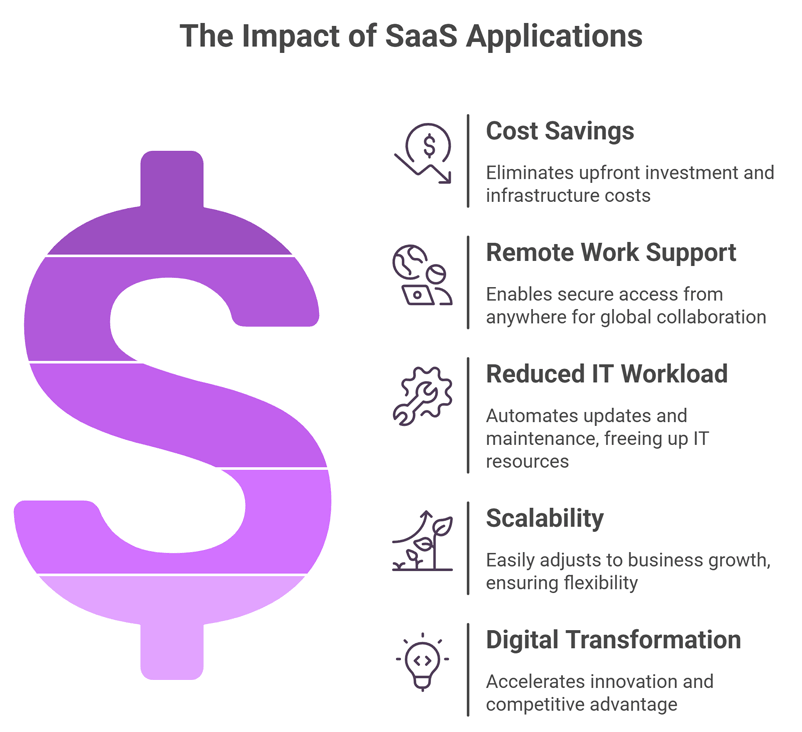
SaaS applications matter because they enable businesses to access powerful software without heavy upfront investments or infrastructure costs. They support remote work and global collaboration by allowing secure, browser-based access from anywhere. Automatic updates and vendor-managed maintenance reduce IT workload and operational risks. SaaS solutions scale easily as businesses grow, ensuring long-term flexibility and cost control. Most importantly, SaaS accelerates digital transformation by improving efficiency, innovation, and competitive advantage.
How Has SaaS Evolved from Traditional Software to Cloud Computing?
SaaS has evolved significantly since its inception. Initially, software was primarily delivered through physical media and installed on individual machines. The shift to the cloud has revolutionized this process, allowing for greater accessibility and efficiency. Advancements in cloud computing and the increasing availability of software development services have accelerated the adoption of SaaS, making it a staple in modern business environments.
Which SaaS Deployment Model Is Right for Your Organization?
There are various deployment models within SaaS, tailored to meet different organizational needs.
- Public SaaS, the most common model, is where services are provided over a public network and shared among multiple users.
- Private SaaS offers a more secure environment, hosting applications on a private cloud infrastructure.
- Hybrid SaaS combines elements of both, offering flexibility and control over data.
Which Industries Benefit Most from SaaS Applications?
SaaS has permeated numerous industries, from healthcare and education to finance and retail.
- Healthcare: SaaS applications streamline patient record management, telemedicine, and appointment scheduling. For example, platforms like Cerner enable secure access to medical data and enhance patient care delivery.
- Education: SaaS tools like Google Workspace for Education facilitate virtual classrooms, collaboration, and resource sharing, making remote and hybrid learning accessible.
- E-commerce: Shopify, a popular SaaS solution, empowers businesses to manage online stores, track inventory, and handle payments seamlessly.
- Finance: SaaS platforms like QuickBooks Online assist in accounting, payroll, and financial reporting, offering real-time access to critical financial data.
- Human Resources: Tools like Workday provide HR management solutions, from recruitment to employee performance tracking, enabling efficient workforce management.
- Marketing: SaaS solutions like HubSpot centralize marketing automation, email campaigns, and analytics to optimize outreach strategies.
- Manufacturing: Platforms such as NetSuite ERP help manufacturers manage supply chains, production, and financials in real time. ·
- Legal Services: SaaS tools like Clio assist law firms with case management, document storage, and billing, enhancing productivity.
- Real Estate: Solutions like Zillow or Propertybase facilitate property listings, lead management, and client interactions efficiently.
- IT and Software Development: GitHub and Jira empower developers with collaboration tools, project tracking, and code version control.
The versatility of SaaS makes it suitable for a wide range of applications, driving innovation across sectors.
What Core Features Define a Modern SaaS Application?
SaaS applications offer distinct characteristics that set them apart from traditional software models.
a. Accessibility
Users can access SaaS applications from any device with an internet connection, providing unparalleled flexibility. This accessibility ensures that employees can work remotely and still have access to the tools they need, fostering a more dynamic and responsive work environment. It also means businesses can operate globally without the constraints of geographical boundaries.
b. Subscription-Based Model
SaaS solutions typically operate on a subscription model, offering businesses predictable costs. This model allows companies to manage their budgets more effectively, avoiding the large capital expenditure associated with traditional software. Subscription models often include different tiers, enabling businesses to choose a plan that best suits their needs, with the option to upgrade as they grow.
c. Maintenance and Updates
The software vendor manages maintenance, updates, and security patches, reducing the burden on IT departments. This ensures that the software is always up to date with the latest features and security enhancements. Businesses can focus on their core operations without worrying about technical disruptions, as updates are rolled out seamlessly in the background.
Why Are Businesses Rapidly Adopting SaaS Solutions?
- SaaS reduces upfront IT investment and shifts costs to a predictable subscription model.
- Cloud-based access enables remote work, global collaboration, and business agility.
- Automatic updates eliminate maintenance burdens and improve security posture.
- Built-in scalability supports startups, SMEs, and enterprises alike.
- Integration capabilities streamline workflows across departments.
How Does SaaS Reduce Software and IT Costs?
SaaS Is More Cost-Effective Than Traditional Software
- No large upfront license fees or hardware purchases.
- Subscription-based pricing converts CAPEX into OPEX.
- Lower infrastructure and server maintenance costs.
- Reduced dependency on in-house IT teams.
SaaS Lowers Initial Investment Costs
- Eliminates on-premise hardware setup.
- Removes installation and configuration expenses.
- Ideal for startups and small businesses with limited capital.
Pay-As-You-Go Model Improves Budget Control
- Pay only for active users or features.
- Upgrade or downgrade plans based on demand.
- Avoid long-term financial lock-in.
SaaS Reduces Operational Expenses
- Vendor-managed updates and support.
- Lower downtime and maintenance disruptions.
- Reduced energy and infrastructure costs.
How Does SaaS Enable Business Scalability and Growth?
SaaS Is Highly Scalable for Growing Businesses
- Add users instantly without infrastructure upgrades.
- Scale storage, bandwidth, and features on demand.
- Support seasonal or rapid growth without system failure.
SaaS Supports Seamless Expansion
- Expand teams across multiple locations easily.
- Introduce new features without downtime.
- Support mergers or acquisitions with flexible licensing.
SaaS Can Be Customized for Business Needs
- Configurable dashboards and workflows.
- API integrations with CRM, ERP, HR, and marketing tools.
- Role-based access controls for operational efficiency.
SaaS Improves Business Agility
- Quickly adopt new tools or integrations.
- Respond faster to market changes.
- Enable innovation without infrastructure delays.
How Quickly Can You Deploy and Integrate a SaaS Solution?
Fater Implementation Compared with Traditional Software
- Deployment within hours or days.
- No physical installation is required.
- Faster time-to-value and ROI realization.
SaaS Easily Integrates with Existing Systems
- API-based integrations with third-party applications.
- Seamless data synchronization across platforms.
- Minimal disruption to existing workflows.
SaaS Doesn’t Require Extensive Employee Training
- User-friendly web interfaces.
- Short onboarding cycles.
- Faster adoption across teams.
Why Are Automatic Updates a Major Advantage of SaaS?
Automatic Updates Improve Performance
- Continuous feature enhancements.
- Immediate access to new capabilities.
- No manual upgrade costs.
SaaS Updates Strengthen Security
- Automatic security patches.
- Real-time vulnerability fixes.
- Reduced risk of outdated software exploitation.
SaaS Reduces IT Workload
- Vendor-managed maintenance.
- Less internal troubleshooting.
- IT teams focus on strategic initiatives.
What Security Standards Should You Expect from a SaaS Provider?
SaaS Providers Must Protect Business Data
- Data encryption in transit and at rest.
- Secure cloud data centers.
- Multi-factor authentication (MFA).
Compliance Certifications Required From SaaS Vendor
- ISO 27001
- SOC 2
- GDPR compliance
- HIPAA (if healthcare-related)
Steps To Prevent Cyber Threats
- Proactive threat detection systems.
- Continuous monitoring and logging.
- Regular security audits.
How Does SaaS Improve Remote Work and Team Collaboration?
SaaS Is Essential for Remote Work
- Browser-based access from any device.
- Centralized communication platforms.
- Cloud document storage and sharing.
SaaS Enables Real-Time Collaboration
- Simultaneous document editing.
- Instant messaging and task tracking.
- Shared dashboards and reporting tools.
SaaS Supports Cross-Platform Compatibility
- Works on Windows, macOS, iOS, Android.
- Accessible via web browsers.
- Enables seamless device switching.
SaaS vs Traditional Software: Which Model Delivers Better ROI?
While traditional software has its place, the SaaS model presents distinct advantages that are hard to overlook. Traditional software often requires significant investments in hardware, infrastructure, and IT personnel for maintenance. In contrast, SaaS minimizes these costs and responsibilities, providing a more streamlined and efficient approach to software deployment.
What Are the Key Differences Between SaaS and On-Premise Software?
a. Deployment and Accessibility
SaaS applications are hosted in the cloud, allowing users to access them from anywhere, whereas traditional software is usually confined to specific devices. This fundamental difference in deployment offers SaaS users unmatched flexibility and convenience. The ability to access software remotely is particularly beneficial for businesses with mobile workforces or multiple office locations.
b. Financial Considerations
The cost structures of SaaS and traditional software differ significantly. Traditional software often involves a substantial upfront investment, while SaaS offers a more manageable, subscription-based model. This difference allows businesses to choose a payment structure that aligns with their financial strategy, making SaaS a more attractive option for budget-conscious organizations.
c. Maintenance and Support
With SaaS, the vendor is responsible for software maintenance, updates, and technical support, whereas traditional software requires in-house resources to manage these tasks. This distinction reduces the burden on internal IT teams and ensures that businesses have access to expert support when needed. Outsourcing maintenance to the vendor can lead to improved software performance and reliability.
As companies move away from on-premises systems, SaaS is no longer just a software model but a long-term enabler. This shift is explored further in SaaS in modern business, highlighting its role in adaptability,resilience, and sustained growth.
How to Evaluate and Choose the Best SaaS Solution for Your Business
When selecting a SaaS application, businesses should consider their specific needs and objectives. Factors such as scalability, integration capabilities, security measures, and customer support are crucial in determining the most suitable solution. It is also essential to evaluate the reputation and reliability of the software vendor to ensure long-term success.
a. Assessing Vendor Reputation
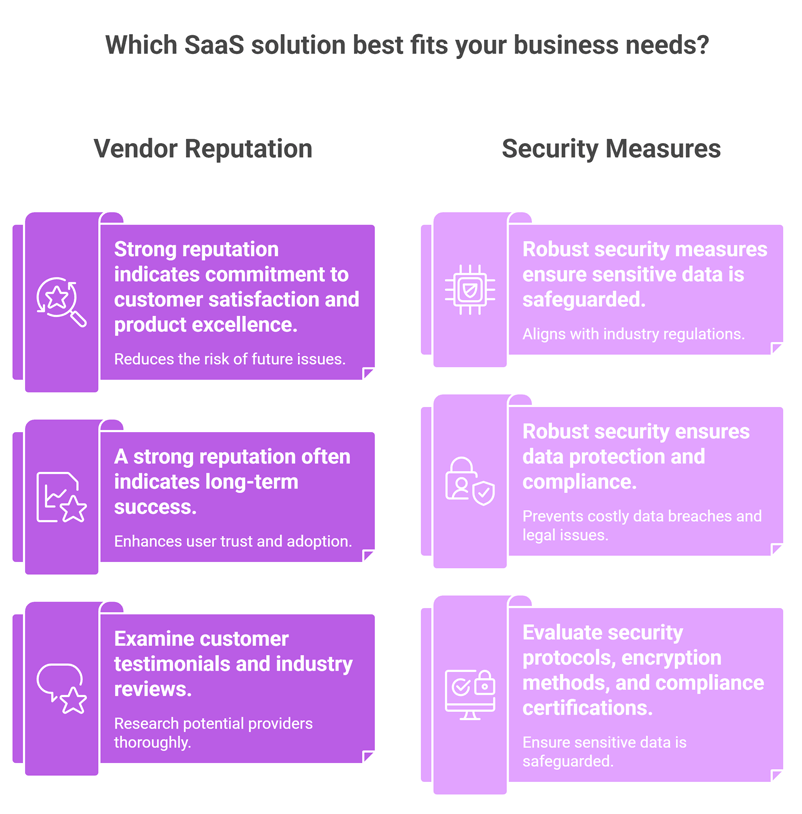
A vendor’s reputation can provide valuable insights into their reliability and quality of service. Businesses should research potential providers, examining customer testimonials and industry reviews. A strong reputation often indicates a commitment to customer satisfaction and product excellence, reducing the risk of future issues.
b. Security Considerations
Security is a critical factor when selecting a SaaS provider, as it directly impacts data protection and compliance. Businesses should evaluate the provider’s security protocols, encryption methods, and compliance certifications. Choosing a provider with robust security measures ensures that sensitive data is safeguarded against threats and aligns with industry regulations.
c. Customer Support and Training
Comprehensive customer support and training resources are essential for successful SaaS implementation. Businesses should ensure that the provider offers responsive support channels and detailed documentation to assist with onboarding and troubleshooting. Access to training materials and resources can also enhance user adoption and proficiency with the software.
How to Maximize ROI with the Right SaaS Solution
Maximizing ROI with SaaS solutions begins with selecting the right tools tailored to your business needs. The flexibility and scalability of SaaS platforms enable businesses to reduce operational costs, improve efficiency, and achieve significant returns. Here’s how you can get the most value:
- Identify Specific Needs: Understand your business processes and pinpoint areas where a SaaS solution can optimize operations. For example, if your team struggles with disconnected communication, platforms like Clariti offer context-based collaboration by unifying emails, chats, and tasks. ·
- Opt for Scalable Solutions: Choose SaaS tools that grow with your business. Scalable platforms allow you to expand functionality or increase usage as your team or customer base grows, ensuring long-term value without repeated investments in new software.
- Leverage Integration Capabilities: Maximize ROI by selecting SaaS platforms that integrate with existing tools. Clariti, for example, allows seamless integration of email accounts, file-sharing tools, and calendars, eliminating the need for additional subscriptions.
- Use Data-Driven Insights: Many SaaS solutions provide analytics to track performance and usage. Use this data to optimize workflows, identify gaps, and ensure that teams are fully utilizing the tool.
- Prioritize Training and Onboarding: ROI increases when employees fully understand and use the platform’s features. Invest in proper training to minimize inefficiencies and maximize productivity.
By aligning SaaS solutions with your business objectives, ensuring proper adoption, and leveraging the advanced features these platforms provide, businesses can significantly enhance their operational efficiency and achieve impressive returns on their investment.
The Future of SaaS
The future of SaaS is bright, with continued advancements in cloud computing and digital technologies. As businesses increasingly embrace remote work and Digital Transformation IT Solutions, SaaS applications will continue to play a pivotal role in driving efficiency, innovation, and growth.
Emerging Trends
Several trends are shaping the future of SaaS, including the rise of artificial intelligence and machine learning. These technologies are being integrated into SaaS applications to enhance functionality and provide deeper insights. Additionally, the growth of low-code and no-code platforms is empowering businesses to customize applications with minimal technical expertise.
Increasing Adoption Across Industries
The adoption of SaaS is expected to increase across various industries as businesses recognize its benefits. Sectors such as healthcare, education, and finance are likely to see significant growth in SaaS usage, driven by the need for innovative solutions that enhance efficiency and service delivery. The versatility of SaaS makes it well-suited to meet the evolving demands of these industries.
Challenges and Opportunities
While the future of SaaS is promising, there are challenges to address, such as data privacy concerns and integration complexities. However, these challenges also present opportunities for providers to innovate and differentiate themselves. By focusing on security enhancements, seamless integrations, and customer-centric solutions, SaaS vendors can continue to drive growth and adoption.
Clariti: A SaaS Solution Revolutionizing Contextual Communication and Collaboration
Clariti stands out as a game-changing SaaS platform designed to streamline communication and collaboration for teams. Unlike traditional tools that isolate emails, chats, and files, Clariti uniquely integrates all forms of communication into hybrid Conversations. This allows users to link emails, chats, shared files, and calendar events based on context, ensuring nothing important is ever lost or disconnected.
One of the most distinctive features of Clariti is its ability to merge multiple email accounts under a single platform while embedding these emails directly into relevant conversations. For instance, instead of forwarding long email threads to team members, users can seamlessly share emails in group conversations, saving time and maintaining clarity. Furthermore, Clariti’s AI helps organize incoming emails by categorizing them into ongoing conversations, reducing inbox clutter and manual sorting.
Beyond email integration, Clariti supports contextual collaboration by allowing users to pin important emails, schedule to-dos or calls directly from emails, and automatically populate participants and context for meetings based on email details. This eliminates the hassle of juggling multiple apps and minimizes the risk of miscommunication.
In addition, Clariti promotes efficient teamwork with built-in features like group chats, voice, video calling, and screen sharing. Its ability to link files to conversations ensures teams can access all relevant documents without switching platforms.
By prioritizing context over fragmentation, Clariti redefines how teams collaborate in today’s fast-paced, hybrid work environment, making it an indispensable tool for businesses aiming to enhance productivity and reduce communication chaos.
What Is the Total Cost of Ownership (TCO) of SaaS vs Traditional Software?
A Total Cost of Ownership (TCO) comparison evaluates the complete long-term cost of a SaaS solution versus traditional software or alternative cloud models. It includes subscription fees, implementation costs, integrations, maintenance, support, scaling, and potential downtime.
While SaaS eliminates hardware and infrastructure investments, businesses should calculate long-term value carefully—especially when evaluating insights shared in Unlocking the Power of SaaS Application: Benefits, Comparisons, and Tips for Choosing the Right Solution. For startups featured in Top SaaS tools for startups and small businesses in 2026, lower upfront investment often results in a significantly reduced TCO compared to on-premise systems.
What Are the Risks of SaaS Vendor Lock-In and How Can You Avoid Them?
SaaS vendor lock-in occurs when switching providers becomes difficult due to proprietary systems, complex integrations, or data export limitations. This can lead to higher costs, operational disruption, and limited flexibility.
Growing SaaS vendors—like those highlighted in Clariti makes it to SaaSworthy’s list of Fastest Growing Software in Collaboration—reduce lock-in risks by offering open integrations and export capabilities. Businesses should evaluate flexibility early, particularly when selecting platforms from lists such as Top 15 SaaS-based productivity tools for remote teams in 2026.
What Is a SaaS Service Level Agreement (SLA) and Why Does It Matter?
A SaaS Service Level Agreement (SLA) is a formal contract that defines uptime guarantees, response times, data ownership, support terms, and compensation policies for service outages.
SLAs are critical when choosing collaboration platforms or productivity tools, including those featured in Top SaaS tools for startups and small businesses in 2026. For SaaS vendors, clear and competitive SLAs also play a strategic role, as discussed in Six tips to boost your sales as a SaaS vendor, since reliability directly impacts customer trust and retention.
What Is a Multi-Cloud SaaS Strategy and When Should You Use It?
A multi-cloud SaaS strategy involves using multiple SaaS vendors or cloud providers to avoid dependence on a single ecosystem. This improves resilience, enhances performance, and reduces operational risk.
Organizations leveraging collaboration and productivity tools—like those mentioned in Top 15 SaaS-based productivity tools for remote teams in 2026—often adopt multi-cloud strategies to balance communication, storage, and analytics platforms. This approach also aligns with broader digital transformation strategies outlined in Unlocking the Power of SaaS Application: Benefits, Comparisons, and Tips for Choosing the Right Solution.
How Is AI Powering SaaS Automation? Key Use Cases Explained
AI-powered SaaS applications automate repetitive tasks, provide predictive insights, and improve decision-making. Common use cases include intelligent email categorization, automated sales forecasting, workflow automation, and real-time analytics.
Fast-growing collaboration platforms, such as those recognized in Clariti makes it to SaaSworthy’s list of Fastest Growing Software in Collaboration, increasingly integrate AI to enhance productivity. AI-driven automation is also a defining feature among the platforms listed in Top 15 SaaS-based productivity tools for remote teams in 2026.
How Does Data Portability Impact Your SaaS Exit Strategy?
Data portability ensures businesses can export, migrate, or transfer their data if they switch SaaS providers. A well-planned exit strategy reduces vendor lock-in, protects compliance, and ensures operational continuity.
This consideration is especially important when evaluating emerging tools from Top SaaS tools for startups and small businesses in 2026. For SaaS providers, enabling seamless data export can become a competitive differentiator, reinforcing trust and long-term growth strategies discussed in Six tips to boost your sales as a SaaS vendor.
Conclusion
SaaS has become a transformative force in modern business, offering solutions that are accessible, scalable, and cost-effective. Its ability to streamline operations, enhance collaboration, and adapt to diverse needs makes it a cornerstone of digital transformation. However, unlocking the true potential of SaaS requires careful selection. Businesses must evaluate their unique requirements, compare offerings, and choose vendors that align with their goals for security, scalability, and integration.
Tools like Clariti demonstrate the power of SaaS by solving specific challenges, such as contextual communication and collaboration, helping businesses manage workflows more effectively. Industry-wide applications of SaaS further highlight its versatility, with tailored solutions for every sector.
Ultimately, selecting the right SaaS solution can maximize ROI and future-proof your business. By embracing SaaS strategically, organizations can achieve greater efficiency, foster innovation, and remain competitive in an ever-changing landscape. SaaS isn’t just a tool; it’s an enabler of growth and success.
Frequently Asked Questions
Why are SaaS applications better for startups?
SaaS applications reduce upfront costs, require no infrastructure setup, and scale easily—making them ideal for startups with limited budgets and growing teams.
How do SaaS companies ensure data security?
They use encryption, multi-factor authentication, secure data centers, compliance certifications, and real-time threat monitoring.
What industries benefit most from SaaS applications?
Healthcare, finance, education, e-commerce, manufacturing, and IT benefit significantly from SaaS-based automation and remote accessibility.
Can SaaS applications integrate with existing tools?
Yes, most SaaS platforms provide APIs and built-in integrations for CRM, ERP, HR, marketing, and communication systems.
What is the difference between public and private SaaS?
Public SaaS is shared infrastructure-based, while private SaaS runs in isolated environments for enhanced security and compliance.
How does SaaS improve collaboration?
It enables real-time access, shared dashboards, document collaboration, and communication tools from any location.
What are the disadvantages of SaaS applications?
Potential downsides include vendor lock-in, internet dependency, limited deep customization, and compliance concerns.
How do you calculate SaaS ROI?
ROI is calculated by comparing subscription costs against savings from reduced infrastructure, IT labor, and productivity improvements.
Is SaaS suitable for large enterprises?
Yes, enterprise SaaS solutions offer advanced scalability, integrations, and security compliance features.
What trends will define the future of SaaS?
AI integration, low-code platforms, vertical SaaS solutions, stronger cybersecurity, and hyper-automation will shape the future.




Start for FREE with Personal CRM
We too hate spam! Your email is secure with us.

Spot secured. You're in.
You’re officially on the list for early access to Clariti.


No more switching tools.

No more lost context.

Just Clarity.
You’ll be among the first to experience it when we launch. We’ll let you know the moment it’s ready.

Keep an eye out for emails from @clariti.app.
(and check your spam folder just in case—whitelisting us helps ensure you don’t miss a thing).

