




- Published on
- 10 min read
Online meetings are virtual collaboration sessions conducted through digital platforms that enable participants to communicate using video, audio, chat, and shared files. They help teams collaborate across locations, making them essential for remote work, hybrid teams, and global business communication.
Online meetings have become the backbone of modern communication, enabling businesses to collaborate seamlessly across locations and time zones. From early teleconferencing systems to today’s advanced platforms offering HD video, AI-powered transcription, and virtual collaboration tools, they have evolved to meet the dynamic needs of remote and hybrid work environments. According to Statista, the global video conferencing market is expected to exceed $19 billion by 2027, reflecting the growing reliance on digital collaboration technologies. In addition, Buffer reports that 98% of remote workers want to continue working remotely at least part-time, highlighting the ongoing need for efficient virtual meeting solutions.
This rapid shift toward remote collaboration has also increased the adoption of meeting platforms. Research from Microsoft Work Trend Index shows that Teams users conduct billions of meeting minutes every day, demonstrating how central they have become to daily operations. As organizations continue to embrace distributed teams, the ability to conduct structured, engaging, and productive online meetings has become a core business skill.
This blog explores the evolution of online meetings, highlights top meeting tools such as Clariti, Microsoft Teams, and Cisco Webex, and shares practical best practices for running successful virtual meetings. From preparing agendas to engaging participants and managing follow-ups, you will learn how to transform routine online meetings into meaningful and productive collaboration sessions.
What Is an Online Meeting?
An online meeting is a virtual meeting where people connect over the internet using a computer or mobile device. It allows teams to talk, share ideas, and work together without being in the same place. Participants can use video, audio, chat, and screen sharing to communicate. This makes it easy to present information and collaborate in real time.
How Online Meetings Evolved from Teleconferencing to AI-Powered Collaboration
They have evolved from simple conference calls to advanced video collaboration platforms. Early systems relied on audio-only telephone lines, limiting interaction among participants. As internet speeds improved, video conferencing emerged, adding a visual layer that enhanced communication and engagement.
The global pandemic rapidly accelerated the adoption of online meetings, making platforms like Zoom essential for both business and personal communication. Today’s meeting tools offer productivity features such as screen sharing, breakout rooms, recordings, and virtual backgrounds.
Key milestones in online meeting evolution:
- 1990s: Basic telephone conferencing used for business communication.
- 2000s: Faster internet enabled video conferencing.
- 2010s: Cloud platforms integrated video, audio, chat, and collaboration tools.
- 2020s: Surge in demand for secure, scalable virtual meeting solutions.
- 2026: AI and machine learning
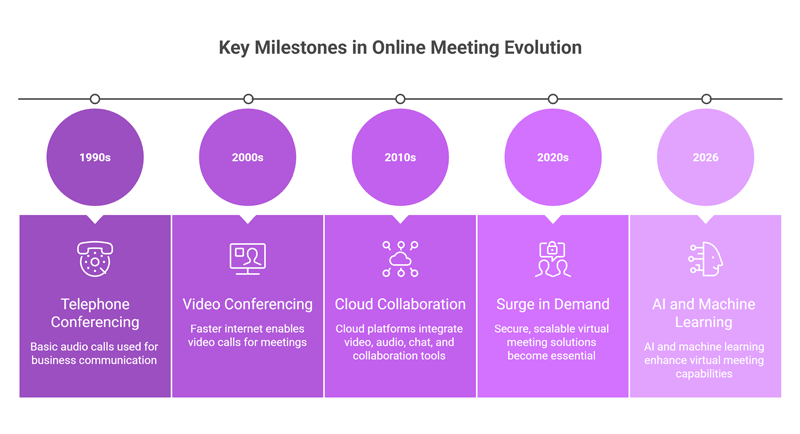
Looking ahead, technologies like AI and machine learning are enhancing meetings through automated transcription, smart summaries, and improved collaboration tools. As technology continues to evolve, online meetings will become more intelligent, efficient, and central to modern workplace communication.
Why Online Meetings Matter in 2026
Online meetings are now a key part of daily work. Many teams work from home, in the office, or both. Because of this, people need a simple way to talk and work together. Online meetings make this possible.
They help teams share ideas fast. People can ask questions, give updates, and make decisions in real time. This saves time and avoids long email chains.
They also reduce costs. There is no need to travel for meetings. Teams can connect from anywhere in the world. This makes it easy to work with global clients and teams.
Online meetings also support flexible work. People can join from laptops or phones. This makes work more comfortable and productive.
Online Meeting Best Practices for Productivity
How to Prepare for an Online Meeting
Good meetings start before the meeting begins.
- First, decide the goal. Ask yourself: what should happen by the end of the meeting?
- Next, create a short and clear agenda. List the topics you will discuss. Share this with the team before the meeting. This helps everyone come prepared.
- You should also check your tools. Test your internet, camera, and microphone. Make sure everything works well.
- Keep all files ready. If you need to show a document or slides, open them in advance. This saves time during meetings.
- Finally, invite only the right people. Too many people can make meetings slow and confusing.
5 Tips for Running Effective Online Meetings
- First, keep the meeting short. Long meetings can make people tired and lose focus. Try to stay within the planned time.
- Second, follow the agenda. This helps you stay on track and cover all points.
- Third, involve everyone. Ask simple questions and invite people to share ideas. This keeps the meeting active.
- Fourth, use tools like screen sharing, chat, or polls. These make meetings more clear and interactive.
- Fifth, always end with clear actions. Say what needs to be done, who will do it, and when it will be done. This makes meetings useful.
Common Online Meeting Mistakes to Avoid
- One common mistake is starting without a goal. This leads to long and unclear meetings.
- Another mistake is inviting too many people. This makes it hard to manage the discussion.
- Many meetings also ignore remote participants. This creates unfair situations where some voices are not heard.
- Letting one person talk too much is another issue. It reduces team participation.
- Finally, ending without action steps is a big mistake. If no one knows what to do next, the meeting has little value.
Best Online Meeting Tools Comparison 2026
Clariti: Top Choice for Unified Hybrid Teams
- Clariti is different from many tools because it brings everything into one place. It combines chat, email, voice calling, and files.
- All communication stays in one thread, called a conversation. This means nothing is lost. Teams can see the full context at any time.
- This reduces the need to switch between apps. Less switching means better focus and higher productivity.
- It is very useful for hybrid teams, where people work from different places but still need to stay connected.
Zoom vs. Microsoft Teams vs. Google Meet
Choosing the right meeting tool depends on how your team works. Each platform has its own strengths.
- Zoom is best for simple and high-quality video meetings. It is easy to use and works well for quick calls, webinars, and large meetings. Many users like it because it requires little setup.
- Microsoft Teams is a strong choice for companies that use Microsoft 365. It combines meetings, chat, and file sharing in one place. It is useful for teams that need deep collaboration and internal communication.
- Google Meet is simple and fast. It works well with Gmail and Google Workspace. It is great for teams that want quick access without complex setup.
If you want a tool just for video calls, choose Zoom.
If you want an all-in-one workspace, choose Microsoft Teams.
If you want a simple and lightweight tool, choose Google Meet.
|
Feature
|
Zoom
|
Microsoft Teams
|
Google Meet
|
|---|---|---|---|
|
Ease of Use
|
Very easy
|
Moderate
|
Easy
|
|
Best For
|
Video meetings & webinars
|
Team collaboration
|
Quick meetings
|
|
Integration
|
Limited
|
Strong (Microsoft 365)
|
Strong (Google Workspace)
|
|
Chat &
Collaboration
|
Basic
|
Advanced
|
Basic
|
|
Video Quality
|
High
|
High
|
Good
|
|
Participant Capacity
|
Very high
|
High
|
Moderate
|
|
Pricing
|
Free + Paid
|
Free + Paid
|
Free + Paid
|
|
Ideal Users
|
Small to large teams
|
Medium to large teams
|
Small to medium teams
|
Cisco Webex for Enterprise Security
- Cisco Webex is known for strong security features. It protects data with advanced encryption.
- It is often used by large companies and teams that handle sensitive data.
- Webex also offers good video quality and control features. This makes it a reliable choice for professional use.
How AI Is Changing Online Meetings
What Is Auto-Transcription and Meeting Summary?
- Auto-transcription means AI turns spoken words into text. This happens during the meeting.
- AI can also create short summaries after the meeting ends. These summaries highlight key points and decisions.
- This helps people who missed the meeting. It also saves time, as no one needs to take notes manually.
How Does Real-Time Translation Work in Meetings?
- Real-time translation allows people to speak different languages in the same meeting.
- AI listens to speech and converts it into another language instantly.
- This helps global teams work together without language barriers. It makes communication smooth and clear. For video content shared after meetings, invideo’s video translator extends this further by converting recorded sessions into different languages, so teammates and clients in any region can follow along without a live interpreter.
What Are Clariti’s AI Hybrid Chat Advantages?
Clariti’s AI hybrid chat is different from regular chat tools. It does not treat messages, emails, and files as separate items. Instead, it connects them into one clear conversation. This helps teams see the full picture without switching apps.
1. Keeps All Communication in One Place
Clariti links emails, chats, files, and events into a single thread. You do not have to search in many tools. Everything related to a topic stays together. This saves time and reduces confusion.
2. AI Builds Context Automatically
Clariti’s AI understands related messages and groups them. It connects past emails, chats, and files without manual effort. This means users always see the full history of a discussion in one place.
3. Reduces App Switching
In many teams, people jump between email, chat apps, and file tools. Clariti removes this need. Since everything is on one platform, users can focus better and work faster.
4. Improves Decision-Making
When all information is in one conversation, it is easier to make decisions. Teams can see what was said, why it was said, and what needs to be done next. This avoids mistakes and repeated work.
5. Faster Information Search and Retrieval
Clariti’s AI helps users find information quickly. Instead of searching for a single message, users can view the entire conversation. This makes it easy to understand the full context.
6. Better Team Collaboration
Team members can join a conversation at any time and still understand everything. They do not need long explanations. This helps new members get up quickly.
7. Smart Linking of Tasks and Actions
Tasks, meetings, and follow-ups are connected to conversations. This means users know exactly what action came from which discussion. It improves accountability and clarity.
8. Supports Both Async and Real-Time Communication
Clariti allows users to chat in real time or respond later. Both types of communication stay in the same conversation. This is very useful for remote and global teams.
9. Reduces Miscommunication
Since all messages stay in context, there is less chance of confusion. People do not miss key details or misunderstand messages.
10. Scales with Team Growth
As teams grow, communication becomes complex. Clariti’s AI keeps conversations organized. This helps teams stay efficient even as work increases.
In simple terms, Clariti’s AI hybrid chat helps teams stay organized, save time, and work with full clarity by keeping everything connected in one place.
How to Choose the Best Online Meeting Software for Your Team
Selecting the right online meeting software is crucial for productivity. Your choice must cater to the needs of your team. Begin by assessing your organization’s communication requirements. Consider factors like the number of participants and the type of meetings. Software options vary in features and user experience. It’s important to list essential features that align with your goals. Below are key features to consider when evaluating online meeting software.
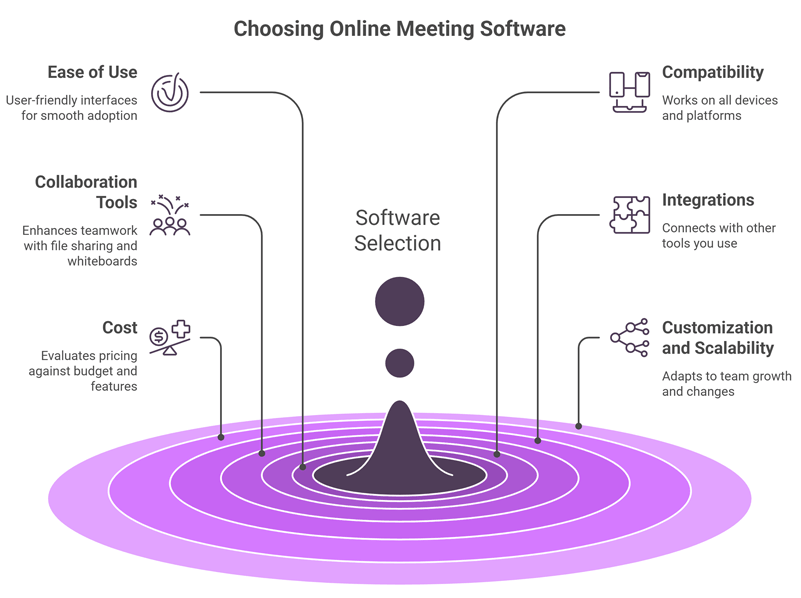
- Ease of Use: User-friendly interfaces make adoption smoother.
- Compatibility: Ensure the software works on all your devices and platforms.
- Collaboration Tools: Features like file sharing and whiteboards enhance teamwork.
- Integrations: Check if the software integrates with other tools you use.
- Cost: Evaluate the pricing against your budget and features required.
- Customization and scalability are also essential factors. Your chosen software should adapt as your team grows and changes.
Finally, consider the vendor’s support services. Reliable customer support ensures quick resolution of any issues encountered.
Free vs. Paid Online Meeting Tools: Which One Is Better?
- Free tools are good for small teams or basic use. They offer simple features like video calls and chat.
- Paid tools offer more features. These include recording, better security, and support.
- If your team needs advanced features, a paid tool is a better choice.
What Are the Future Trends in Online Meetings?
Will VR and AR Change Online Meetings by 2027?
- Yes, VR and AR will change how meetings feel.
- People will be able to meet in virtual spaces. It will feel like sitting in the same room.
- This can improve engagement and make meetings more interactive.
How Will Privacy and Security Improve Online Meetings?
- Security will become a top priority. Tools will use stronger encryption to protect data.
- Users will get more control over who can join meetings and access content.
- Companies will also follow strict data rules. This will make online meetings safer for everyone.
Conclusion
Integrating online meetings into business operations offers numerous benefits. They enhance communication, save time, and reduce travel expenses.
To maximize these benefits, careful planning is essential. Businesses should select the right software that aligns with their goals. Evaluating features and ease of use is paramount. Training staff on effective online meeting practices is also crucial. It ensures everyone can contribute productively. Well-structured agendas and skilled facilitation keep meetings focused.
Moreover, measuring meeting effectiveness helps in refining strategies. Feedback and data analysis guide improvements. They help in identifying areas for growth and enhancing user experience. As technology evolves, staying informed about emerging tools is vital. Companies should remain adaptable to incorporate new trends into their operations.
Online meetings are here to stay. They offer a pathway to efficient and flexible communication. By embracing them, businesses can thrive in the modern digital landscape.
Frequently Asked Questions
What is an online meeting?
An online meeting is a virtual gathering via video, audio, or chat platforms like Clariti or Zoom, enabling remote collaboration without physical presence.
What are the best online meeting tools for 2026?
Top picks include Clariti ($9/mo for hybrid teams), Zoom (versatile webinars), and Microsoft Teams (Office integration).
How do you prepare for an online meeting?
a. Share agenda 24 hours early.
b. Test tech (camera, mic).
c. Set clear goals and time limits.
What are online meeting best practices?
Start/end on time, mute when not speaking, use screen sharing, and send summaries post-meeting.
What are common online meeting mistakes to avoid?
No agenda, multitasking, poor lighting, or forgetting to mute—leading to 30% productivity loss.
Why choose Clariti for online meetings?
Clariti offers AI hybrid chats, context search, and unified comms at $9/user/mo, outperforming Zoom for SMBs.
What AI features improve online meetings?
Auto-transcription, real-time summaries, and translation—available in Clariti and Zoom Pro.
What are free online meeting tools?
Google Meet (60-min limit), Zoom Basic (40-min), and Slack Huddles for quick calls.
How to run effective online meetings?
Use polls/chats for engagement, limit to 30-45 mins, and record for absentees.
What are future trends in online meetings?
AI avatars, VR integration, and enhanced security by 2027 for hybrid work.




Start for FREE with Personal CRM
We too hate spam! Your email is secure with us.

Spot secured. You're in.
You’re officially on the list for early access to Clariti.


No more switching tools.

No more lost context.

Just Clarity.
You’ll be among the first to experience it when we launch. We’ll let you know the moment it’s ready.

Keep an eye out for emails from @clariti.app.
(and check your spam folder just in case—whitelisting us helps ensure you don’t miss a thing).

