


Blog
Best Teamwork Alternatives in 2026: Top Tools for Smarter Team Collaboration
- By Vinod Kumar VR
- No Comments


- Published on
- 10 min read
Team collaboration has changed a lot in recent years. Today, teams work from different places and time zones. Because of this, they need tools that are simple, fast, and easy to use.
Studies show how important good tools are. According to McKinsey, better collaboration tools can improve productivity by 20–25%. A report by Gallup shows that engaged teams perform 21% better.
Also, Forrester notes that remote work tools are now a key part of business success.
Many teams started with Teamwork because it is a well-known project management tool. But as teams grow, their needs change. They want tools that are easier to use, more flexible, and better for communication.
This is why many teams are now looking for better options. They want tools that bring everything together in one place. They also want tools that reduce confusion and save time.
In this guide, we will explore the best Teamwork alternatives in 2026. You will learn about their features, pricing, and what makes each tool unique. This will help you choose the right tool for your team.
Why Teams Are Switching from Teamwork in 2026
Many teams are moving away from older tools because their needs have changed. Work is faster now, and teams want tools that are simple and easy to use. When a tool feels complex, it slows people down. Teams also want fewer apps so they can stay focused and organized.
- Tools should be simple and quick to learn
- Too many apps create confusion
- Teams want everything in one place
- Faster communication is important
- Better support for remote work is needed
Common Complaints: Pricing, Customization, and Complexity
Many teams feel that Teamwork can become expensive as the team grows. Some users also find it hard to customize workflows. The interface can feel complex, especially for new users.
What to Look for in a Teamwork Competitor
Teams now look for tools that are simple, flexible, and easy to use. They also want better communication features and smooth integrations with other tools.
The Landscape of Cloud Collaboration Tools in 2026
Cloud tools are now a big part of daily work. Teams use them to stay connected and share updates from anywhere. These tools help people work together even if they are not in the same place. Many tools now focus on keeping work simple and clear.
- Work from anywhere with cloud access.
- Share messages and files in real time.
- Tools work on mobile and desktop.
- Many tools combine chat and tasks.
- Easy and simple tools are preferred.
Free vs Paid: What the Difference Means
|
Usage
|
Free Plan
|
Paid Plan
|
|---|---|---|
|
Features
|
Basic
|
Advanced
|
|
Users
|
Limited
|
Scalable
|
|
Support
|
Limited
|
Priority
|
|
Storage
|
Low
|
High
|
Limitations of Free Plans
Free plans are a good way to start, especially for small teams. They allow users to try a tool without paying. But as work grows, these plans may not be enough. Teams often need more features and fewer limits.
- Limited features in free plans.
- Restrictions on users or storage.
- Advanced tools may not be included.
- Limited support options.
- Paid plans are needed as teams grow.
Top 5 Teamwork Alternatives for Small and Mid-Size Teams (2026)
1. Clariti — Best All-in-One Alternative for Unified Communication
Clariti is a modern tool that combines emails, chats, tasks, and files in one place. It uses contextual conversations to keep everything connected. This helps teams avoid switching between apps. It is simple and easy to use. It works well for remote and hybrid teams. It improves clarity and reduces confusion.
Pros
- All-in-one platform.
- Clear context.
- Easy collaboration.
Cons
- Learning curves for users who are new to hybrid conversations.
Why did we choose this tool
- Reduces app switching.
- Keeps all work connected.
- Improves team clarity.
Pricing Info
Free: No
Premium: Premium Pricing is available on request.
2. Asana — Best for Structured Workflow Management
Asana is a popular project management tool. It helps teams manage tasks and projects in a structured way. It is easy to track progress. It works well for teams with clear workflows. It offers many features for planning and tracking.
Pros
- Strong task tracking.
- Easy to use.
- Good reporting.
Cons
- Can get complex.
- Limited communication tools.
Why did we choose this tool
- Great for task tracking.
- Good for structured teams.
- Strong reporting.
Pricing Info
Free: Yes.
Premium: Starts ~$10.99/user/month.
3. ClickUp — Best for Teams That Want Everything in One Place
ClickUp is a feature-rich tool. It offers tasks, docs, goals, and chat in one place. It is very flexible and customizable. Teams can manage everything in one tool. It is good for growing teams. It can replace many tools.
Pros
- All-in-one features.
- Highly customizable.
- Good value.
Cons
- Can feel complex.
- Learning curve.
Why did we choose this tool
- Many features.
- Flexible workflows.
- Good pricing.
Pricing Info
Free: Yes.
Premium: Starts ~$7/user/month.
4. Trello — Best for Visual, Kanban-Style Project Tracking
Trello is simple and visual. It uses boards and cards to manage tasks. It is easy to understand. It works well for small teams. It is great for simple workflows.
Pros
- Easy to use.
- Visual boards.
- Quick setup.
Cons
- Limited features.
- Not for complex projects.
Why did we choose this tool
- Simple design.
- Fast setup.
- Great for small teams.
Pricing Info
Free: Yes
Premium: Starts ~$5/user/month.
5. Monday.com — Best for Scalable Enterprise Work Management
Monday.com is a powerful tool for managing work. It is flexible and scalable. It offers many features and integrations. It works well for large teams. It supports complex workflows.
Pros
- Highly customizable.
- Scalable.
- Strong integrations.
Cons
- Expensive.
- Can be complex.
Why did we choose this tool
- Great for large teams.
- Flexible workflows.
- Strong features.
Pricing Info
Free: Limited.
Premium: Starts ~$9/user/month.
How to Choose the Right Teamwork Alternative for Your Team
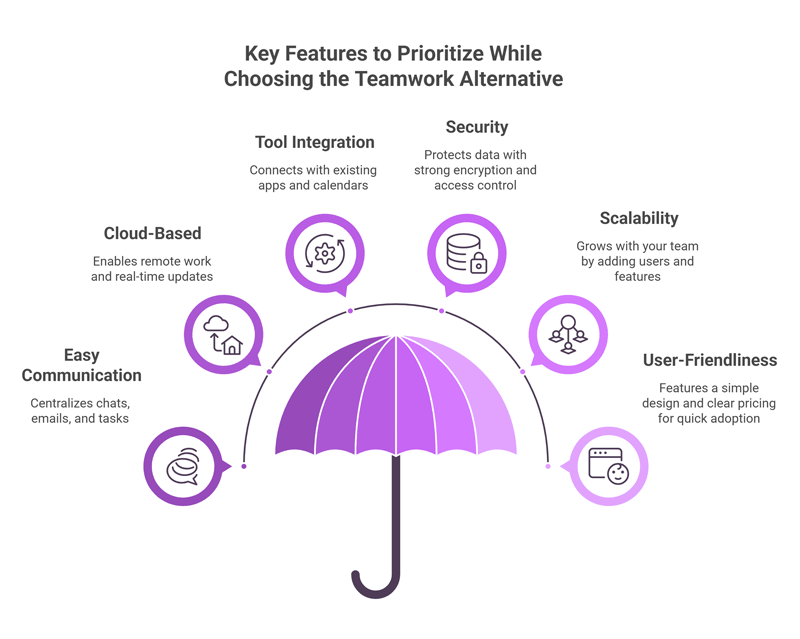
Key Features to Prioritize
When you pick a Teamwork alternative, look for simple and useful features.
- The tool should make communication easy. It should keep chats, emails, and tasks in one place, so nothing gets lost.
- It should be cloud-based. This means your team can work from anywhere, and your data stays updated.
- It should connect with other tools. Good tools work well with email, calendars, and apps you already use.
- Security is also important. Your data should stay safe with strong protection and access control.
- Additionally, a cloud solution for business communication easily scales with business growth, allowing teams to add users, integrate with other platforms, and expand functionalities without major infrastructure investments. The tool should grow with your team. You should be able to add more users and features easily.
- Finally, it should be easy to use. A simple design and clear pricing help your team get started fast and work better every day.
Pricing Comparison: Cost vs Value
|
Tool
|
Free Plan
|
Starting Price (Paid)
|
What You Get
|
Best For
|
Value for Money
|
|---|---|---|---|---|---|
|
Clariti
|
No
|
On request
|
Chat, email, files in one place
|
Teams that want simple communication
|
High for daily use
|
|
Asana
|
Yes
|
~$10.99/user/month
|
Task tracking, timelines
|
Teams with structured work
|
Good but can grow costly
|
|
ClickUp
|
Yes
|
~$7/user/month
|
Tasks, docs, goals
|
Teams wanting many features
|
High value but complex
|
|
Trello
|
Yes
|
~$5/user/month
|
Boards and cards
|
Small teams, simple tasks
|
Good for basic needs
|
|
Monday.com
|
Yes
|
~$8/user/month
|
Workflows, dashboards
|
Growing teams and companies
|
Good but depends on use
|
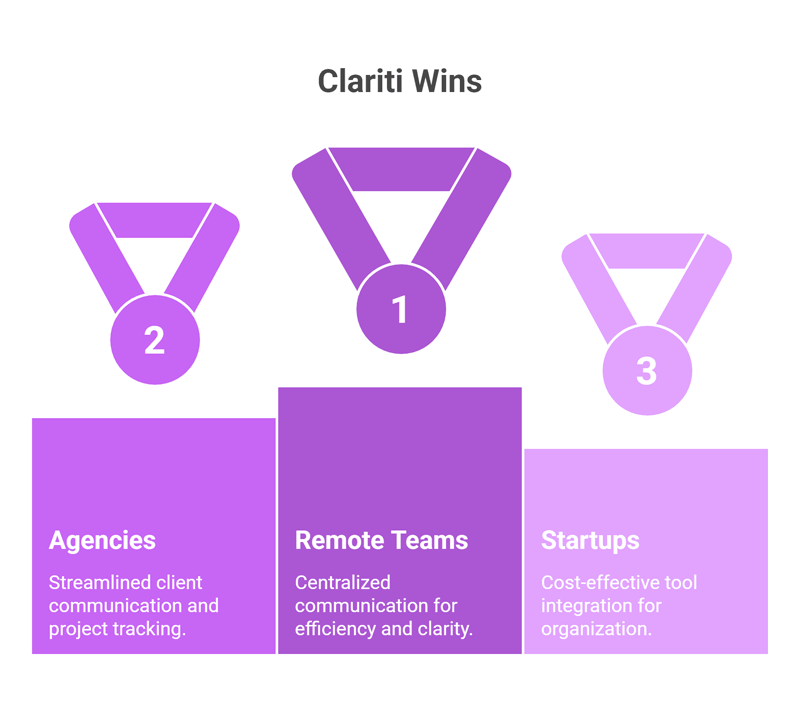
Which Tool Wins for Remote Teams, Agencies, and Startups?
Clariti works very well for remote teams. It keeps all communication in one place. Teams do not need to switch between apps. This saves time and reduces confusion.
For agencies, Clariti helps manage client communication better. Emails, chats, and files stay connected. This makes it easy to track work and conversations.
For startups, Clariti is a strong choice because it combines many tools into one. Startups can save money and stay organized without using many apps.
Overall, Clariti stands out because it focuses on clarity and context, which many teams need today.
Conclusion
Choosing the right collaboration tool is very important for any team. The right tool can improve productivity, reduce confusion, and help teams work better together.
While Teamwork is still a good tool, many teams now need more flexibility and better communication features. This is why alternatives like Clariti, Asana, ClickUp, Trello, and Monday.com are becoming popular.
Each tool has its strengths. Some are better for task management, while others are better for communication or flexibility. The best choice depends on your team’s needs.
If your team wants everything in one place with less confusion, Clariti is a strong option. If you need structured workflows, Asana works well. For flexibility, ClickUp is a good choice.
In the end, the goal is simple. Choose a tool that makes work easier, not harder. When teams have the right tools, they can focus on what really matters—getting work done and growing together.
Frequently Asked Questions
Is there a free alternative to Teamwork?
Yes, there are free options. Tools like Clariti, Trello, ClickUp, and Asana offer free plans with basic features. These work well for small teams, but they may have limits on users, storage, or advanced features.
What is the closest competitor to Teamwork?
Clariti, Asana and ClickUp are the closest competitors. They offer strong task management, project tracking, and team collaboration features similar to Teamwork, with more flexibility and modern interfaces.
Is Clariti better than Teamwork for small teams?
For small teams, Clariti can be a better fit. It brings emails, chats, files, and tasks into one place, so teams don’t switch apps. This helps teams stay focused and work faster with full context.




Start for FREE with Personal CRM
We too hate spam! Your email is secure with us.

Spot secured. You're in.
You’re officially on the list for early access to Clariti.


No more switching tools.

No more lost context.

Just Clarity.
You’ll be among the first to experience it when we launch. We’ll let you know the moment it’s ready.

Keep an eye out for emails from @clariti.app.
(and check your spam folder just in case—whitelisting us helps ensure you don’t miss a thing).

