


Blog
From Discussion to Decision: How Video Conferencing Enhances Real-Time Collaboration
- By Clariti Team
- No Comments

Blog Summary
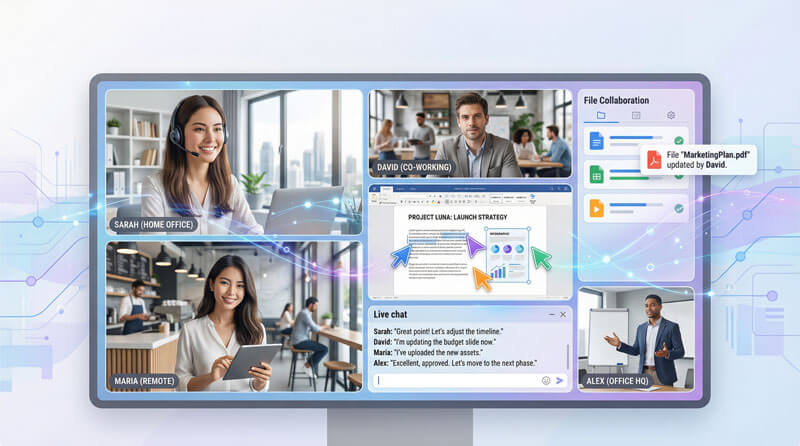
Traditional remote collaboration relies on fragmented tools; email chains, separate video apps, disconnected chat-creating delays, miscommunication, and context loss. Studies confirm that video is essential for building trust, reducing miscommunication, and maintaining team cohesion across distances.
Key Benefits:
- Shared visual context through screen sharing
- Instant chat-to-video transitions
- Restored nonverbal communication
- Synchronous problem-solving
- Inclusive remote participation
Clariti integrates video directly into Hybrid Conversations-keeping context, documents, and chat history visible during calls. Video conferencing isn't just for meetings. It's the fabric of real-time collaboration.
View more
What if your team could brainstorm like they’re in the same room even when they’re spread across three time zones?
What if a confusing chat message could become a face-to-face clarification with one click? What if screen sharing meant everyone literally sees the same thing, annotates together, and decides on the spot?
This isn’t hypothetical. It’s what happens when video conferencing is built for collaboration, not just meetings. The gap between “remote” and “in-person” teamwork has been closing for years. The organizations pulling ahead aren’t just using video. They’re using it as the fabric that connects their distributed teams in real time.
In this article, we explore how video conferencing transforms remote teamwork, the key capabilities that make real-time collaboration possible, and why the right platform choice determines whether your team thrives or merely survives in a distributed world.
How Does Video Conferencing Enhance Real-Time Collaboration
Video conferencing enhances real-time collaboration by restoring nonverbal communication cues, enabling instant screen sharing for shared visual context, compressing decision timelines through synchronous discussion, and allowing seamless transitions between chat and face-to-face interaction-all without requiring physical proximity.
Remote work isn’t new. But how we collaborate remotely has fundamentally shifted.
A decade ago, remote collaboration meant email chains, conference calls with grainy audio, and shared documents that three people edited simultaneously creating version control nightmares. Teams tolerated these friction points because the alternative was expensive for travel or relocation.
Then video conferencing matured. And everything changed.
Today’s video conferencing platforms don’t just transmit faces across distances. They create shared digital spaces where ideas flow, decisions happen, and work gets done-all in real time. The gap between “remote” and “in-person” collaboration has narrowed dramatically.
What Does Video Conferencing Research Say About Team Collaboration
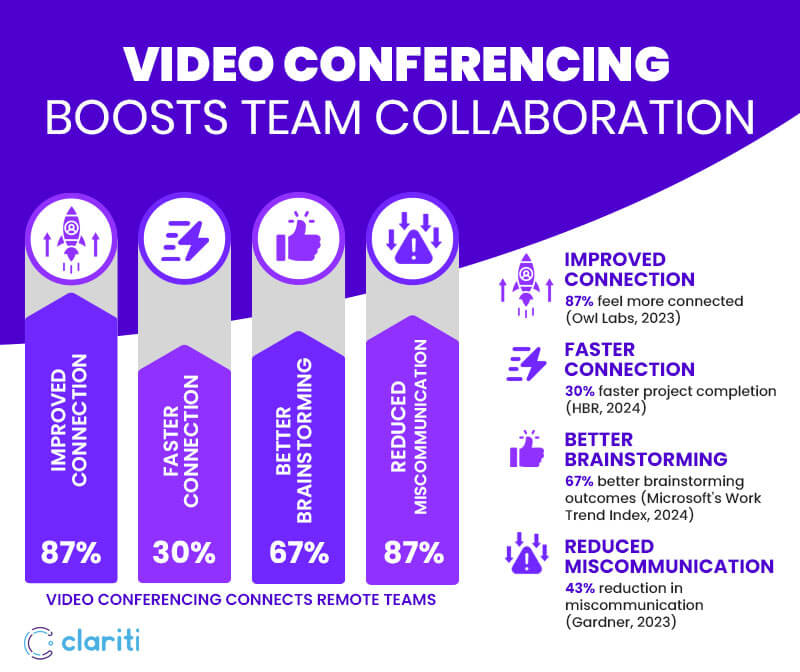
Research consistently shows video conferencing improves team connection, accelerates project completion, and captures nonverbal cues that text-based communication misses. Multiple studies confirm that video is essential for building trust, reducing miscommunication, and maintaining team cohesion across distances. Owl Labs (2023) found 87% of remote workers feel more connected through video; Harvard Business Review (2024) reported 30% faster project completion; Microsoft’s Work Trend Index (2024) showed 67% better brainstorming outcomes; and Gartner (2023) documented 43% reduction in miscommunication when teams use video for complex discussions.
Why Is Real-Time Virtual Meetings being Critical for Remote Teams
Real-time virtual meetings tools accelerate decision-making, builds trust through visible nonverbal cues, reduces text-based miscommunication, and creates conditions for synchronous problem-solving-capabilities that asynchronous tools cannot replicate when speed and alignment matter most.
1. Speed of Decision-Making
Asynchronous communication has its place. But some decisions can’t wait for inbox cycles.
When a product launch hits an unexpected snag, you need everyone aligned within hours-not days. When a client raises concerns mid-project, immediate discussion prevents small issues from becoming deal-breakers. When creative direction needs refinement, real-time brainstorming produces results that back-and-forth comments simply can’t match.
Video conferencing compresses decision timelines. What might take a week of email exchanges resolves in a 30-minute call.
2. Building Trust and Connection
Trust isn’t built through text alone.
You develop trust by watching how someone reacts under pressure. By seeing their enthusiasm when discussing ideas. By noticing when they’re confused but hesitant to speak up. These micro-signals-invisible in chat and email-shape how teams bond and function.
Research from MIT’s Human Dynamics Laboratory found that the most successful teams communicate face-to-face (or via video) frequently, reading social cues and adjusting their approach in real time. High-performing teams don’t just exchange information-they connect.
3. Reducing Miscommunication
Text is efficient but dangerous.
Without tone, facial expressions, or vocal inflection, messages get misinterpreted constantly. A direct request reads as demanding. A brief response seems dismissive. Sarcasm lands as an insult. Teams waste hours untangling misunderstandings that a two-minute video conversation would have prevented.
Video conferencing restores the communication richness that text strips away. You see confusion on someone’s face before they voice it. You hear enthusiasm that words alone can’t convey. Clarity increases. Conflict decreases.
What Are the Key Benefits of Video Conferencing for Team Collaboration
Key benefits include shared visual context through screen sharing, instant transition from chat to video without losing context, restored nonverbal communication, synchronous problem-solving capabilities, and inclusive participation that ensures remote team members contribute equally regardless of location.
1. Shared Visual Context
The most powerful aspect of video collaboration isn’t seeing faces-it’s seeing the same thing simultaneously.
- Screen sharing transforms passive discussions into active work sessions. Instead of describing a problem, you show it. Instead of explaining a design concept, you walk through the prototype together. Instead of referencing a spreadsheet, you analyze it side by side.
- Collaborative annotation takes this further. Participants markup shared screens, highlight key points, and contribute visually-not just verbally. Ideas that struggle to survive verbal description become crystal clear when drawn on screen. Similarly, industries developing AI-powered applications such as autonomous vehicles, robotics, and digital twins rely on professional 3D annotation services to create accurate spatial datasets that help distributed teams collaborate more effectively on computer vision projects.
- Virtual whiteboards recreate the spontaneity of in-person brainstorming. Teams sketch diagrams, map workflows, and organize thoughts spatially capturing creative energy that structured documents often miss.
Platforms like Clariti enhance this by connecting video calls directly to conversation. The documents you’ve already shared, the context you’ve already established-it’s all visible during the call. You’re not just seeing faces. You’re seeing the work itself.
2. Instant Transition from Discussion to Action
The best collaboration tools eliminate the gap between “let’s discuss this” and actual discussion.
Traditional video conferencing requires scheduling. Calendar invites. Meeting links. Waiting for participants to join. By the time everyone is connected, the urgency that prompted the call may have faded.
Modern collaboration platforms enable instant video escalation. A chat conversation that needs clarification becomes a video call with one click. No scheduling. No context loss. The discussion simply shifts from text to face-to-face and back again seamlessly.
Clariti’s approach exemplifies this. When a chat reaches a point where video would help, participants click the call icon and transition immediately. The conversation history remains visible. The shared files stay accessible. Nothing gets lost in the handoff.
3. Nonverbal Communication Restored
Words carry information. Faces carry meaning.
Consider how much you learn from watching someone during a conversation:
- Confusion: A furrowed brow signals that clarification is needed-even if no one asks for it.
- Agreement: Nodding heads confirm alignment without interrupting the speaker.
- Hesitation: A pause before responding hints at concerns that might otherwise go unspoken.
- Enthusiasm: Animated expressions reveal genuine engagement versus polite tolerance.
In text-based communication, these signals vanish. Teams miss cues. Assumptions go unchecked. Misalignment of festers.
Video conferencing restores the nonverbal layer that makes human communication complete.
4. Synchronous Problem-Solving
Some problems require real-time minds working together, not sequential contributions.
Technical troubleshooting moves faster when experts see the issue of live and guide solutions step by step. Creative brainstorming produces richer ideas when participants riff off each other’s suggestions at the moment. Complex negotiations require reading reactions and adjusting approaches on the fly.
Video conferencing creates conditions for synchronous thinking. Participants feed each other’s energy. Ideas build on ideas. Momentum compounds.
5. Inclusive Participation Across Locations
Video conferencing democratizes participation in ways physical meetings cannot.
In traditional office settings, proximity creates a hierarchy. Those in the room dominate conversations. Remote participants-if included at all-become afterthoughts, struggling to hear and be heard.
Well-implemented video conferencing levels this imbalance. Every participant appears in the same format. Gallery views ensure visibility. Features like hand-raising and reactions give everyone equal tools for participation.
What Are the Best Online Collaboration Tools with Video Meetings
The best online collaboration tools with video meetings integrate calling seamlessly with chat, file sharing, and project context. Leading options include Clariti (context-first hybrid conversations), Microsoft Teams (M365 ecosystem), Google Meet (Google Workspace integration), Slack Huddles (quick team syncs), and Cisco Webex (enterprise security).
Best Video Collaboration Platform Comparison 2026
|
Platform
|
Key Strength
|
Video Integration Approach
|
Best For
|
|---|---|---|---|
|
Clariti
|
Context-based Hybrid Conversations
|
Video calls linked directly to subject (Context-based) with full chat history visible
|
Teams eliminating app-switching and context loss
|
|
Microsoft Teams
|
M365 ecosystem integration
|
Native video with Outlook, SharePoint, OneDrive connectivity
|
Organizations invested in Microsoft infrastructure
|
|
Google Meet
|
Seamless Google Workspace embedding
|
One-click joining from Gmail, Calendar, Docs
|
Teams already using Google productivity tools
|
|
Slack Huddles
|
Instant audio/video from channels
|
Quick escalation from chat to face-to-face
|
Fast-moving teams needing spontaneous syncs
|
|
Cisco Webex
|
Enterprise-grade security
|
Comprehensive collaboration suite around video core
|
Regulated industries requiring advanced compliance
|
|
Zoom
|
Standalone video quality
|
Strong standalone platform with integration options
|
Organizations prioritizing video-first meetings
|
What Features Make Video Conferencing Effective for Collaboration
Effective video collaboration requires high-quality audio/video, seamless screen sharing with annotation, integrated chat during calls, recording with transcription, breakout rooms for smaller discussions, calendar integration, context preservation connecting calls to relevant documents, and cross-device accessibility.
Essential Features Checklist
|
Feature
|
Why It Matters for Collaboration
|
|---|---|
|
HD Audio/Video
|
Poor quality creates fatigue and miscommunication
|
|
One-Click Screen
Sharing
|
Transforms passive viewing into active collaboration
|
|
In-Meeting Chat
|
Allows questions and links without interrupting speakers
|
|
Recording & Transcription
|
Captures decisions for absent team members and future reference
|
|
Breakout Rooms
|
Enables smaller group discussions during larger sessions
|
|
Calendar Integration
|
Effortless scheduling with one-click joining
|
|
Context Preservation
|
Connects calls to documents, chat history, and project context
|
|
Cross-Device Access
|
Full functionality on desktop, mobile, and web
|
|
Virtual Whiteboards
|
Recreates spontaneous in-person brainstorming
|
|
Noise Suppression
|
Reduces background distractions for clearer communication
|
How Does Clariti's Approach Differ from Traditional Video Conferencing
Clariti treats video as part of ongoing Hybrid Conversations rather than a separate destination. Video calls connect directly to subject chat, keeping chat history, shared files, and project context visible during calls-eliminating fragmentation and ensuring decisions connect to the discussions that prompted them.
Most video conferencing tools exist as destinations. You go to them. You have a meeting. You leave. The conversation that prompted the call? It lives somewhere else. The decisions you made? You’ll need to document them manually if you remember.
Clariti reimagines video as part of ongoing Hybrid Conversations. Instead of separating chat, email, and calls into disconnected silos, Clariti weaves them together around specific subjects.
The Clariti Difference in Practice
Stop hunting for links. When you’re discussing a client’s proposal in a Clariti conversation, you don’t search for your inbox for a meeting URL. You click the call icon and you’re in. One click. No authentication screens. No waiting rooms.
Never join blind. Traditional video calls start with “So, what are we discussing?” Clariti calls start with full context visible in the chat history, the shared documents, the decisions already made. Participants arrive informed, not confused.
Drop in and out seamlessly. Missed part of the call? In traditional tools, you’re out of luck. In Clariti, you rejoin from the same conversation and see exactly what was discussed before you arrived.

Share screens where the work happens. Screen sharing isn’t a separate feature you activate in a meeting room. It’s integrated directly into the collaboration conversation, keeping shared visuals connected to the discussion that needs them.
Decisions don’t disappear. The biggest problem with traditional video calls? Outcomes vanish when the call ends. AI-powered Clariti ties every video call directly into your ongoing discussion, keeping context and decisions intact, so what was decided stays visible. What was shared stays accessible.
Scheduling made simple. Built-in calendar scheduling maps for participants automatically based on the conversation. No copying email addresses. No manual invite lists. The people in the discussion are the people in the meeting.
Alignment, everywhere. For enterprise teams, Clariti provides native video conferencing tied to structured conversations ensuring that distributed teams stay aligned without sacrificing the context that makes collaboration effective.
This approach eliminates the fragmentation that plagues traditional tools:
- No hunting for meeting links.
- No “what did we decide last time?” Confusion.
- No context is lost between communication modes.
Video becomes what it should be a seamless extension of collaboration, not an interruption to it.
Beyond Meetings: Video as Collaboration Culture
The organizations that thrive in distributed environments don’t just use video for scheduled meetings. They embed video into their collaboration culture.
- Quick sync-ups replace lengthy email chains. When clarification is needed, a two-minute video call resolves what might otherwise become a day-long chain of messages.
- Spontaneous conversations recreate hallway interactions. Virtual “drop-ins” maintain the social fabric that remote work can erode.
- Collaborative work sessions replace isolated execution. Teams work together via video, sharing screens and solving problems in real time rather than handing off work asynchronously.
- Onboarding becomes immersive. New team members connect with colleagues face-to-face, absorbing culture and context that documents alone can’t convey.
This cultural shift-from video as “meetings” to video as “collaboration fabric”-separates organizations that merely survive remote work from those that excel at it.
Conclusion: The Real-Time Advantage
Distance no longer determines collaboration quality. The tools you choose to do.
Video conferencing when implemented thoughtfully doesn’t just simulate in-person interaction. It enhances it. Participants share screens and documents instantly. Transitions from chat to video happen seamlessly. Context travels with conversations instead of getting lost between applications. Real-time collaboration demands more than scheduled meetings in separate apps. It demands fluid movement between text and video. Shared context that persists across communication modes. Instant escalation when discussion needs faces, not just words.
The organizations that master this will outpace those still treating videos as an add-on. Because in a distributed world, real-time collaboration isn’t nice-to-have. It’s a competitive advantage.
Stop treating video calls as just a meeting. With AI-powered Clariti bring video into the flow of work. Move from chat to video instantly, keep context intact, and collaborate in real time without switching apps.
Frequently Asked Questions
How does video conferencing improve team collaboration compared to chat or email?
A: Video conferencing restores the 93% of communication that is nonverbal-facial expressions, tone, and body language that text cannot convey. Research shows teams using video to complete projects 30% faster than those relying on asynchronous communication alone. Video enables real-time decision-making, reduces miscommunication by 43%, and builds trust through visible human connection.
What features should I look for in video collaboration tools?
A: Prioritize high-quality audio/video, one-click screen sharing with annotation, integrated chat during calls, recording with transcription, breakout rooms, calendar integration, and context preservation that connects calls to relevant documents. Cross-device accessibility ensures participation from anywhere. Platforms like Clariti add value by linking video calls directly to ongoing conversations.
Why is real-time video collaboration better than scheduled meetings?
A: Scheduled meetings require calendar coordination, meeting links, and waiting for participants-often losing the urgency that prompted the discussion. Real-time video collaboration allows instant escalation from chat to face-to-face with one click. The conversation continues seamlessly without context loss, compressing decision timelines and maintaining momentum.
How does Clariti's video conferencing differ from Zoom or Google Meet?
A: While Zoom and Google Meet function as standalone meeting destinations, Clariti integrates video into Hybrid Conversations. When you start a Clariti video call, the subject (context), shared files, and chat history remain visible. You don’t leave your workspace to have a meeting-the call becomes part of the ongoing conversation, eliminating fragmentation between communication modes.




Start for FREE with Personal CRM
We too hate spam! Your email is secure with us.

Spot secured. You're in.
You’re officially on the list for early access to Clariti.


No more switching tools.

No more lost context.

Just Clarity.
You’ll be among the first to experience it when we launch. We’ll let you know the moment it’s ready.

Keep an eye out for emails from @clariti.app.
(and check your spam folder just in case—whitelisting us helps ensure you don’t miss a thing).

