


Blog
Unifying Your Digital Workplace: The Irreplaceable Value of Native Video Conferencing
- By Clariti Team
- No Comments

Blog Summary
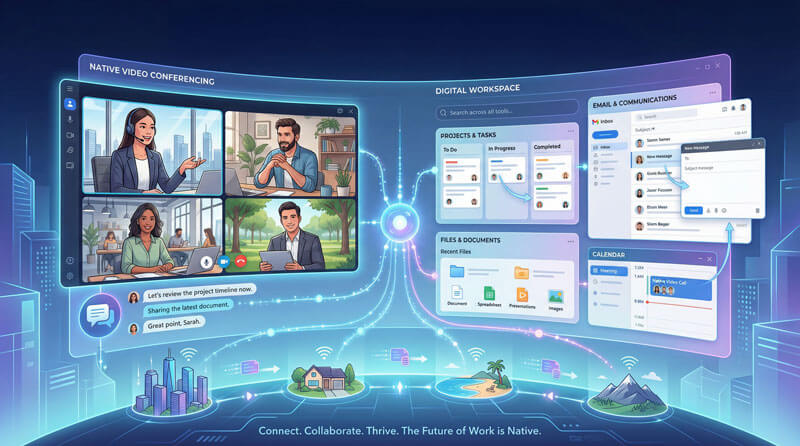
Most teams use video conferencing tools that are "integrated" but not "native" meaning calls happen in separate apps, pulling you out of your workflow. This fragmentation costs you dearly.
Key Benefits:
- Productivity drain: Context switching consumes up to 40% of productive time.
- Security risks: Data scattered across vendors creates vulnerabilities.
- Budget bloat: Overlapping tools inflate tech spend by 23%.
- User frustration: 67% of employees feel overwhelmed by app overload.
Native video conferencing is built directly into your collaboration platform. Same security. Same interface. Same context. You click a call icon and transition from chat to video without losing sight of your project. Teams using unified platforms report 32% faster project completion and 41% reduction in meeting follow-up time. Native video isn't an add-on feature; it's the foundation for seamless collaboration.
View more
There are two types of video calls.
The first pulls you out of your work. You stop what you’re doing, launch a separate app, hunt for a meeting link, authenticate into a completely different system, and wait for everyone else to figure out how to join. By the time you’re connected, the momentum that sparked the conversation has evaporated. Your project files sit untouched in another window. Context is gone.
The second flows from your work. One click. Same screen. Same context. The conversation, the shared files, the video call they all live in the same space. You don’t “start a meeting.” You simply continue the discussion with faces instead of text.
The difference isn’t just convenience. It’s architecture. And its silently costing organizations more than they realize in productivity, security, and budget.
In this article, we break down the critical distinction between native and integrated video conferencing, expose the hidden “integration tax” that fragmented tools create, and identify the platforms that are getting unified collaboration right.
What is Native Video Conferencing
Native means the video capabilities are engineered directly into the fabric of the collaboration platform. Same underlying code. Same infrastructure. Same data models. Same identity management. Same user interface elements. It’s not an application launched from the platform. It is the platform.
So what actually constitutes native video conferencing?
Technically, it refers to systems built specifically for the environment they inhabit. On a hardware level, this means dedicated room systems (like Zoom Rooms) where the PC, camera, and mic are hard-coded to the platform for “one-tap” joining. On a software level, it refers to apps built using platform-specific languages like Swift for iOS or Kotlin for Android or leveraging WebRTC for plugin-free browser performance.
But for a modern team, the true definition of “native” is architectural unity. It is the difference between a tool that is a guest in your workspace and one that is a resident.
- Standalone Tool (The “Stranger”): This is a completely separate application with zero connection to your live work. To use it, you must stop your current task, launch a new program, and manually re-invite your team.
- Example: Opening the Zoom desktop app and manually typing in a meeting ID while your project files sit untouched in another window.
- Integrated Tool (The “Visitor”): This is a third-party app “plugged in” via an API. While it’s convenient to launch, it’s still just a bridge. Your data and video stream are sent to an external vendor cloud, creating “seams” in your security.
- Example: Clicking a “Start Zoom Meeting” button inside Slack that generates a web link.
- Native Tool (The “Resident”): This is built directly into the platform’s DNA. It shares the same security protocols, identity management, and most importantly data context as your chat and email. You never leave the screen because the call is the screen.
- Example: Clicking the call icon in Clariti to instantly turn a specific subject conversation into a video call without losing sight of the documents or history.
Integrated vs. Third-Party Video Conferencing: A Comparison
To clarify the choice organizations face, let’s break down the differences:
|
Feature
|
Third-Party Integration (e.g., Slack + Zoom)
|
Native/Integrated Solution (e.g., MS Teams, Zoho Cliq, Clariti)
|
|---|---|---|
|
Setup
|
Requires managing two vendors, two logins, and an API connection.
|
Single sign-on, one vendor, ready out of the box.
|
|
Data Storage
|
Split across two servers/locations.
|
Centralized in one secure database.
|
|
Search
|
Fragmented; requires searching two apps.
|
Unified; one search bar finds everything.
|
|
User Experience
|
"Jumping" between windows and apps.
|
Fluid transition within a single interface.
|
|
Cost
|
Often requires two separate premium subscriptions.
|
Usually bundled into a single per-user price.
|
In a native setup, starting a video call feels as natural as sending a message. It’s part of the same digital conversation, leveraging the same permissions and shared context.
Platforms like Clariti take this further. Video calling isn’t a separate destination; it’s part of a Hybrid Conversation. When you’re already in a “Digital Marketing” discussion, you don’t “start a meeting.” You simply click the call icon and transition from text to video without ever losing the project’s context.
Cost of The Fragmented Reality: When Video Lives Apart
Before we champion the native approach, let’s dissect what you’re actually dealing with.
You’ve probably experienced this: You’re deep in a project discussion. Context is flowing. Then someone says, “Let’s hop on a quick call.” Suddenly, you’re hunting for a Zoom link, waiting for a browser to load, authenticating into a completely different system, and poof your momentum evaporates.
This isn’t collaboration. It’s controlled chaos.
Many collaboration suites let you “launch” a video call from external services like Zoom or Google Meet. Technically, that’s an integration. But it’s more like providing a link to another building than adding a room to your house.
And this seemingly convenient arrangement? It’s silently bleeding you dry.
The Productivity Drain of Context Switching
Every time you shift from your project board to chat to a separate video app, your brain performs a micro-reset. Cognitive scientists call this “attention residue” part of your mind stays stuck on the previous task.
The numbers are brutal:
- The average worker loses 23 minutes regaining focus after each interruption (University of California, Irvine)
- Context switching can consume up to 40% of your productive time (American Psychological Association)
- Teams using fragmented tools report 28% more meeting fatigue than those with unified platforms
You’re not just losing time. You’re losing the quality of your thinking.
This is exactly why Clariti’s “Resume Chat” workflow exists. You launch an instant group call directly from a specific chat. The conversation, the shared files, the video call they all live in the same space. No mental reboot required. Your team maintains a single flow of thought from start to finish.
Security Gaps and Data Silos: The Hidden Nightmare
When your recordings live in one vendor’s cloud, your chat logs in another, and your files scattered across a third you’re not managing security. You’re managing a house of cards.
Remember the 2020 Zoom security meltdown?
“Zoombombing” wasn’t just about trolls crashing meetings. It was a systemic exposure:
- 500,000 user credentials sold on the dark web.
- Thousands of private meeting recordings left exposed on public internet.
- Companies scrambling to patch vulnerabilities they didn’t know existed.
This is the “Integration Tax” you pay when you duct-tape apps together via APIs. Every connection point creates a seam. Hackers love seams.
Every external link becomes a potential back door. Managing GDPR, HIPAA, or SOC 2 compliance across three different vendors? That’s not a compliance strategy. That’s a breach waiting to happen.
Clariti eliminates this risk at the root. By hosting calls, emails, and files behind a single security perimeter, you remove the back doors entirely. Your data isn’t traveling between apps it’s sealed in one vault.
The UX Frustration Factor
Your team craves consistency. When interfaces, navigation, and features differ wildly between your core collaboration tool and your video conferencing app, friction multiplies.
What this looks like in practice:
- Steeper learning curves that slow adoption
- Frustrated users defaulting to familiar (but inefficient) workarounds
- Inconsistent behaviors that erode trust in your digital tools
A 2023 Gartner study found that 67% of employees feel overwhelmed by the number of apps required to do their job. Each new interface adds cognitive weight. Each workaround adds frustration.
Administrative Headaches and Budget Bloat
Managing separate contracts, licenses, user provisioning, and support channels for multiple vendors isn’t just tedious; it’s expensive.
When something breaks, you’re stuck in a finger-pointing loop between providers. Meanwhile, your team is waiting. And pays. In time. In patience. In missed deadlines.
The hidden costs add up:
- Overlapping features across tools inflate technology spend by an average of 23% (Flexera State of SaaS Report, 2024)
- IT teams approximately spend 30% of their time managing integration issues rather than strategic initiatives
- Troubleshooting cross-platform problems takes 2.5x longer than single-platform issues
Reliability Roulette
Integrations depend on two distinct systems communicating perfectly. API limitations, network latencies, and differing update cycles create a perfect storm for inconsistency.
Dropped calls. Audio glitches. Video freezing at the worst possible moment. And when it happens, diagnosing the problem becomes a frustrating exercise in elimination.
You didn’t sign up for this.
The Transformative Power of Native Integration: Why It Matters Most
Adopting native video conferencing isn’t just about streamlining; it’s a strategic investment that fundamentally elevates how teams work, communicate, and innovate.
1. Effortless User Experience (UX)
This is the most immediate impact you’ll feel. You don’t “switch” to a video call you flow into one.
A quick chat becomes a video discussion with one click. A calendar event comes with an embedded, ready-to-join meeting link using the same login. No authentication gymnastics. No waiting for external apps to load.
The result: Communication feels intuitive instead of interrupted.
2. Unleashed Productivity and Workflow Optimization
When you eliminate context switching, momentum stays intact.
Meeting decisions auto-populate into project tasks. Shared files from a call land in the correct project folder automatically. The entire communication lifecycle from ideation to execution lives within one coherent system.
Teams using unified platforms report:
- 32% faster project completion (McKinsey, 2023)
- 41% reduction in meeting follow-up time (Microsoft’s Work Trend Index, 2024)
- 27% improvement in first-time task accuracy
3. Ironclad Security and Uncompromised Compliance
With native solutions, security protocols apply uniformly across everything. Data encryption, access controls, user authentication, compliance adherence all centrally managed.
All meeting recordings, chats, and shared content exist within a single, secure ecosystem. Audits become simpler. Attack surfaces shrink dramatically.
4. Actionable Data and Holistic Analytics
When video conferencing data connects to everything else, patterns emerge.
You can analyze which projects demand the most meeting time. Track collaboration patterns across teams. Correlate meeting frequency with project milestones.
5. Streamlined Administration and Cost Effectiveness
One vendor. One support channel. One set of licenses to manage.
User provisioning, permission management, software updates all from one source. Your IT team stops playing vendor referees and starts focusing on strategic initiatives.
The savings compound:
- Reduced licensing complexity
- Lower training requirements
- Freed-up IT resources
6. Rich Feature Interoperability
True native integration unlocks capabilities that integrations simply can’t match:
- Initiate video calls directly from specific tasks with all relevant context pre-loaded
- Share screens and annotate documents stored in your team’s cloud without downloading anything
- Auto-generate meeting summaries and action items from transcriptions, assigned directly within the platform
- Use integrated whiteboards and polls tied to team member identities and project data
7. Superior Reliability and Performance:
Because the video conferencing module is purpose-built and optimized for the collaboration platform infrastructure, it benefits from enhanced reliability and performance. Network optimizations, integrated resource management, and unified bug fixes contribute to a more stable and consistently high-quality user experience, minimizing frustrating technical glitches.
Essential Native Video Conferencing Features
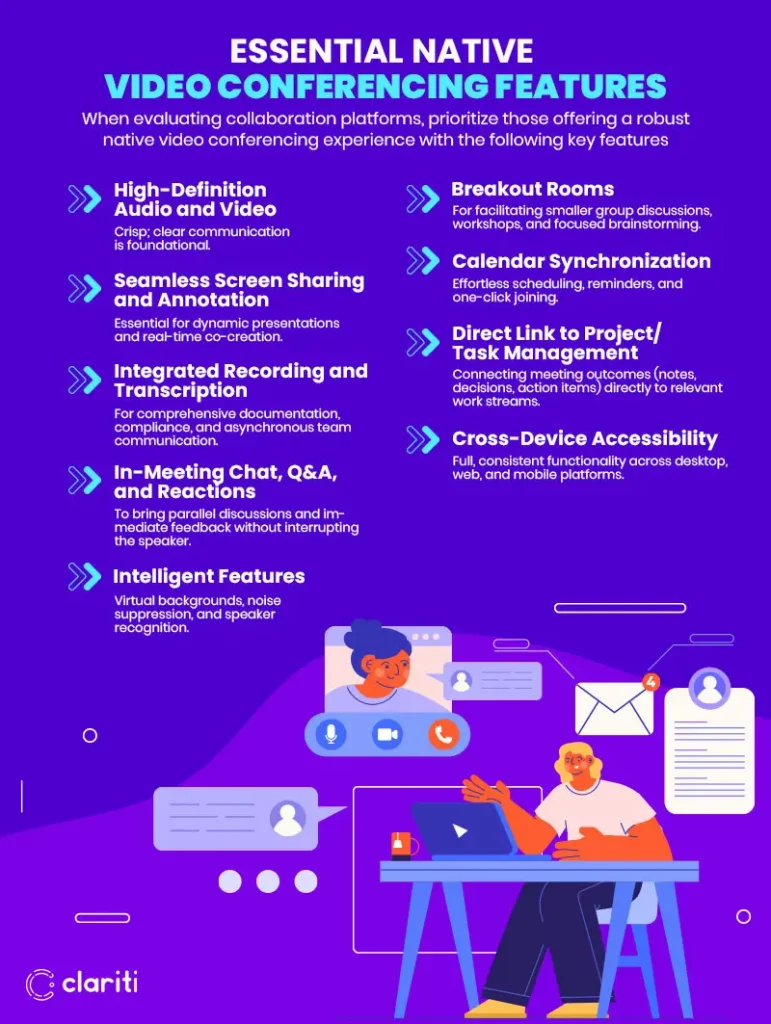
When evaluating collaboration platforms, prioritize those offering a robust native video conferencing experience with the following key features:
- High-Definition Audio and Video: Crisp; clear communication is foundational.
- Seamless Screen Sharing and Annotation: Essential for dynamic presentations and real-time co-creation.
- Integrated Recording and Transcription: For comprehensive documentation, compliance, and asynchronous team communication.
- In-Meeting Chat, Q&A, and Reactions: To bring parallel discussions and immediate feedback without interrupting the speaker.
- Intelligent Features: Virtual backgrounds, noise suppression, and speaker recognition.
- Breakout Rooms: For facilitating smaller group discussions, workshops, and focused brainstorming.
- Calendar Synchronization: Effortless scheduling, reminders, and one-click joining.
- Direct Link to Project/Task Management: Connecting meeting outcomes (notes, decisions, action items) directly to relevant work streams.
- Cross-Device Accessibility: Full, consistent functionality across desktop, web, and mobile platforms.
6 Best Native Video Conferencing Software
Several industry leaders have recognized the strategic importance of native integration and have deeply embedded video conferencing into their core offerings:
- Clariti (The Context-First Approach): Beyond just “offering” video, Clariti unifies email, chat, and calls into a single workspace (Hybrid conversations). It is specifically designed for teams that want to move away from “app-switching” by keeping every call linked to a Hybrid Conversation. This ensures that the “why” behind every decision is always visible, searchable, and actionable.
- Microsoft Teams: As the central hub of Microsoft 365, Teams offers sophisticated video conferencing (Microsoft Meet/Teams Calls) that seamlessly interlaces with Outlook, SharePoint, OneDrive, and other M365 applications, making it a prime example of native integration.
- Google Workspace (Google Meet): Embedded throughout Gmail, Calendar, Drive, and Docs, Google Meet provides a fluid, unified video communication experience within the extensive Google ecosystem.
- Slack (Huddles/Calls): While Slack integrates with external VC tools, its own Huddles and Calls provide instant, native audio and video for ad-hoc, channel-based conversations, designed for quick, informal team syncs.
- Cisco Webex Suite: Evolving from its video conferencing roots, Webex now delivers a comprehensive collaboration suite where chat, file sharing, and project management capabilities are tightly integrated around its robust video platform.
- Modern Work OS Platforms (e.g., ClickUp, Monday.com): A growing number of these platforms are building their own video conferencing components, ensuring that discussions are intrinsically linked to tasks, whiteboards, and project timelines within their unified environments.
The Unified Future: Beyond Just Meetings
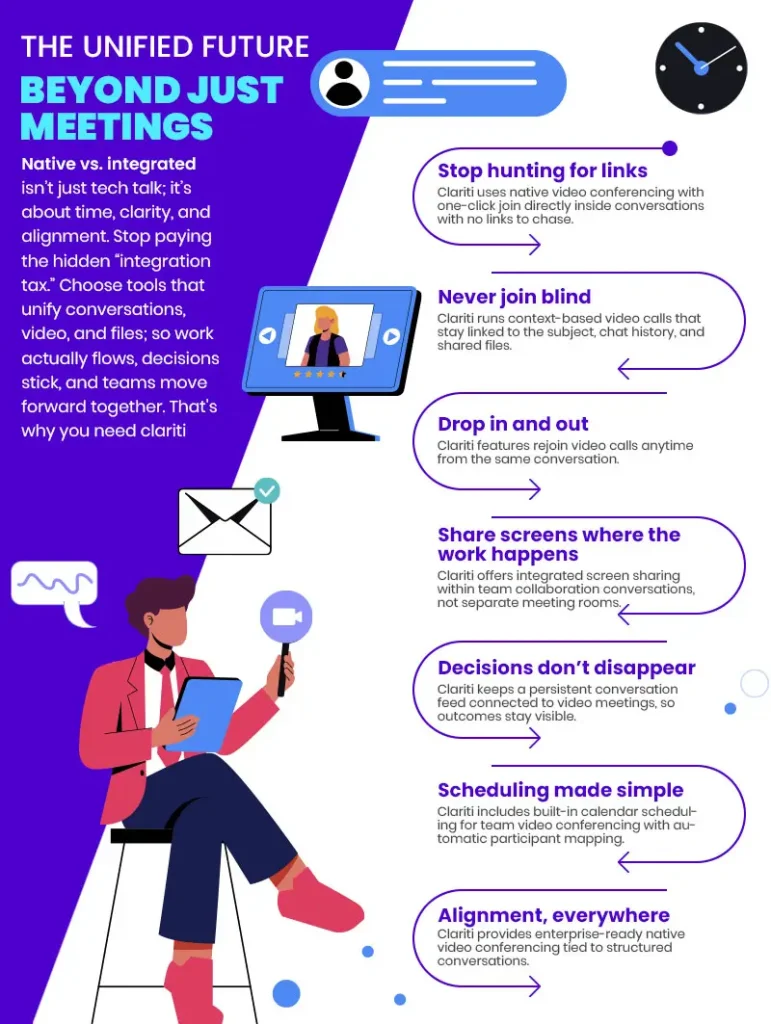
Native vs. integrated isn’t just tech talk; it’s about time, clarity, and alignment. Stop paying the hidden “integration tax.” Choose tools that unify conversations, video, and files; so work actually flows, decisions stick, and teams move forward together. That’s why you need clariti:
- Stop hunting for links: Clariti uses native video conferencing with one-click join directly inside conversations with no links to chase.
- Never join blind: Clariti runs context-based video calls that stay linked to the subject, chat history, and shared files.
- Drop in and out: Clariti features rejoin video calls anytime from the same conversation.
- Share screens where the work happens: Clariti offers integrated screen sharing within team collaboration conversations, not separate meeting rooms.
- Decisions don’t disappear: Clariti keeps a persistent conversation feed connected to video meetings, so outcomes stay visible.
- Scheduling made simple: Clariti includes built-in calendar scheduling for team video conferencing with automatic participant mapping.
- Alignment, everywhere: Clariti provides enterprise-ready native video conferencing tied to structured conversations.
Conclusion: A Strategic Imperative for a Connected World
As long as your video is “integrated” and not “native,” your data is fractured, your security is leaky, and your team is exhausted.
Stop trying to duct-tape the 2019 office together. The strategic imperative right now is unification. The gap between “frontline email” and “backend chat” doesn’t close with a plugin. It closes when video stops being a guest in your workflow and starts being the host. The results? Ruthless efficiency. When you unify the conversation like Clariti does you don’t just get better meetings; you weaponize your communication. We’re talking about a 60% drop in the gaps where good ideas go to die. Native video isn’t a feature you “add on.” It’s the only way to stop bleeding efficiency. Stop switching tabs. Start winning.
Frequently Asked Questions
What is the difference between native and integrated video conferencing?
A: Native video conferencing is built directly into a collaboration platform’s core architecture sharing the same code, security protocols, identity management, and user interface as other platform features. Integrated video conferencing connects to a third-party application via API, requiring your data and video stream to travel to an external vendor cloud. Think of native as a “resident” in your workspace (you never leave the screen), while integrated is a “visitor” (you’re clicking on a link that takes you to another building).
How does context switching affect my team's productivity?
A: Context switching creates significant productivity drains. According to research from the University of California, Irvine, the average worker loses 23 minutes, regaining focus after each interruption. The American Psychological Association found that context switching can consume up to 40% of productive time. Additionally, teams using fragmented tools report 28% more meeting fatigue than those with unified platforms. Every time you shift from your project board to chat to a separate video app, your brain performs a micro-reset, losing both time and thinking quality.
What security risks come with using fragmented video conferencing tools?
A: When your recordings live in one vendor cloud, chat logs in another, and files scattered across a third, every connection point creates a potential vulnerability. The 2020 Zoom security issues illustrated this risk 500,000 user credentials were sold on the dark web, and thousands of private meeting recordings were left exposed. Managing GDPR, HIPAA, or SOC 2 compliance across multiple vendors increases complexity and risk. Native solutions eliminate these “seams” by hosting calls, emails, and files behind a single security perimeter.
What are the hidden costs of using separate video conferencing tools?
A: The costs extend far beyond subscription fees. According to the Flexera State of SaaS Report (2024), overlapping features across tools inflate technology spend by an average of 23%. IT teams spend 30% of their time managing integration issues rather than strategic initiatives. Troubleshooting cross-platform problems takes 2.5x longer than single-platform issues. A 2023 Gartner study also found that 67% of employees feel overwhelmed by the number of apps required to do their job, adding friction and frustration that impacts performance.
What productivity benefits do teams see with unified, native video conferencing platforms?
A: Teams using unified platforms report significant improvements: 32% faster project completion (McKinsey, 2023), 41% reduction in meeting follow-up time (Microsoft’s Work Trend Index, 2024), and 27% improvement in first-time task accuracy. Organizations leveraging unified analytics also see 45% faster identification of communication bottlenecks, 38% improvement in resource allocation decisions, and 22% reduction in unnecessary meetings. These gains come from eliminating context switching and keeping the entire communication lifecycle from ideation to execution within one coherent system.




Start for FREE with Personal CRM
We too hate spam! Your email is secure with us.

Spot secured. You're in.
You’re officially on the list for early access to Clariti.


No more switching tools.

No more lost context.

Just Clarity.
You’ll be among the first to experience it when we launch. We’ll let you know the moment it’s ready.

Keep an eye out for emails from @clariti.app.
(and check your spam folder just in case—whitelisting us helps ensure you don’t miss a thing).

