


Blog
Context-Based Conversation: A Practical Guide to Context, Email Chaos, and AI for Teams
- By Clariti Team
- No Comments

Blog Summary
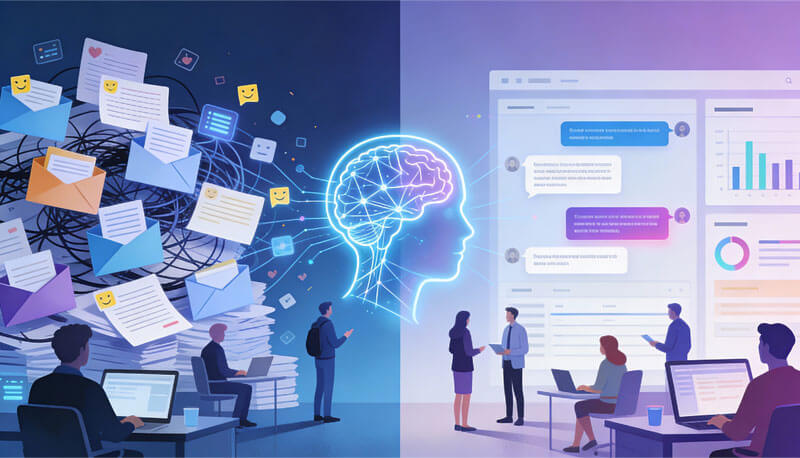
Most teams don’t lose time to too many messages. They lose time rebuilding context.
Employees spend nearly 30% of their week on email, and every interruption costs about 23 minutes to recover. The hidden drain isn’t replying; it’s searching for the why behind past decisions. That’s why email chains grow longer while clarity shrinks.
A context-based conversation (Context Spine) keeps the full story of work intact. It brings together the four types of context teams usually lose:
- Historical context– what was said and decided earlier
- Situational context – where and when the message happened
- Relational context – who said it, and with what authority
- System context – what tools and data the system already knows
When these live in one place, email, chat, files, and meetings stop competing.
Key takeaway:
Work breaks when meaning disappears, not when messages increase.
That’s why context-based hybrid conversations help teams reduce rework and give AI something useful to work with. They don’t replace email or chat. They only give them memories.
View more
If your inbox were a colleague, there’s a decent chance it would be on a performance improvement plan.
We’ve seen teams where people start the day with good intentions and a strong coffee, then open their inbox… and that’s the day. The work becomes:
- Triage
- Search
- Reply-all management
- A bit of archaeology
But the conversation as a whole the why behind the what had effectively vanished.
That’s the real tension hiding under “email overload.” The messages are there. The meaning keeps slipping through the cracks.
In search data, this shows up as people asking about “context-based conversation,” “what is conversational context,” and the “importance of context in communication.” In our work with teams, it shows up as:
- Email chaos and sprawling reply-all chains
- Fragmented chat histories
- Conflicting versions of “what we decided”
So let’s start at the root: What actually is a context-based conversation, why does it matter in both human and AI systems, and how does it connect to that very real, very painful email problem?
What Is a Context-Based Conversation?
Before we talk about tools or inboxes, we need a deeper definition.
A context-based conversation is a conversation where:
- Each message is interpreted in light of what came before,
- The system (or human) understands who is speaking, what they’re referring to, and why, and
- The full history. Emails, chats, docs, decisions forms a single, navigable story rather than disconnected fragments.
Under the hood, it’s powered by conversational context.
What Is Conversational Context?
When people search “what is conversational context,” they’re usually circling around a few layers:
- Linguistic context
The words around a phrase.- “Let’s ship it” means something different in a testing channel vs. a legal review channel.
- Situational context
Where and when the conversation happens.- A 2 a.m. Slack message tagged “urgent” lands differently than a comment in a weekly planning doc.
- Relational context
Who is talking to whom.- “We need to talk about pricing” sounds very different from the CEO vs. an intern.
- Historical context
What’s already been said or decided.- “Same as last time” is nonsense if nobody can see what “last time” was.
- System context (for tools and AI)
What the system knows about the user, the project, the current state, and any external data sources.
When all of these are present and visible, you get a context-based conversation: messages linked to history, intent, and outcome.
When they’re not, you get… a lot of guessing.
Work doesn’t fail because people forget tasks. It fails because they forget meaning.
And that’s true for humans and machines.
Why Context Matters in Human Communication (and AI)
If the “importance of context in communication” feels obvious, that’s because humans are naturally good at inferring it until our tools get in the way.
We’ve seen this in simple ways:
- A one-line reply “Sure, fine” that sounds supportive in one thread and furious in another.
- A forwarded email stripped of its original subject line and attachments.
- A chat message that says “This won’t work” with no visible reference to what “this” was.
Humans usually compensate by:
- Re-reading old messages
- Asking, “Can you remind me what this is about?”
- Re-opening old docs and calendars
In other words, they spend mental energy rebuilding context manually.
AI systems face the same problem, but more brutally. Without context, even sophisticated models:
- Misinterpret pronouns (“it,” “this,” “them”)
- Give generic advice that ignores prior constraints
- Surface irrelevant messages because they don’t see the project-level picture
This is why context-based conversations are becoming a design priority for AI products:
- Chatbots and assistants need historical and situational context to answer follow-up questions intelligently.
- AI summarization tools need access to whole threads not just the last email to generate accurate recaps.
- Recommendation engines work better when they understand roles, past decisions, and relationships.
We’ve seen teams treat “add AI” as the solution, only to discover that without a solid context layer, the AI is just a very polite stranger.
Which brings us back to where most work actually happens: email, chat, and an endless amount of context switching.
From Theory to Reality: How Context Gaps Turn Into Email Chaos
Once you understand context in theory, email chaos suddenly looks less like a personal failing and more like a system design flaw.
We’ve watched the same pattern repeat across teams:
- Work is initiated in email.
- Clarified in chat.
- Documented in docs and tickets.
- Finalized in meetings.
- Remembered… mostly by whoever has been there longest.
The result isn’t just “a lot of messages.” It’s a huge amount of lost or fragmented context.
The impact shows up in statistics people often search under “context switching in the workplace statistics”:
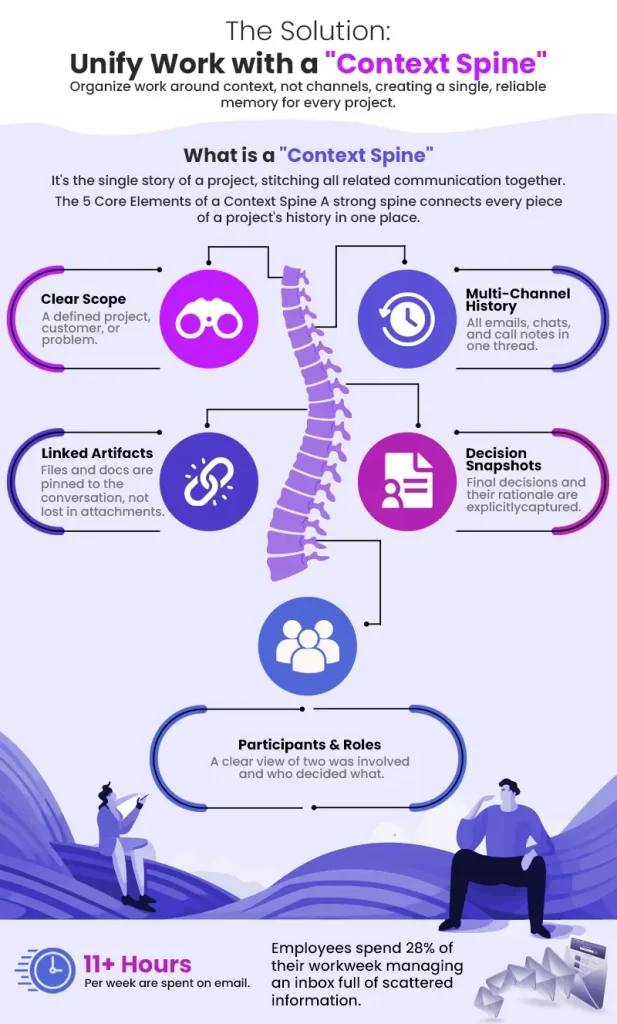
- Employees spend about 28% of their workweek on email roughly 11.7 hours every week.
- Only around 10% of those emails are genuinely business-critical.
- It takes an average of 23 minutes to regain focus after an interruption.
- 47% of digital workers report struggling to find the information they need.
- 48% of employees say their work feels chaotic and fragmented.
- 79% of knowledge workers blame constant emails and messages for feeling
overwhelmed.
We’ve seen these numbers come to life in small, painful stories:
- A senior leader delaying a go/no-go decision because they can’t find “the email with the updated risk analysis.”
- A team recreating a slide deck from scratch because nobody knows which version is final.
- A product group spending half a meeting debating whether something was decided, instead of building on the decision.
None of this is caused by laziness or lack of tools.
It’s what happens when conversation history lives everywhere except in a single, trustworthy context.
So how do you fix that without throwing away everything and starting over?
The “Context Spine”: A Simple Mental Model for Context-Based Conversations
To explain what we’ve watched work in real teams, we started using a term leaders could repeat internally:
A Context Spine is the single line that holds the story of a piece of work:
- All relevant emails
- All related chats
- Linked docs and files
- Meeting notes and call summaries
- Decisions and their rationale
Instead of living in separate silos, they’re stitched together into one conversation with memory.
You can think of it as a Work Memory Layer:
- It remembers what was said.
- It remembers why it was said.
- It remembers what you did about it.
Different tools implement this differently, but the principle is consistent: work is organized by context, not by channel.
Key Elements of a Context Spine
Across teams that use context-based conversations well, we’ve noticed five recurring elements:
- Clear scope
Each spine has a defined scope: a project, customer, problem, or major decision. - Multi-channel history
Email, chat, docs, and call notes feed into the same conversation, not separate islands. - Participants & roles
You can see who was involved, who decided what, and who needs to be looped in now. - Artifacts linked, not lost
Files and docs are pinned to the relevant context, not just attached to one email. - Decision snapshots
Final calls are captured explicitly: “On [date], we decided X because Y.”
Some platforms (including Clariti, with its context feature) automate a lot of this by:
- AI grouping related emails and chats
- Letting you chat on top of an email chain
- Pulling in external data via integrations
But the concept itself the Context Spine is tool-agnostic. It’s a way of thinking:
“Every important stream of work deserves one conversation that remembers everything.”
Once leaders name that, behavior starts to shift in surprising ways.
How Context-Based Conversations Change Real Teams
Concepts are nice. Examples pay the bills.
Here is a condensed story from a team we’ve observed moving toward context-based conversations.
A Feature Launch Without the Groundhog Day
A product team was preparing a major feature launch.
Before:
- Requirements in a Google Doc
- Client input via email
- Internal debates in Slack
- Trade-offs discussed in multiple meetings
- Launch decision announced in a company-wide email
Three weeks later, they revisited the feature and discovered:
- Nobody could find the rationale for certain trade-offs.
- Customer objections had been mentioned… somewhere.
- Junior team members were quietly rebuilding context from scratch.
After introducing Context-based Communication:
- The feature had one context-based conversation as its spine.
- All emails from stakeholders were attached there.
- Internal chat debates happened on top of that spine.
They still used email and chat. But they basically eliminated email chains that lived outside a context.
And.. many such patterns convinced us context-based conversations aren’t just a UX flourish. They change what teams remember, and therefore what they can build on.
So how do you move in this direction in a practical, low-drama way?
How To Move Toward Context-Based Conversations (5 Practical Steps)
Most successful shifts we’ve seen followed a similar sequence not a big bang.
Here’s a pragmatic five-step path you can adapt.
Step 1: Define Your Core Contexts
Start by answering: “What are the natural containers of work around here?”
Common answers:
- Projects (e.g., “Q4 Website Refresh”)
- Customers or accounts (e.g., “Acme Corp – Expansion”)
- Problem areas (e.g., “Reduce Onboarding Drop-Off”)
- Major decisions (e.g., “2025 Pricing Model”)
Pick 4–6 categories that matter most. For each, define:
- What belongs here? (emails, chats, docs, metrics)
- Who should always have visibility?
- When is this considered “done” or archived?
This turns “context” from an abstract idea into a concrete rule of thumb.
Once you know what your contexts are, the next step is giving each one a home; its what we call a Context-based hybrid conversation workspace (Context Spine).
Step 2: Create a Context-Based Chain for Each Critical Subject of Work
For each important project, customer, or problem, create one conversation that acts as the context-based hybrid conversation.
- Name it clearly:
- [Client] – [Project] – [Quarter]
- [Area] – [Problem Statement]
From now on, treat this hybrid conversation as the source of truth:
- New emails related to it should land here (either automatically via your tool or by forwarding).
- Chat discussions about it should happen here.
- Docs and links should be attached here.
This is where tools that support hybrid chat + email shine: the same chain can contain both long-form emails and quick internal chats.
Once the spines exist, the real change comes from shifting how people start communication in the first place.
Step 3: Start Messages in Context, Not in the Nearest App
We’ve noticed one small behavior change that makes a disproportionate difference:
Before sending a message, people:
- Go to the relevant hybrid conversation.
- Start their email, chat, or call from there.
So instead of:
- Opening email and typing a new subject line, or
- Opening chat and creating yet another DM,
They ask: “Which context does this belong to?” and communicate inside that.
This simple practice:
- Reduces scattered side-conversations
- Helps consolidate email and chat around the right context
- Makes it easier for others to catch up later
Over time, this is how teams quietly eliminate email chains that don’t belong in isolation.
With communication starting in context, the next challenge is making that context easy to search and reuse.
Step 4: Add Light Structure While AI Organize the Conversations
We’ve watched teams get strong results with minimal structure:
- Consistent naming: Occasional tags for “Decision,” “Risk,” or “Blocked.”
On top of that, AI can do the heavy lifting:
- AI-driven topic suggestions: As messages arrive across email and chat, Clariti AI recommends the most relevant topic based on meaning.
- Context linking: Related messages are grouped with the help of AI into the right conversations, preventing discussions from scattering across threads.
- Reduced context fragmentation: Conversations that belong together stay together, making it easier to follow decisions and history across subjects.
Need to find something later? Our search understands which conversation a question your query belongs to.
The result:
- Less time hunting through inboxes
- Fewer “I can’t find it, so let’s decide again” moments
- Conversations that stay intact as work moves forward
With context in place, there’s one more layer to the tempo of work itself.
Step 5: Retrieval Built into the Flow of Work
Context only pays off if it’s easy to find.
Even the strongest context model breaks down if information can’t be retrieved quickly. Clariti treats search as a first-class workflow, not an afterthought. Users can run a general search across emails, chats, files, and conversations to find anything, from anywhere.
When focus matters, search becomes more precise:
- Dedicated search bars for Conversations, Chats, Mails, and Files
- Each search lives right where the work happens above the relevant list
- No need to remember where something was shared
The result is faster retrieval, fewer interruptions, and less time switching between tools.
When teams can trust search, they stop hoarding tabs and start moving forward with confidence. At this point, context-based conversations aren’t just a theory. They’re the way your team experiences time, attention, and collaboration.
Conclusion: From Inboxes to Hybrid Conversations
We’ve watched countless teams try to win the productivity game with new tools, new rules, and heroic individual effort.
What consistently changes the game isn’t a magic app. It’s a quieter shift:
- From messages to meaning
- From channels to contexts
- From individual memory to a shared context-based hybrid conversation
Email isn’t going away. Chat isn’t going away. AI is only getting more central. But the teams that will feel least overwhelmed and most effective are the ones that treat context-based conversations as the real operating system of their work.
If your world currently feels like spinning plates of email, chat, and meetings, you don’t need a full reset. You need one experiment:
- Choose a critical project or customer.
- Give it a single hybrid conversation space.
- Route all related emails, chats, and decisions there for a month.
- Let your tools (Clariti or otherwise) do as much of the stitching as they can.
Then ask your team a simple question:
“Did this make our work clearer, or just noisier?”
In our experience, once people see what it feels like to work inside a true context-based conversation, it’s very hard to go back to raw inbox survival mode.
Frequently Asked Questions
What is conversational context?
Conversational context is the information that surrounds a message and gives it meaning—previous messages, who is speaking, the situation, shared history, and the tools or systems involved. Without it, a message like “Let’s do it” is ambiguous; with it, the intent is clear.
What is a context-based conversation?
A context-based conversation is a conversation (human or AI-driven) where every message is interpreted in light of prior messages, participants, and related artifacts. In practice, it means emails, chats, documents, and decisions are threaded into a single, navigable history—often what we described as a Context Spine.
Why is context important in communication at work?
Context reduces confusion, prevents rework, and speeds up decisions. We’ve seen teams lose hours re-reading threads or re-making decisions simply because they couldn’t see the original context. A strong context layer gives people access to the meaning behind past messages, not just the messages themselves.
How does context-based conversation relate to AI?
AI systems need context to understand references, maintain coherent dialogue, and make relevant suggestions. When tools provide AI with access to full conversation history, roles, and related data, answers become sharper and more trustworthy. Without context, AI tends to produce generic or incorrect responses.
How does Clariti use context in conversations?
Clariti is one example of a tool that implements context-based conversations. From what we’ve observed, its Clariti context feature automatically connects related emails, chats, calls, and files into unified threads. Users can move between email and chat inside the same conversation, with AI “Super Search” making it easy to find information across those contexts.
Can context-based conversations really reduce email chaos?
Yes—indirectly but measurably. By routing emails into the right hybrid conversation, supporting hybrid chat + email, and documenting decisions in one place, teams:
- Spend less time searching
- Have fewer duplicate conversations
- Need fewer “catch-up” meetings
- Experience less mental load from constant context switching
Email doesn’t disappear, but it stops being the only place where work memory lives.




Start for FREE with Personal CRM
We too hate spam! Your email is secure with us.

Spot secured. You're in.
You’re officially on the list for early access to Clariti.


No more switching tools.

No more lost context.

Just Clarity.
You’ll be among the first to experience it when we launch. We’ll let you know the moment it’s ready.

Keep an eye out for emails from @clariti.app.
(and check your spam folder just in case—whitelisting us helps ensure you don’t miss a thing).

