
Video Conference Software

Meet Face-to-Face Without Meeting IDs or Hassle!

video conference BI

Start a Meeting in Seconds — No Links, No Logins, No Fuss!

One-Click Video Calls

Start a video meeting from any chat or conversation.

Open button Close button

No Access Codes

Join meetings without meeting IDs or passcodes.

Open button Close button

Quick Invites

Add team members or external guests instantly.

Open button Close button

Chat-to-Video Switch

Move from text to video without interruption.

Open button Close button

Rejoin Anytime

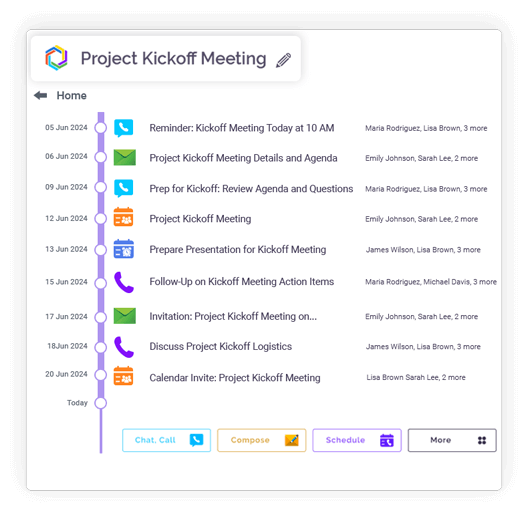
Leave and rejoin meetings without restarting.
Open button Close button
Feature slide img

Plan Ahead, Meet on Time — Clariti Keeps You Organized!

Advance Scheduling

Plan video calls using Clariti’s scheduling feature.

Open button Close button

Automatic Invites

Calendar invitations are sent automatically.

Open button Close button

Smart Reminders

Receive notifications before scheduled meetings.

Open button Close button

Contextual Calendar View

Meetings appear alongside related conversations.

Open button Close button

Topic-Based Organization

Each scheduled call stays linked to its conversation.

Open button Close button
Feature slide img

Your Meetings, Your Space — Only Invited Voices Allowed!

Invitation-Only Access

Only invited participants can join.

Open button Close button

End-to-End Encryption

Video sessions are fully encrypted.

Open button Close button

In-App Video

No external applications required.

Open button Close button

Privacy-First Design

Meeting data remains confidential.

Open button Close button
Feature slide img

Record, Share, Collaborate — All Without Leaving Clariti!

Meeting Recording

Record and share video sessions.

Open button Close button

Organized Storage

Recordings are saved under relevant topics.

Open button Close button

Screen Sharing

Present slides, reports, or live demos during calls.

Open button Close button

Mode Switching

Switch between audio and video seamlessly.

Open button Close button
Feature slide img

Talk, Chat, and Share — Everything Works Better Together!

Conversation Linking

Video calls remain connected to chats, emails, and files.

Open button Close button

Calendar Sync

All calls and reminders appear in the Clariti calendar.

Open button Close button

Past Meeting Access

Review previous call recordings.

Open button Close button

Multi-Mode Collaboration

Use video, chat, and documents together.

Open button Close button

Team Engagement

High-quality video supports better collaboration.

Open button Close button
Feature slide img

Integration

Connect your apps. Get more done.

Microsoft 365

Microsoft 365

Office productivity suite

Google Workplace

Google Workspace

Cloud-based productivity suite

Onedrive

OneDrive

Cloud file storage

Google Drive

Google Drive

Cloud file storage and sharing

Dropbox

Cloud file storage and sharing

PCloude

pCloud

Secure cloud file storage

Github

GitHub

Source code hosting

Hot Spot

HubSpot

Marketing automation platform

Team

Microsoft Teams

Team collaboration platform

More Useful Features

One-Click Join 

Start meetings instantly.

Invite Participants 

No passcodes needed.

Record & Share 

Save sessions for later.

Schedule Calls 

Sync with calendar.

Share Screen in Call 

Collaborate visually.

Secure Access 

Only relevant participants can join.

What Is Video Conferencing Software and How Does It Work?

Video conferencing software enables real-time visual communication between multiple participants across different locations. Using internet connectivity, these platforms capture video and audio through computer cameras and microphones, compress the data, transmit it over networks, and decompress it on recipients’ devices. Modern solutions like Clariti integrate this capability directly into their communication ecosystem, allowing teams to transition seamlessly from chat conversations to face-to-face meetings without switching applications. This integration eliminates the friction of separate meeting links and complicated setups, making visual collaboration a natural extension of daily workflow.

video blog_img

Top Benefits of Using Video Conference Software for Businesses

The advantages extend far beyond simple cost savings from reduced travel. Video conferencing fosters stronger team cohesion by preserving the nonverbal cues—facial expressions, gestures, and tone—that text-based communication misses. It accelerates decision-making by bringing stakeholders together instantly, regardless of location. Businesses benefit from faster problem resolution, improved meeting efficiency, and the ability to tap into global talent without geographical constraints. Perhaps most importantly, it humanizes remote work, helping distributed teams build the trust and rapport essential for effective collaboration.

The Evolution of Video Conferencing Technology

The journey from expensive, hardware-based systems to accessible software solutions mirrors the broader digital transformation of workplace technology. Early video conferencing required dedicated equipment and specialized rooms, limiting its use to large organizations and important meetings. The shift to software-based platforms democratized the technology, while the advent of cloud computing made it scalable and reliable. Today, integrated platforms like Clariti represent the next evolutionary stage—moving beyond standalone video apps to unified communication environments where video is simply one modality among many, all working in harmony.

How Video Conferencing Software Transformed Remote Work

Video conferencing became the cornerstone of the remote work revolution by providing the visual connection that makes distributed teams feel present and engaged. It has enabled organizations to maintain company culture across distances, facilitate mentoring relationships, and ensure that remote workers remain visible and included. The technology has proven particularly valuable for complex discussions, sensitive conversations, and creative brainstorming sessions where visual cues significantly enhance understanding and participation.

Understanding the Basics of Video Conferencing Software

At its core, effective video conferencing relies on three key elements: reliable connectivity, intuitive interface, and seamless integration. Modern platforms prioritize ease of use with one-click joining, simple screen sharing, and mobile accessibility. Security features like end-to-end encryption have become standard, ensuring confidential business discussions remain protected. The most advanced solutions, like Clariti, enhance these basics by embedding video capabilities directly into topic-based conversations, ensuring that every video meeting has immediate access to relevant context, documents, and discussion history.

Blog Links

Frequently Asked Questions?

What does video conferencing mean?

Video conferencing refers to live, visual meetings conducted over the internet between two or more participants in different locations. It combines audio and video transmission to simulate face-to-face interaction, allowing teams to discuss ideas, share screens, and collaborate in real-time without physical presence.

Clariti’s key benefit is holding video calls directly inside relevant topic threads, keeping conversations contextual. It eliminates app-switching by integrating meetings with related chats, emails, and files. This saves time, preserves discussion continuity, and ensures everyone has immediate access to shared context. The platform also offers secure, reliable video quality without complex setups.

With the rise of remote and hybrid work models, video conferencing bridges geographical gaps, maintaining team cohesion and organizational agility. It supports global collaboration, helps preserve company culture, and ensures projects move forward efficiently without the delays of scheduling in-person meetings.

Use Clariti for seamless collaboration, as it blends video calls with other communication forms in one platform. It simplifies workflows by letting you launch or join calls directly from ongoing chats or emails. The software enhances productivity through unified search and organized conversation history. It also ensures security with encrypted meetings while supporting flexible remote work.