



- Published on
- 10 min read
Hybrid collaboration is reshaping how organizations allocate time, make decisions, and preserve focus. As teams span offices and remote locations, leaders must balance synchronous engagement with individual deep work to avoid calendar fatigue. According to Microsoft Work Trend Index, the average Teams user saw a 252% increase in weekly meeting time since 2020, highlighting how hybrid work has significantly expanded synchronous collaboration.
This article provides a practical framework for designing effective sessions that deliver outcomes without overwhelming participants. It synthesizes research on meeting frequency and effectiveness and translates those findings into actionable practices. The guidance is intentionally platform-agnostic so teams can adopt the practices with whatever collaboration stack meets their security and integration requirements.
Recent platform-level analyses show a rise in after-hours and cross–time-zone collaboration that contributes to what researchers call the “infinite workday.” Data from Microsoft WorkLab shows that meetings starting after 8 p.m. increased significantly as global teams coordinate across time zones.
Policy and research bodies have also noted that a meaningful share of synchronous gatherings lack a clear purpose. Research cited by Harvard Business Review suggests that up to one-third of meetings may be unnecessary, often replaceable by asynchronous updates or smaller working groups.
Employee preference data reinforces the importance of hybrid flexibility. According to Gallup, six in ten employees with remote-capable jobs prefer hybrid work, making equitable scheduling and inclusive meeting design essential for retention.
Finally, productivity research indicates that employees spend a large share of their time in meetings. Statista reports that many professionals spend up to 30% of their workweek in meetings, with a significant portion reporting meeting overload.
Hybrid meetings combine in-office and remote collaboration but can easily lead to meeting overload if poorly managed. By defining clear objectives, limiting attendees, using asynchronous updates, and measuring meeting effectiveness, organizations can transform hybrid meetings into focused, productive sessions that support collaboration without disrupting deep work.
This article presents 15 practical strategies that operational leaders, meeting hosts, and team members can adopt to improve the quality of collaborative time.
1. Define Clear Objectives Before Every Hybrid Meeting
Begin every session by declaring a single, measurable objective so attendees understand whether the goal is alignment, a decision, or brainstorming in hybrid meetings. When objectives are explicit, hosts can tailor the agenda and pre-work to the outcome rather than defaulting to broad status updates in hybrid meetings.
For a launch readiness meeting, open with the decision statement (“Approve release timeline and contingency plan”) and allocate time slots for validation, risk review, and the motion to approve so the session completes with documented owners and deadlines in hybrid meetings.
2. Invite Only Decision-Makers and Essential Participants
Limit invites to those whose input is required for the stated objective; avoid defaulting to large distribution lists that turn active sessions into passive status briefings. Narrow attendee lists improve the signal-to-noise ratio and reduce repeat follow-ups after hybrid meetings.
For a budgeting call, invite budget owners and decision-makers only, and send a concise summary to the broader distribution list post-meeting—this preserves focus and reduces redundant attendance in hybrid meetings.
3. Invite Only Decision-Makers and Essential Participants
Set precise start and end times, then enforce them. Timeboxing communicates respect for participants’ calendars and creates pressure to prioritize what is essential, preventing meetings from expanding to fill available time in hybrid meetings.
Use a 25/5 rule—allocate 25 minutes for the core agenda and reserve 5 minutes to confirm decisions and owners; anything unresolved becomes a short asynchronous follow-up to avoid calendar creep in hybrid meetings.
4. Facilitate Hybrid Meetings to Ensure Remote Participation
Adopt techniques that ensure remote participants have equal opportunity to speak—rotate facilitators, call on quieter attendees by name, and use structured turn-taking. Without deliberate facilitation, in-room attendees can dominate and remote contributors may be sidelined in hybrid meetings. Example: For each agenda item, ask one remote attendee to summarize the prior status first, then open the floor; this practice reduces in-room bias and increases remote engagement in hybrid meetings.
5. Standardize Hybrid Meeting Technology and AV Setup
Standardize on a reliable set of audio/video tools and require a quick connectivity check before critical sessions. Technical friction disproportionately affects remote attendees and can derail the meeting’s purpose in hybrid meetings.
Require presenters to run a five-minute AV check ten minutes prior and provide a phone dial-in as a fallback so the session continues smoothly even if video fails in hybrid meetings.
6. Use Pre-Reads to Reduce Time Spent in Hybrid Meetings
Distribute short briefs and explicit pre-work requests before the session so meeting time can focus on synthesis and decisions rather than presentation. Pre-reads reduce the need to re-present information during hybrid meetings.
Attach a two-page summary to the invite and ask participants to post three questions or proposed decisions in advance; use synchronous time to resolve those questions rather than repeat background in hybrid meetings.
7. Assign Clear Meeting Roles for Better Hybrid Collaboration
Designate a facilitator to manage flow, a timekeeper to enforce segments, and a scribe to capture decisions and owners. Clear role assignment prevents duplication and ensures that action items are recorded and distributed after hybrid meetings.
Rotate these roles among team members so skill builds across the group; the scribe publishes notes and action owners within 24 hours to ensure clarity after hybrid meetings.
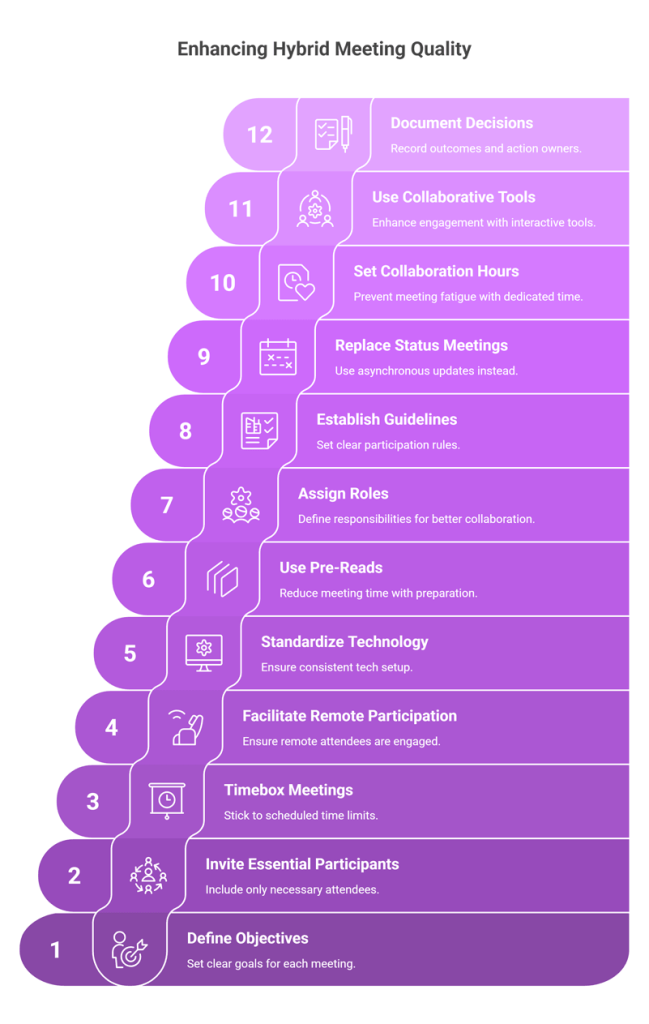
8. Establish Hybrid Meeting Participation Guidelines
Define expectations for cameras, muting, and signaling to speak. Clear norms reduce interruptions, respect bandwidth constraints, and maintain professional tone in hybrid meetings.
For large sessions, request that only active speakers enable video while all participants use a hand-raise function to indicate contributions—this minimizes audio feedback and improves participation equity in hybrid meetings.
9. Replace Status Meetings with Asynchronous Updates
Replace status-style synchronous sessions with short recorded updates, shared documents, or structured message threads—reserve live time for debate and decision-making. Asynchronous alternatives reduce the number of required hybrid meetings and broaden participation across time zones.
Replace a weekly status meeting with a three-minute recorded update and a shared comment thread; convene a brief, scheduled sync only when a decision is needed to avoid unnecessary synchronous load in hybrid meetings.
10. Set Core Collaboration Hours to Prevent Meeting Fatigue
Establish core collaboration windows and protect deep-work periods so meetings do not fragment attention throughout the day. Explicit working windows reduce scheduling conflicts and prevent recurring late or early sessions that create fatigue in hybrid meetings.
Set core hours—such as 10:00–15:00 local—and encourage teams to cluster collaborative sessions inside that window while preserving mornings and afternoons for focused work outside of hybrid meetings.
11. Use Collaborative Tools Instead of One-Way Presentations
Leverage shared notes, collaborative whiteboards, and synchronous editing so the session becomes a working workshop rather than a one-way presentation. When everyone can contribute simultaneously, output quality and ownership improve in hybrid meetings.
During a prioritization workshop, use a shared board where remote and in-room participants add and vote on items in real time; this democratic approach produces a single prioritized backlog during hybrid meetings.
12. Document Decisions and Action Owners Before Ending Meetings
Conclude every session by reviewing decisions, confirming owners, and setting deadlines. Visible, recorded next steps prevent ambiguity and reduce the need for follow-up clarification after hybrid meetings.
Finish with a one-slide decision log that lists each action, the responsible person, and delivery date; publish that slide to the project channel immediately to ensure alignment after hybrid meetings.
13. Rotate Meeting Times for Global Team Fairness
When teams span time zones, rotate recurring meeting times so the burden of inconvenient hours is shared equitably. Rotate schedules and record sessions for those who can’t attend, combined with asynchronous recap, to maintain inclusion without forcing constant late-hour attendance for the same colleagues in hybrid meetings.
Alternate the weekly all-hands between time windows each month so the same region is not consistently disadvantaged by meeting times in hybrid meetings.
14. Run Short Stand-Ups to Maintain Hybrid Team Momentum
Short, highly structured stand-ups keep momentum without creating overhead. Restrict updates to three concise points—what I did, what I will do, and blockers—and route detailed follow-ups to working channels outside the meeting to preserve efficiency in hybrid meetings.
A 10–15-minute daily huddle focused strictly on impediments ensures clarity while avoiding the tendency to drift into problem-solving that requires separate, smaller working sessions in hybrid meetings.
15. Track Hybrid Meeting Metrics to Reduce Overload
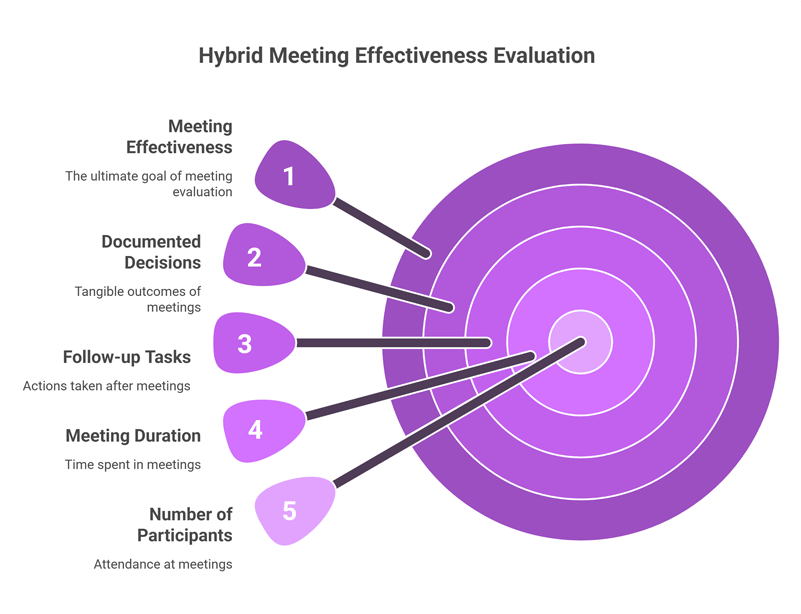
Track meeting frequency, average length, attendance, and the percentage of meetings that end with documented decisions; use that data to prune unnecessary recurring sessions and measure the effect of changes. Regular audits reveal where time is being spent and where to prioritize improvements so that organizational meeting hygiene improves and perceived overload declines in hybrid meetings.
Conduct quarterly reviews that reduce recurring meetings by a target percentage and validate the change with employee feedback and delivery metrics in hybrid meetings.
|
Meeting Type
|
Purpose
|
Best Use Case
|
Drawback
|
|---|---|---|---|
|
Hybrid Meeting
|
Combines remote + in-person participation
|
Distributed teams
|
Risk of remote exclusion
|
|
Remote Meeting
|
Fully virtual collaboration
|
Global teams
|
Less personal interaction
|
|
In-Person Meeting
|
Face-to-face collaboration
|
Strategic workshops
|
Requires travel
|
Case Study
How Clariti’s Client Mastered Hybrid Meetings Without Overload Using Clariti
The following case study is based on the combined effect of Clariti platform features, plus the process changes and training the organization adopted
A mid-sized professional services firm with ~450 employees operating across three time zones. The client faced meeting overload, low meeting effectiveness, and recurring context loss between email and synchronous sessions.
By adopting Clariti’s AI-powered contextual communication and standardized meeting practices, the organization reduced total recurring meeting hours, increased the share of meetings that ended with documented decisions, and substantially lowered employee-reported meeting fatigue within six months.
Background and context
The organization supports client delivery teams, internal operations, and sales functions distributed across multiple offices and remote locations. Prior to the intervention, the firm reported high meeting volume and frequent follow-ups: many status updates were duplicated across email, chat, and calls, and remote participants often lacked the historical context needed to contribute efficiently. Leadership identified three priorities: (1) reduce calendar overload, (2) improve decision closure rates during meetings, and (3) ensure equity and participation for remote attendees.
Challenges
- Fragmented context: Important email threads and attachments were rarely visible during live discussions, producing rework after meetings.
- Excessive attendance: Recurring meetings included broad distribution lists by default, leading to many passive participants and long meeting cycles.
- Inequitable participation: In-room attendees dominated discussions; remote participants often missed subtle cues and context.
- Poor handoff of decisions: Action items were inconsistently recorded, producing duplicated follow-ups and delayed execution.
- Tool sprawl: Multiple communication tools caused confusion about where decisions and history lived.
Solution overview
The client implemented a three-phased program combining process changes and Clariti configuration:
Phase 1 — Standardization and training (Weeks 1–4)
- Adopted meeting templates within Clariti for decision meetings, status updates, and workshops.
- Trained hosts on timeboxing, role assignments (facilitator, timekeeper, scribe), and inclusive facilitation techniques.
- Established a short host checklist stored in Clariti for every scheduled calendar event.
Phase 2 — Platform-enabled contextual collaboration (Weeks 5–12)
- Embedded relevant email threads and document links directly into Clariti Conversations tied to each meeting, ensuring historical context was available to attendees before and during the session.
- Replaced recurring broad distribution invites with focused guest lists and published asynchronous summaries to broader groups via Clariti’s contextual conversations.
- Used Clariti’s AI to surface prior decisions and related conversations when preparing agendas and pre-reads.
Phase 3 — Measurement and iterative improvement (Weeks 13–24)
- Instrumented basic meeting health metrics (meeting hours per person, percentage of meetings with pre-read, percentage with documented decisions) within Clariti.
- Ran weekly pulse surveys on perceived meeting overload for pilot teams and adjusted meeting cadences based on data.
Implementation details and examples
- Pre-reads and focused invites: For product-release meetings, hosts attached a two-page pre-read and a decision statement in the Clariti Conversation. Only release owners and key approvers were invited to the live session; others received the summary after the meeting. This change converted several weekly status calls into asynchronous updates and reduced live attendees by 60% for that cadence.
- Contextual embedding: Project managers embedded the complete email thread and the latest test-run report into the meeting Conversation. During the session, the facilitator referenced the embedded items and the scribe linked each action back to the relevant message—removing ambiguity about “which email” an action came from.
- Inclusive facilitation: Hosts adopted a structured turn-taking approach for every agenda item and used Clariti to surface the subject-matter owner first; remote contributors were given explicit slots to speak. This ensured parity and reduced the number of post-meeting clarifying messages from remote offices.
- Decision capture and calendar events: At meeting close, the scribe recorded the decision slide and created calendar events (calendar events, not task objects) with owners and deadlines linked into Clariti Conversations so work stayed discoverable and tied to the related dialogue.
Results (reported by the client after six months)
- Meeting hours per participant: 35% reduction in weekly recurring meeting hours for pilot teams.
- Decision closure: Share of meetings that ended with documented decisions and owners rose from 45% to 82%.
- Follow-up messages: 42% fewer post-meeting clarification emails and chat threads.
- Employee perceived overload: In pilot teams, the proportion of employees reporting frequent meeting overload dropped from 64% to 27% on pulse surveys.
- Participation equity: Qualitative feedback from remote attendees indicated improved ability to contribute and reduced instances of being overlooked.
(Results are client-reported and reflect the combined effect of Clariti platform features plus the process changes and training the organization adopted.)
Key enablers of success
- Embedding history into conversations: Making prior emails, documents, and decisions available instantly during meetings removed the friction of context switching.
- Clear meeting templates and roles: Templates reduced preparation time; role rotation normalized facilitation skills across the team.
- AI-assisted context surfacing: Clariti’s contextual engine suggested prior relevant conversations and decision artifacts when hosts prepared agendas, shortening prep cycles.
- Measurement and iteration: Tracking a small set of metrics enabled data-driven pruning of recurring meetings and validated process changes.
Lessons learned and recommendations
- Start small and measure: The client began with two pilot teams before scaling; this allowed targeted training and clear measurement of impact.
- Prioritize decision meetings for live time: Use synchronous time for debate and decisions; move status reporting to concise asynchronous formats.
- Enforce scribe discipline: Immediate capture and distribution of decisions removed a major source of follow-up overload.
- Share facilitation skills broadly: Rotating facilitation duties built organizational capacity and prevented single-point dependencies.
The anonymized client succeeded in mastering hybrid meetings without overload by combining Clariti’s contextual collaboration capabilities with disciplined meeting design and measurement. The initiative reduced calendar load, improved decision closure, and materially lowered employee-reported overload within six months. The case demonstrates that technology—when paired with clear processes and training—can convert meeting time from a drain on capacity into a targeted engine for aligned action and reduced friction.
Hybrid Meeting Etiquette for Remote and In-Office Participants
Hybrid meetings work best when both remote and in-office participants follow clear etiquette. In-person attendees should avoid side conversations and ensure remote participants are included in discussions. Remote participants should keep microphones muted when not speaking and signal when they want to contribute. Using cameras when possible, speaking clearly, and respecting turn-taking helps create balanced participation and smoother collaboration.
How to Design Inclusive Hybrid Meetings for Global Teams
Designing inclusive hybrid meetings requires consideration of time zones, language differences, and participation styles. Rotate meeting times so the same region is not always inconvenienced. Provide clear agendas and pre-reads in advance so participants can prepare. Using collaborative tools, live captions, or translation features can also help ensure everyone can participate effectively regardless of location.
Hybrid Meeting Technology Setup Checklist
A reliable technology setup is essential for successful hybrid meetings. Ensure high-quality microphones and cameras are available in meeting rooms so remote participants can hear and see clearly. Test screen sharing, internet connectivity, and conferencing software before the meeting begins. Providing backup options such as dial-in audio or alternative links helps prevent disruptions if technical issues arise.
How to Measure Hybrid Meeting Effectiveness with KPIs
Organizations can evaluate hybrid meeting effectiveness by tracking key performance indicators (KPIs). Common metrics include meeting duration, number of participants, percentage of meetings with documented decisions, and follow-up tasks completed on time. Employee feedback surveys and engagement levels can also reveal whether meetings are productive or contributing to meeting overload.
Common Hybrid Meeting Mistakes and How to Avoid Them
Some common hybrid meeting mistakes include inviting too many participants, running meetings without clear objectives, and overlooking remote attendees during discussions. These issues can be avoided by defining clear goals, limiting invites to essential contributors, and assigning a facilitator to ensure equal participation. Sharing pre-reads and documenting decisions also helps reduce confusion and unnecessary follow-ups.
How to Implement Hybrid Meeting Best Practices in Your Organization
The practices described above provide a coherent set of interventions to preserve focus while maintaining the benefits of synchronous coordination. Adopting clear objectives, limiting attendees, enforcing timeboxes, and using inclusive facilitation together yield disproportionate benefits because they reduce the number of follow-ups that commonly generate the most overhead. Leaders should pair these practices with simple metrics—meeting hours per person, percent of meetings with a pre-read, and percent of meetings with documented decisions—and act on the data to guide further change.
Implementation roadmap: nominate a small cross-functional pilot team, document baseline metrics (total meeting hours, percent of meetings with a pre-read, and percent of meetings with documented decisions), and select three practices to adopt in sequence. For each practice, set a measurable target—reduce total recurring meeting hours by 15%, require pre-reads for decision meetings, or ensure that 90% of meetings end with an assigned owner—and measure progress weekly. Training: run short facilitator workshops (60–90 minutes) that teach timeboxing, inclusive facilitation, and the use of shared notes. Provide a one-page host checklist to support consistent execution and encourage rotation of facilitation duties so that skills are distributed.
Tooling and governance: standardize on a small set of meeting templates and a single place to publish meeting notes. Prefer platforms that make it easy to record decisions, tag owners, and export action lists. Resist the temptation to adopt many overlapping tools; simplicity reduces cognitive load. Feedback and continuous improvement: collect quick pulse surveys after the pilot and run a retrospective focused on meeting effectiveness. Use both quantitative measures and open comments to determine which practices reduce perceived overload and which need further adaptation. Share results broadly and iterate.
Improving collaborative time is a marathon, not a sprint. Commit to a sequence of small, measurable changes; track their effects; and communicate wins. Over time, this disciplined approach will protect deep work, improve inclusion, and preserve the advantages of both synchronous and asynchronous collaboration. Begin with one change this week—shorten a recurring meeting, add a pre-read requirement, or assign a scribe—and measure the effect. Act now.
Frequently Asked Questions
What are hybrid meetings?
Hybrid meetings involve participants joining both remotely and in person. They allow distributed teams to collaborate effectively while maintaining flexibility for employees working from different locations.
Why do hybrid meetings cause meeting overload?
Hybrid meetings often increase calendar pressure because organizations try to replicate in-person communication with frequent synchronous meetings instead of using asynchronous collaboration tools.
How can organizations reduce hybrid meeting fatigue?
Teams can reduce fatigue by timeboxing meetings, limiting attendees, using asynchronous updates, and scheduling meetings within defined collaboration hours.
What tools are best for hybrid meetings?
Platforms like Microsoft Teams, Zoom, Google Meet, and contextual communication tools like Clariti help manage hybrid meetings through video collaboration, document sharing, and conversation tracking.
What is the biggest challenge in hybrid meetings?
Ensuring equal participation between remote and in-person attendees is often the biggest challenge. Structured facilitation and collaborative tools can help maintain parity.
How long should hybrid meetings be?
Most hybrid meetings should last 25–45 minutes with clear agendas and decision points to maintain engagement and avoid unnecessary discussion.
How do you measure hybrid meeting effectiveness?
Organizations can track metrics such as meeting hours per employee, percentage of meetings with decisions, attendance levels, and employee feedback on meeting overload.
When should hybrid meetings be replaced with asynchronous updates?
Status updates, routine reporting, and simple information sharing are often better handled through shared documents, recorded updates, or team collaboration platforms.
What role does AI play in hybrid meetings?
AI can automatically generate meeting transcripts, summaries, action items, and insights about participation, helping teams improve meeting efficiency.
How can managers run inclusive hybrid meetings?
Managers should rotate speaking opportunities, encourage remote participants to contribute first, and use collaborative tools like shared documents and whiteboards.




Start for FREE with Personal CRM
We too hate spam! Your email is secure with us.

Spot secured. You're in.
You’re officially on the list for early access to Clariti.


No more switching tools.

No more lost context.

Just Clarity.
You’ll be among the first to experience it when we launch. We’ll let you know the moment it’s ready.

Keep an eye out for emails from @clariti.app.
(and check your spam folder just in case—whitelisting us helps ensure you don’t miss a thing).

