


Blog
Why Unified Communication Platforms Are Critical for Business Continuity in the Future of Work
- By Clariti Team
- No Comments


Blog Summary
Most companies still prepare for outages by protecting infrastructure. But the failures leaders face today aren’t always technical; they’re often communicative. In a real incident, work stalls not because servers crash, but because people can’t find the latest update, the right channel, or the person in charge.
That’s the core tension the blog unpacks: business continuity now lives or dies by how quickly teams communicate, especially in hybrid environments where information splinters across tools.
The piece breaks down what unified communication truly means:
- why platforms like Teams don’t fully qualify
- how UC differs from UCaaS, CCaaS, CPaaS…
It also offers a practical lens for choosing the right platform one built for clarity during high-stakes moments.
View more
A decade ago, “business continuity” meant:
- A second data center
- Off‑site backups
- A thick binder of DR procedures
If your servers and building survived, you were “resilient.”
Today, you can pass every infrastructure test and still fail the first 30 minutes of a real incident-because no one knows:
- Which channel to use
- Where the latest information lives
- Or who is actually in charge
In other words, the infrastructure stays up…but the communication breaks down.
That’s not theoretical. Studies like McKinsey’s research on knowledge work have found employees spend ~20% of their time just searching for information or tracking down colleagues. Now spread those people across time zones, tools, and home offices-and you see why communication has quietly become your biggest continuity risk.
In this world, Unified Communication Platforms are no longer “collaboration nice‑to‑haves.” They are core business continuity infrastructure.
And if you’ve ever caught yourself wondering:
- What is a unified communication platform, really?
- Is Microsoft Teams actually a UC platform?
- What’s the difference between UC and UCaaS?
- What is the best platform for communication for my business?
…this article is designed to answer those questions and help you pick the right platform, starting with why we believe the Clariti UCaaS should be on top of your list.
The New Continuity Reality: Hybrid, Distributed, Always-in-Flux
Traditional continuity planning assumed: “Everyone is in the office unless something goes wrong.”
The future of work flipped that script. Most organizations now operate in a default state of distributed work:
- Hybrid schedules where teams are rarely in the same room
- Remote employees across cities, countries, and time zones
- Contractors, partners, and vendors tightly woven into daily operations
Disruption doesn’t always look like a movie disaster. It might be:
- A regional outage that knocks connectivity out for one office
- A cyber incident that forces you to lock down core systems
- A public transportation strike that strands everyone at home
- Or the quiet chaos of people so spread across tools that nobody knows where the real conversation is happening
From a continuity standpoint, that last one is the sleeper risk. Because if your teams can’t communicate clearly and consistently, all the redundant infrastructure in the world won’t help.
Continuity is no longer an edge-case plan; it’s the operating environment. Which is why the question “What is the best platform for communication?” has become a continuity decision, not just an IT procurement one.
What Is a Unified Communication Platform?
At its simplest, a unified communication platform (UC) is software that brings multiple communication channels together, so your team doesn’t have to live in a dozen apps.
Typically, Unified Communication features combine:
- Telephony/VoIP – Voice calls, call routing, voicemail
- Video conferencing – Meetings, screen sharing, recordings
- Instant messaging/chat – 1:1 and group messaging
- Presence – Real‑time availability status
- Collaboration tools – File sharing, shared workspaces, calendars
- Some degree of email integration
The promise: Instead of bouncing between disconnected tools, teams get unified team communication in a single, coherent environment. Remote teams don’t have to guess where a conversation happened or chase context across tools which actually makes the team’s collaboration simpler and far less effortful.
The catch: in many organizations, “unified” still means:
- Chat + video are in one place
- But email, files, and tasks are still scattered across other tools
That fragmentation quietly recreates the same continuity risks: slow response times, conflicting information, and critical updates buried in the wrong thread.
For us, “unified” has to go further. A truly modern UC platform should:
- Tie synchronous and asynchronous communication together (meetings, calls, emails, chats)
- Maintain a single source of context around context or projects
- Work everywhere-desktop, mobile, low‑bandwidth environments
- Provide centralized governance, security, and analytics
These are the benefits of unified communication and only then does it become real continuity infrastructure and unlock the deeper UC platform investments. In fact, when teams are truly connected, work moves faster with less friction. Studies show well-connected teams can improve productivity by nearly 25% -30%; not by working harder, but by spending less time untangling communication.
UC vs UCaaS vs the Alphabet Soup
If you’ve ever tried to decode UC, UCaaS, CCaaS, CPaaS:
- UC (Unified Communications) – The capability: integrated voice, video, chat, etc. Can be on‑prem or cloud.
- UCaaS (Unified Communications as a Service) – UC delivered as a cloud subscription. Vendor hosts; you access via internet. This is where most modern unified communication platforms live.
- CCaaS (Contact Center as a Service) – Customer-facing communication (support, inbound/outbound calls, omnichannel).
- CPaaS (Communications Platform as a Service) – Embedded comms inside your custom apps (alerts, in‑app messaging, SMS).
From a continuity lens:
- UCaaS is the everyday communication layer your people live in.
- CCaaS ensures customers can still reach you under stress.
- CPaaS makes sure automated alerts and workflows keep firing.
If your UCaaS layer is fragmented or unreliable, your continuity plan is fragile-no matter how pretty the DR slide looks.
Analysts expect the UCaaS market to keep growing at double‑digit annual rates this decade, precisely because hybrid work and resilience are now board‑level concerns.
Is Microsoft Teams a UC Platform?
Yes, Microsoft Teams is a unified communication platform:
- Chat (1:1 and group)
- Audio/video meetings
- Telephony options
- Presence
- File sharing via SharePoint/OneDrive
- Deep integration with Microsoft 365
If your main goal is internal chat + meetings and you’re standardized on Microsoft 365, Teams is a logical choice.
But in tough continuity scenarios, two gaps matter:
- Email is still separate.
External communication lives in Outlook. Internal discussion about it is in Teams. The full story is split across apps and inboxes. - Context is scattered.
That critical incident? Pieces of it may be in an email chain, a Teams chat, a meeting recording, and a document-making post‑incident analysis painful.
So yes, Teams is UC. But if your real challenge is unified messaging + email + chat + files + tasks around a topic, you’ll need a different approach.
That’s where the Clariti platform deliberately differentiates.
Unified Communication by Context, Not Just Channel
Clariti is an AI-powered unified communication platform that brings emails, chats, files, calls, to‑dos, and calendar events into one context‑based workspace called a hybrid conversation.
Instead of organizing work by app (Inbox vs Chat vs Drive), it organizes it by topic (Context):
- A customer
- A project
- An incident
- A campaign
Inside each hybrid conversation, you can have:
- External client emails
- Internal chats
- Voice/video calls and notes
- Files and links
- To‑dos and calendar events
That’s what true unified messaging + email + chat looks like in practice.
Why this matters for Business Continuity
With Clariti:
- Frontline teams (sales, support) embed external client emails directly into internal hybrid conversations. No forwarding chains.
- Backend teams (ops, tech) respond via chat, calls, or file sharing in that same space-without needing access to individual inboxes.
- Managers see the full narrative across time: who said what, when, in response to which customer or event.
For a mid‑sized B2C company struggling with frontline‑backend misalignment, Clariti delivered:
- ~60% drop in communication gaps
- ~35% faster response times
- Faster onboarding, because new hires can scroll organized hybrid histories instead of digging through multiple tools
From a continuity standpoint, that means:
- If someone leaves, their context doesn’t.
- If teams operate async across time zones, newcomers get up to speed by reading a single, themed conversation.
- If an incident is revisited months later, the full trail (emails, chats, decisions, tasks) is searchable in one place.
That’s resilience by design-not by heroics-and a concrete example of the real unified communication platform design done right.
5 Best Unified Communication Platforms for Business Continuity
If you’re actively asking, “What is the best platform for communication?” here’s a short, continuity‑focused shortlist.
1. Clariti - Best for context-driven continuity and async/hybrid teams
- Type: UCaaS, context‑first.
- Strengths:
- Hybrid conversations that unify emails + chats + files + calls + to‑dos + calendar events by context.
- AI‑powered sorting to auto‑suggest the right conversation for new messages.
- Seamless frontline-backend collaboration (embed emails into internal threads).
- Ideal for remote, hybrid, and async teams who can’t live in constant meetings.
- Best for:
- Teams that care about business continuity, context retention, and reducing tool chaos.
- Organizations where email + chat fragmentation is a major pain point.
2. Microsoft Teams - Best for Microsoft‑centric organizations
- Type: UC/UCaaS, chat‑ and meeting‑centric.
- Strengths:
- Deeply integrated with Microsoft 365 (Outlook, SharePoint, Office apps)
- Strong for internal chat, meetings, and basic collaboration.
- Best for:
- Companies already running on Microsoft 365 that need a centralized hub for internal comms.
3. Zoom Workplace (Zoom One) - Best for video-first communication
- Type: UCaaS, video‑first.
- Strengths:
- Excellent video conferencing experience.
- Telephony and chat capabilities improving steadily.
- Cost Efficiency: Organisations can significantly lower their total cost of ownership by utilising a Zoom discount through annual billing or non-profit programs, making premium features like AI Companion and unlimited cloud storage more accessible.
- Best for:
- Organizations that prioritize video meetings and webinars as their primary communication mode.
4. Slack - Best for real-time collaboration in tech/knowledge teams
- Type: UC/Collaboration, chat‑first.
- Strengths:
- Powerful channel‑based messaging.
- Large integration ecosystem.
- Best for:
- Teams that live in real‑time chat and value flexible, integration‑heavy workflows.
5. RingCentral MVP - Best for telephony-heavy team
- Type: UCaaS, telephony‑first.
- Strengths:
- Strong cloud PBX and call management features.
- UC suite with messaging and video layered on top.
- Best for:
- Organizations replacing legacy phone systems and needing robust calling capabilities.
If your primary goal is continuity through context-keeping all communication and artifacts around critical work in one place so you actually see the real benefits of unified communication platform adoption-Clariti is the only platform on this list intentionally built with that as its core design principle.
Turn Your UC Platform into Continuity Infrastructure
Regardless of which platform you choose, treat UC as infrastructure, not just “another app.” To support continuity, your unified communication platform should:
- Be the one place people default to in both normal operations and crises.
- Enable unified team communication that’s searchable and persistent.
- Keep critical context attached to conversations not scattered across inboxes and tools.
- Work reliably from anywhere, under imperfect conditions.
Clariti was designed specifically for this reality:
- Hybrid conversations keep everything related to a context (topic) together.
- AI quietly keeps context organized by suggesting instead of adding noise.
- Async‑friendly design supports distributed teams without nonstop meetings.
If you want a communication layer that helps you absorb disruption instead of amplifying it, start there.
Best Unified Communication Platforms (Quick Comparison)
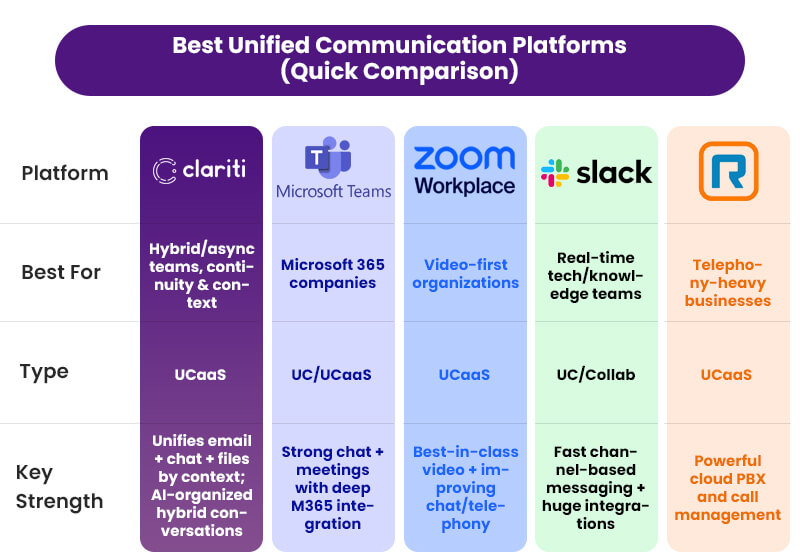
In the end, the “best” unified communication platform is the one that does more than let you talk; it’s the one that keeps your organization in one coherent conversation-no matter what the world throws at you.
Conclusion
At the start, we said continuity used to be about protecting buildings and servers. Now it’s about how quickly your people can find each other, find the context, and move in the same direction.
That’s why unified communication platforms matter. And it’s why the ones that actually unify context, not just channels, will quietly decide who weathers the future of work-and who gets caught in their own communication gaps.
If you want your next disruption to feel like a demanding test instead of an existential shock, don’t just ask, “Can we chat and call on this platform?”
Ask:
“When everything is noisy, will this be the one place my team trusts as the truth?”
If you want that answer to be “yes,” it’s time to see what happens when you organize communication by topic instead of tool and let Clariti’s unified platform turn your everyday conversations into your strongest continuity asset.
Frequently Asked Questions
What are the three main components of unified communication?
Voice (calls/VoIP), video (online meetings), and messaging (chat/IM, often with email integration) are the three core components most unified communication systems bring together.
What are the benefits of unified communication?
It reduces app‑switching, speeds up responses, improves context and visibility of conversations, and lowers costs by replacing multiple separate tools with one connected platform.
What are the main unified communication features?
Key features include voice/VoIP, video meetings, chat, presence (online/busy status), file sharing, calendar integration, and access via desktop and mobile apps.
Can unified communication improve remote team collaboration?
Yes. Unified communication brings email, chat, calls, meetings, and files into one connected space. Remote teams don’t have to guess where a conversation happened or chase context across tools. Everyone sees the same information, decisions stay visible, and collaboration feels less fragmented even across time zones.
Can unified communication improve productivity?
Yes, but not by making people work faster. It improves productivity by reducing searching, re-explaining, and repeated discussions. When conversations, files, and decisions live together, teams spend less time catching up and more time actually moving work forward.




Start for FREE with Personal CRM
We too hate spam! Your email is secure with us.

Spot secured. You're in.
You’re officially on the list for early access to Clariti.


No more switching tools.

No more lost context.

Just Clarity.
You’ll be among the first to experience it when we launch. We’ll let you know the moment it’s ready.

Keep an eye out for emails from @clariti.app.
(and check your spam folder just in case—whitelisting us helps ensure you don’t miss a thing).

